Adding one new brand takes weeks. Dealer pricing needs another workaround. The website says a part is in stock, and the branch says it isn't. Once this becomes routine, leadership starts asking whether the eCommerce platform is worth keeping.
That question sits behind automotive eCommerce replatforming. For a manufacturer or distributor, it is rarely just a storefront decision. Vehicle fitment, product data, ERP connections, customer pricing, and order processing all have to keep working when the commerce layer changes.
Replacing the platform also won't repair what the platform inherited. Inaccurate fitment records, conflicting prices, and disconnected warehouse systems travel with the business to its next storefront.
The short answer
Automotive eCommerce replatforming makes sense when fitment, B2B pricing, multi-warehouse inventory, or integrations repeatedly need major redevelopment. If the root cause is inaccurate fitment data, a slow inventory sync, or an ERP pricing mismatch, fix that first, because a new platform inherits it. Replatform when the limitation is structural.
When Should an Auto Parts Business Replatform?
Replatform when routine business changes keep turning into development projects and the same constraint shows up in more than one place. Age alone is not a reason. A platform that handles your catalog, customer accounts, and fulfillment reliably does not need replacing because it is several years old.
A distributor should not need a development cycle every time it adds a supplier, changes one account's pricing, or opens a warehouse.
Every New Supplier Feed Needs Custom Mapping
Each feed gets its own mapping rules, and vehicle applications are corrected by hand before products become searchable. Your team spends its time preparing parts instead of adding them.
Dealer Pricing Lives in Workarounds
Contract rates, buyer permissions, and payment terms sit in spreadsheets or custom scripts. A single price change means finding every place the rule was copied.
Stock Shows Up That Can't Ship
The site displays a total quantity. It does not know about branch eligibility, reservations, or the customer's territory, so buyers order parts the nearest branch cannot release.
Integration Changes Break Other Things
An ERP update or a new sales channel touches several connected applications. Teams postpone improvements because nobody can predict what else will fail.
The mix differs by business. A specialty retailer depends heavily on vehicle search. A wholesale distributor needs account pricing, multi-location inventory, and repeat ordering. A manufacturer has to publish consistent product and fitment data to distributors and sales channels. Our automotive aftermarket eCommerce solutions start from how the business actually sells parts, not from a standard online-store template.
One of these problems usually has a local cause. When two or three trace back to the same constraint, the platform is the likelier culprit. Before you decide, find out where each one starts.
Should You Fix the Platform or Replace It?
Fix the platform when the cause sits in your data, your integration, or your process. Replace it when the platform cannot support the capability, even after those are clean.
Take a dealer who calls sales because the website shows the wrong contract price. Your team checks the ERP and finds the correct amount there. Somewhere between the ERP and the storefront, the customer account or the pricing rule is not being applied. A new platform fixes that only if the new integration fixes it, and that is the part nobody has diagnosed yet.
The Automotive Replatforming Root-Cause Test
Run these three steps on every problem on your list before you build a business case.
- Name the failed task: be specific, such as "a fleet buyer sees the retail price at checkout," not "pricing is unreliable."
- Find the system that owns the data for that task: that might be the ERP, the PIM, a fitment provider, or the warehouse system.
- Check whether the current platform can support a reliable fix: if the fix needs custom code that breaks at the next upgrade, the limit is structural. If it needs a corrected mapping or a faster sync, it is not.
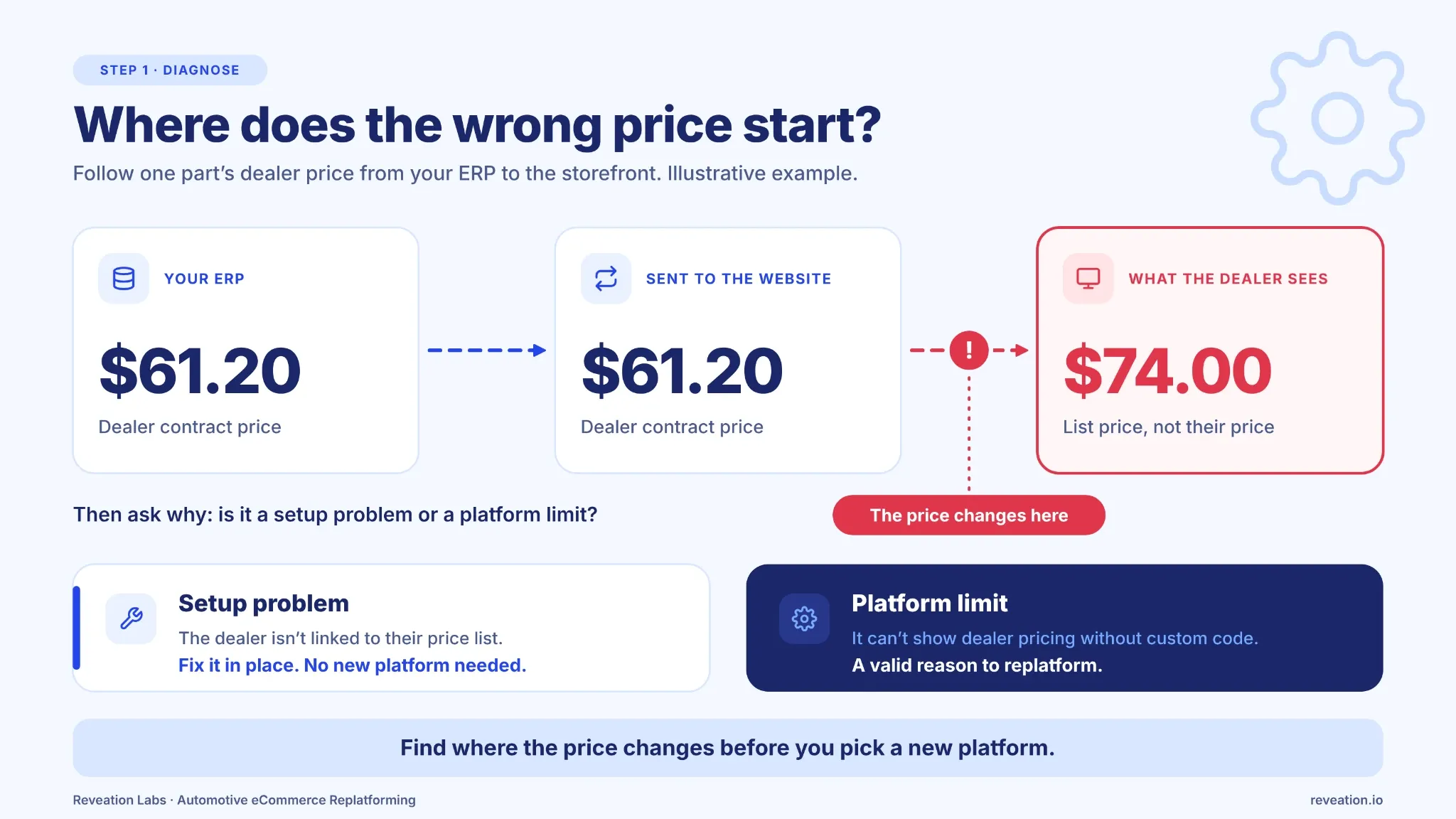 Illustrative example: follow the price until the number changes.
| Problem | Investigate first | When replacement becomes relevant |
|---|---|---|
| Wrong fitment results | Source application data, ID mappings, search configuration | The platform cannot hold the fitment relationships you need or accept updates at your volume. |
| Missing or wrong contract prices | Account IDs, ERP price lists, API responses, caching | Customer-specific pricing needs extensive custom code that is hard to maintain. |
| Stale or incorrect inventory | Sync frequency, availability calculation, ERP/WMS feed | The architecture cannot represent location-level availability and allocations. |
| Slow catalog updates | PIM feeds, import jobs, indexing, database performance | Structural limits keep publishing times unacceptable even after tuning. |
| Orders need manual correction after checkout | Order payload, ID mapping, ERP or OMS acceptance rules | The order workflow cannot be modeled without changing core checkout code. |
| Every new feature needs redevelopment | Platform configuration, extensions, integration dependencies | Routine business changes repeatedly require major rework. |
The findings may point to a data repair, an integration redesign, a platform replacement, or a combination. A clearer split of ownership between systems can resolve conflicting prices, customer records, and orders without a new storefront at all. Our article on ERP and eCommerce alignment explains why those ownership decisions come first.
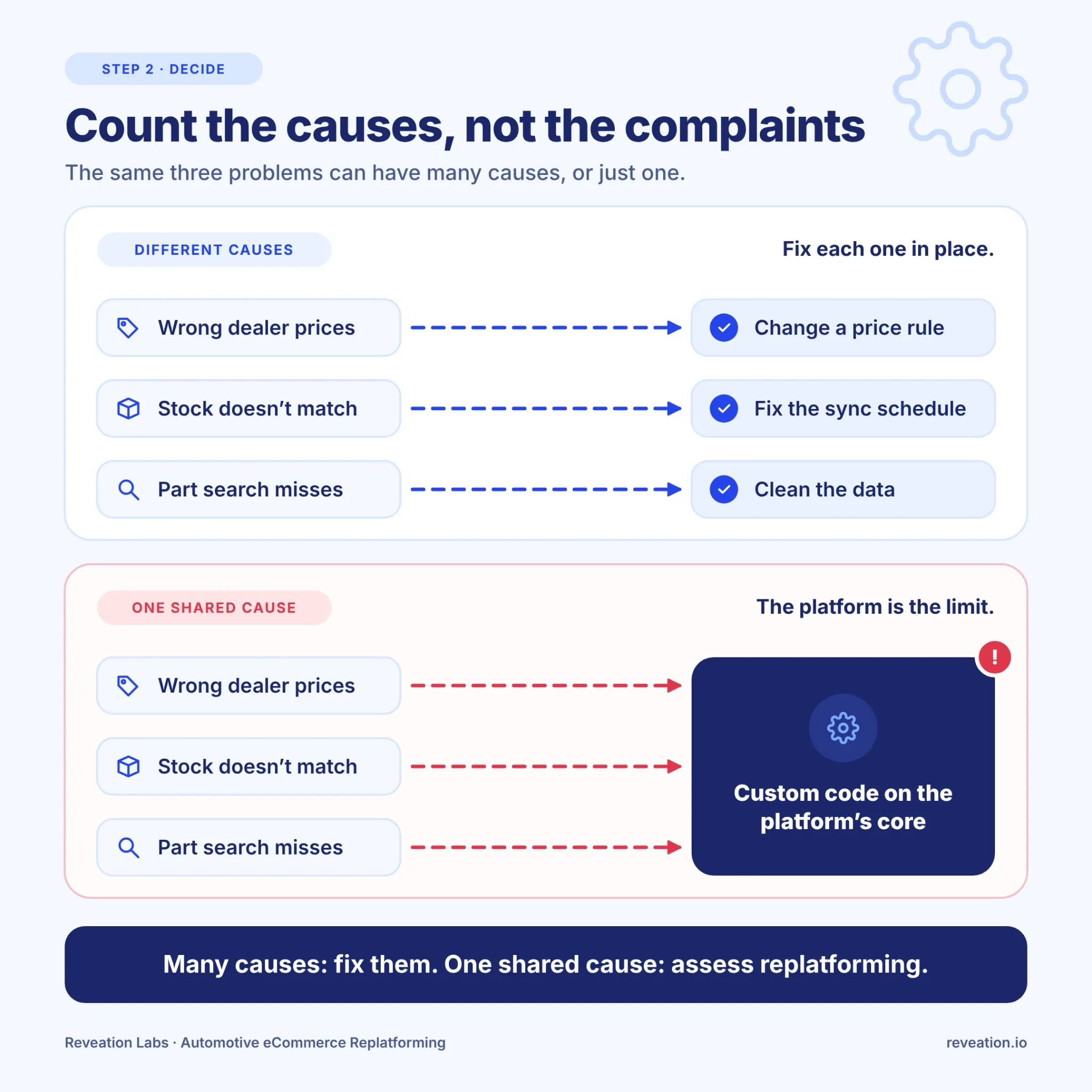 Count the causes, not the complaints.
Write down the next two years of commitments: a new dealer network, another warehouse, 30,000 more SKUs. Then estimate what it takes to deliver each one on the current platform. If several of them depend on the same heavy workaround, you are looking at a structural limit, and the comparison to make is repair versus replacement versus another year of doing nothing.
Which Systems Can You Keep When You Replatform?
Usually your ERP, your PIM, your fitment data source, and your warehouse or order management systems. What changes is the commerce layer in front of them and the integrations that connect to it. The first task is to write down which system owns each piece of information and how the new platform will read it.
| System | Usually stays? | Confirm before moving |
|---|---|---|
| Fitment data source | Yes | The new platform can ingest it, and its identifiers still match your commerce products. |
| PIM / product data | Yes | Part numbers, attributes, and replacement relationships keep their links. |
| ERP (accounts, pricing, credit, orders) | Yes | Customer IDs, price lists, ship-to locations, tax settings, and credit rules map correctly. |
| WMS / OMS | Usually | The storefront can read availability and routing rules instead of recreating them. |
| Storefront, search, custom scripts | Often replaced | Which custom behavior is a real business rule and which is a workaround for the old platform. |
Fitment and Product Data
Vehicle compatibility is a set of relationships between parts and specific makes, models, years, engines, and other application details. The vehicle selector is only the visible end. A distributor might take fitment from a specialist provider and keep part numbers, specifications, images, packaging data, and replacement relationships in a PIM. Both can usually stay when the storefront changes. What matters is whether the new platform can ingest them and keep the relationships intact.
ACES carries vehicle application (fitment) data, and PIES carries product information. The Auto Care Association maintains both standards. Compatibility with ACES 5.0 and PIES 8.0 does not mean a commerce platform validates every source record or maintains every vehicle relationship for you. Our article on what the new ACES and PIES standards mean for aftermarket teams covers validation and downstream dependencies.
Watch superseded part numbers. When a manufacturer replaces a part with a new SKU, buyers keep searching the old number. If the new catalog drops that link, they get zero results for a part you still sell under a different number. The same goes for OEM and interchange numbers. Build the part-number mapping before the data moves, and test searches by the old number.
ERP, Accounts, and Pricing
Many distributors let the ERP own contract pricing, customer terms, credit rules, and the financial order record. Others split those duties across the ERP, a CRM, and a pricing engine. The new platform has to follow the model you actually run, not the one a vendor assumes.
A single dealer account can have several buyers with different permissions, negotiated rates, and multiple ship-to locations. Check that customer IDs, account hierarchies, price groups, tax settings, and credit rules carry across. If they don't, a buyer logs in successfully and sees the wrong assortment or the wrong price. Connecting commerce to the system that owns those rules is the work of ERP and eCommerce integration.
Inventory, Warehouses, and Orders
Say a distributor holds 20 units of a brake component across three locations. Four are available at the buyer's preferred branch, and some of the rest is already allocated. The storefront should not show 20. It should apply the rules that decide what this customer can order, from which location, and by when.
Orders need the same care. The commerce platform creates the customer-facing order, while the ERP or an order management system usually handles fulfillment, invoicing, and status. Returning buyers also expect order history, reorders, shipment updates, invoices, and return status. That history does not have to be copied into the new commerce database. It can be exposed from the ERP, OMS, or whichever system keeps it.
APIs and Integrations
Having an API does not mean the integration works. Teams still have to agree on identifiers, update frequency, which system owns each record, how failed requests are retried, and how duplicates are prevented.
Consider an order submission that times out. The storefront needs a safe way to learn whether the ERP accepted the order before it sends it again. Without one, a temporary network problem creates a duplicate order. A successful API response is also not proof that the process worked: the downstream system has to accept the data and return the operational result you expect.
What Should You Rebuild and What Should You Retire?
Not every customization deserves a place on the new platform. Some exist because the old software could not do something. Others encode a business rule your customers rely on. Sort them before you scope the project.
Usually Retire
- Storefront-specific scripts that patch a platform gap
- Duplicate customer or product records
- Manual steps a reliable integration can replace
- Unsupported extensions with rising maintenance cost
Usually Rebuild
- Contract pricing and approval rules
- Branch eligibility and warehouse routing logic
- Part-number cross-references and supersessions
- Core-charge and return handling
Keeping a system does not mean keeping its connector exactly as it is. An existing integration often needs changes to talk to the new commerce application.
A reusable foundation can shorten that work. Reveation's fitment-ready eCommerce accelerator, built on Virto Commerce, gives teams a starting architecture for product and fitment data, B2B account pricing, inventory and fulfillment context, and integrations. It does not replace your fitment source, PIM, ERP, or the rules specific to your operation. The implementation still has to connect those systems and fit your ordering process.
Compare what the accelerator already covers with what your requirements add. It can reduce how much gets built from scratch. It does not make a complex migration small.
What Can Go Wrong During Automotive Replatforming?
A migration can pass every checklist and still break the buying process. The catalog loads, customers sign in, and checkout works, yet the relationships between those steps have changed.
The Part Is Listed but Vehicle Search Can't Find It
Product records moved with new internal IDs, but the fitment records still point to the old ones. Part-number search works. Vehicle search returns nothing for that part.
An Old Part Number Returns No Results
The supersession link was lost in the move. A buyer who types the discontinued number finds nothing instead of the current replacement.
A Dealer Sees the Retail Price
One account was never linked to its contracted price list. The buyer gets the retail price, and sales has to correct the order by hand.
Checkout Succeeds and the Order Can't Ship
The platform checked total stock and ignored location eligibility. The order routes to a warehouse that cannot fill it under the agreed shipping rules, and operations has to reroute it.
All four share one cause: the data moved, and the relationships between the data did not. For a longer list of automotive-specific mistakes, read our automotive eCommerce migration mistakes guide. For the steps between picking a vehicle and completing an order, see what happens after auto parts fitment.
Returns and core charges also need attention. A business selling remanufactured parts may collect a core charge and issue a credit when the customer returns an eligible old component. The new platform has to respect the return conditions, core-charge rules, and accounting process. If it doesn't, customer service and finance end up correcting transactions by hand after launch.
How Do You Protect Search Traffic During an Automotive Replatform?
Plan the search side before the build starts, not the week before launch. A new platform usually changes product URLs, category paths, and what search engines can index. For a large parts catalog, losing the pages that already earn organic traffic can hurt product discovery even when the new site works perfectly.
- Record a baseline: export the indexed URLs and the organic traffic and revenue they drive before anything changes.
- Map old URLs to new ones: every URL that earns traffic or backlinks needs a destination on the new site.
- Use permanent redirects (301) and carry over titles, meta descriptions, and headings that perform.
- Check the technical layer after launch: canonical tags, internal links, XML sitemaps, and crawl reports in Search Console.
- Expect some ranking movement after the move and monitor it for weeks, not days.
Google's own site move guidance covers URL mapping and redirects in detail.
What Will Replatforming Cost, and How Long Will It Take?
Nobody can give you a credible figure before looking at your catalog, integrations, and account rules. Cost and duration follow from a few specific facts: how clean your fitment and part-number data is, how many systems connect to the storefront, how many pricing and approval rules must survive, how many customer groups and storefronts are in scope, how much custom behavior you retire versus rebuild, and how quickly your own team can make decisions.
The license or subscription is one line in the budget. Ask every vendor to price the same scope, and ask what each quote leaves out.
| Cost line | What it covers |
|---|---|
| Platform and third-party services | Licenses or subscriptions, hosting, fitment data services, search, required extensions |
| Data preparation | Fitment and part-number cleanup, attribute gaps, duplicate records |
| Implementation and integration | Configuration, ERP, PIM, and OMS connections, custom pricing and routing rules |
| Testing and rollout | Realistic transaction tests, redirects, pilot group, parallel running |
| People and support | Training for sales, support, and warehouse teams, post-launch fixes, ongoing maintenance |
The rollout model changes the scope as well. A single cutover and a series of smaller waves carry different costs and different risks. Our comparison of big-bang and phased B2B migration explains when each one fits. For budget lines and timelines in more depth, Virto Commerce's guide to replatforming an auto-parts store is worth reading.
How Do You Test the New Platform Before You Switch?
Run a real buying scenario from start to finish. A demo built on clean sample data will not show how the platform behaves with your catalog and your accounts.
Ask the implementation team to select a vehicle, find a compatible part, sign in as an existing dealer account, check the contract price and branch inventory, and submit the order to the ERP or OMS. Then confirm that the account, price, part identifier, quantity, and ship-to arrive in the back-office record unchanged.
Edge Cases to Include
- A part that fits several vehicle applications
- A superseded part number searched by its old number
- Two dealers with different prices for the same part
- A dealer with several ship-to locations
- A part unavailable at the preferred branch but available elsewhere
- A backordered item, and an order that must ship from a different warehouse
Then Test a Failure
The happy path rarely exposes the weak spots. Break something on purpose and watch what the system does.
| What fails | What the system should do |
|---|---|
| The ERP rejects an order | Show a clear reason to staff, keep the order recoverable, and avoid a duplicate on resubmission. |
| The pricing service times out | Never fall back to the wrong price silently. Block checkout or flag the line for review. |
| An inventory update arrives late | Handle the order against current rules and give the team enough information to find the cause. |
Include order history, return handling, and the error messages employees will see when a connected service is down. The results also show whether you should roll out in phases. Our platform selection guide lists the vendor-demo checks in full.
What Does ERP-Owned Pricing and Inventory Look Like on a Large Parts Catalog?
In our work with De Havilland Aircraft of Canada, we built an aftermarket B2B store on Virto Commerce for a catalog of more than 110,000 parts. The storefront did not recreate pricing and stock. It retrieves customer-specific prices and inventory from the ERP on demand, and a two-way integration with the company's IFS ERP keeps product attributes, pricing, and orders in sync across multiple warehouses. Checkout supports multi-level approvals.
110K+
Aftermarket parts
Two-Way ERP Sync
Attributes, pricing, orders
On-Demand Lookups
Customer pricing and stock
That project was in aerospace, not auto parts, but the idea carries over. The ERP keeps the prices and the stock, and the website looks them up when a buyer signs in. A parts distributor with dealer pricing and several warehouses has the same job to do.
What Should Your Team Decide First?
Bring digital commerce, IT, merchandising, sales operations, and fulfillment into the same review. Each group sees a different part of the problem, and together they can separate platform limits from data and process issues.
- What is actually limiting growth? Name the tasks that fail and how often, instead of starting with a preferred replacement.
- Who owns each piece of data? Document the authoritative system for fitment, products, accounts, pricing, inventory, and orders.
- Which integrations and customizations survive? Review existing APIs, middleware, feeds, and custom code before deciding what to rebuild.
- What must work on day one? List the buyer journeys that cannot fail: vehicle search, account pricing, branch stock, and order submission.
- How will you measure improvement? Set baselines for catalog publishing time, order acceptance, manual corrections, integration failures, and maintenance effort.
The answers can support a full replatform, a narrower modernization, or improvements to the systems you already have. For the broader business case, start with our guide to B2B eCommerce replatforming.
At Reveation Labs, we help manufacturers and distributors check these answers against a live stack, connect commerce to the ERP, PIM, and fulfillment systems they already run, and build around the workflows their buyers use. The answer isn't always a new platform. It can just as well be a repaired fitment feed, a rebuilt integration, or a decision about which system owns pricing.
If you want someone to map this against your own setup, the B2B eCommerce Discovery Sprint is a short, fixed-scope way to assess platform constraints, integration dependencies, and modernization priorities before you commit to a larger project.
Not Sure Yet? Start With the Playbook
Our Aftermarket Auto Parts eCommerce Playbook, co-produced with Virto Commerce, walks through ACES 5.0 and PIES 8.0, real implementation examples, and the questions to settle before you spend on a new platform.
Download the Automotive Aftermarket Playbook