
Imagine this: it is Monday morning, and your inside sales team already has reorder revenue at risk.
A contractor should have reordered consumables last week. A branch customer asked for a quote, but pricing changed overnight. A CSR knows a backorder upsets the account, but that context sits in a Teams thread.
The ERP has an order history. The CRM has notes. The rep has the relationship. Nobody has the full next step in one place.
At Reveation Labs, we see this pattern often: distributors do not lose reorder revenue because teams lack effort. They lose it because reorder signals live across inboxes, ERP screens, spreadsheets, customer notes, branch conversations, and rep memory.
That is where Microsoft Copilot Cowork becomes useful - not as a magic reorder engine, but as a coordination layer. It can help sales teams move faster across emails, meetings, Teams updates, and follow-ups.
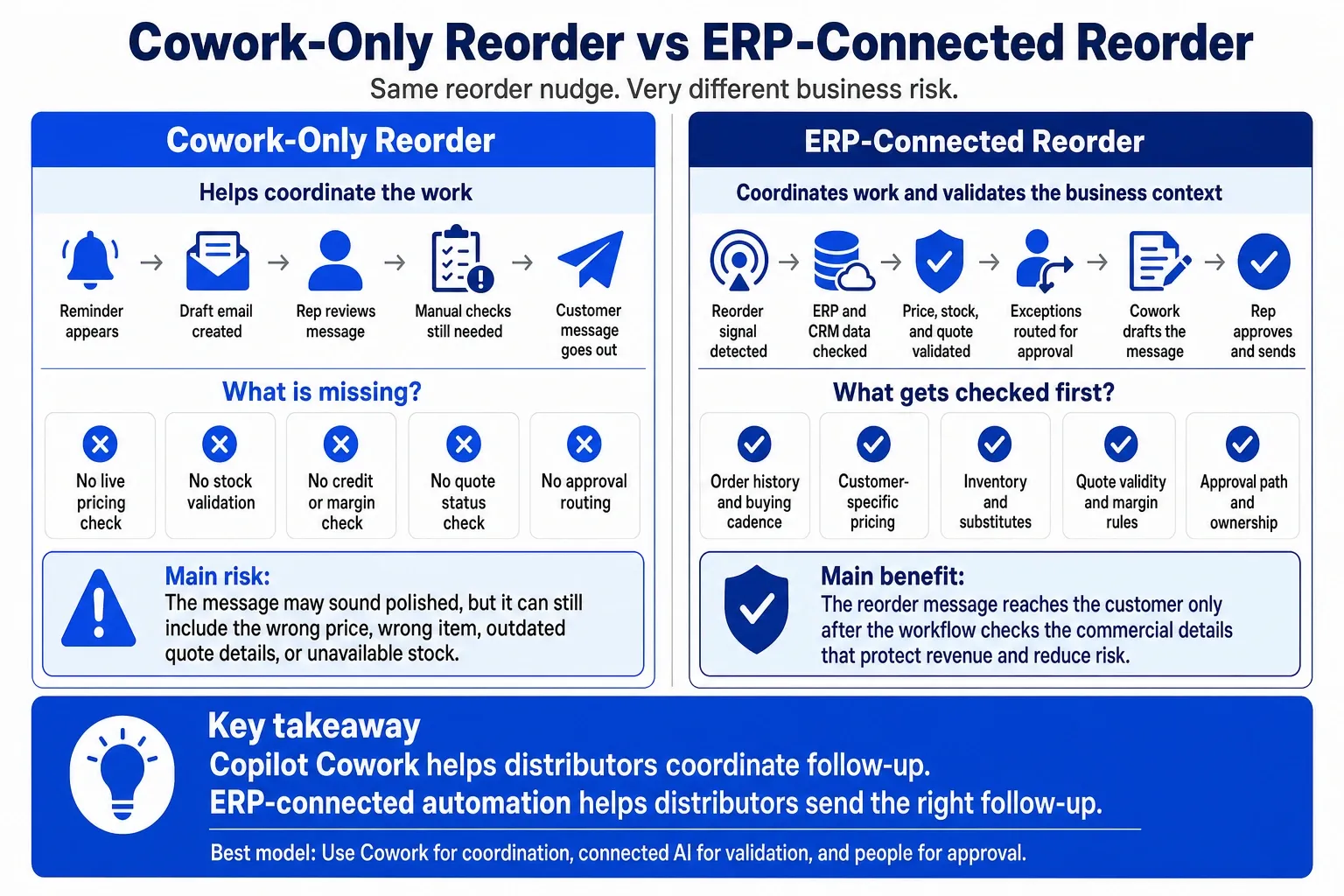
But distributor leaders still need ERP-connected workflows to confirm pricing, stock, order history, margin rules, and approvals before any customer-facing action goes out.
The real question is not, “Can Copilot help sales?” The better question is, “Which reorder workflow should it support, and what distributor data must it trust first?”
Reorders Break Quietly
Reorders rarely fail in one dramatic moment. They fail when buying signals get weaker across systems and teams.
Sales sees the relationship. CSRs see the daily friction. Operations sees stock pressure. Finance sees credit or margin issues. The customer only sees one thing: you either made the reorder easy, or you did not.
Rep memory leaks revenue
Great reps remember buying patterns. They know which customer orders every 30 days, which buyer prefers email, and which branch needs substitutes when stock runs tight.
But rep memory cannot scale across PTO, turnover, territory changes, and hundreds of repeat-buy accounts. A distributor needs follow-up logic that does not depend on who remembered what.
ERP data needs action
Your ERP may hold last order date, SKU history, customer pricing, shipment status, credit holds, and availability.
But ERP data does not always tell a rep what to do next. The rep still has to interpret the account, check the quote, confirm inventory, review margin, and decide whether to call, email, or wait.
Buyers punish friction
B2B buyers want speed and accuracy. Sana Commerce’s 2025 B2B Buyer Report says 73% of B2B buyers prefer to buy online, while 85% experience frustrations when buying online. It also points to missing information around products, stock levels, delivery times, and prices as major sources of friction.
That matters for distributors because reorder work sits between digital self-service and relationship selling. The customer does not care whether the nudge comes from a portal, a rep, a CSR, or an AI-assisted workflow. They care whether the timing, product, price, and next step make sense.
Practical warning: A polished AI email can still create risk if it includes the wrong price, promises unavailable stock, ignores a credit hold, or suggests the wrong substitute.
Failed moves still happen
| Failed move | Why teams try it | Why it stalls | Better move |
|---|---|---|---|
| “Just follow up more” | It sounds simple | Reps chase loud accounts, not due accounts | Prioritize by reorder signal |
| Weekly ERP exports | Managers want visibility | Reports do not create next steps | Turn reports into tasks |
| Generic reorder emails | They scale quickly | Buyers ignore vague reminders | Personalize by SKU, cadence, and account |
| Broad Copilot rollout | It feels modern | Usage does not prove revenue impact | Start with one role-based workflow |
| AI before data cleanup | It moves fast | Bad context creates bad actions | Fix the reorder logic first |
This is why Reveation Labs recommends workflow-first Copilot adoption. Our guide to Microsoft Copilot ROI explains that teams prove value faster when they choose frequent, high-friction workflows, capture a baseline, and measure business outcomes instead of usage alone.
Start With One Reorder Flow
The most useful distributor AI pilot does not start with “AI for sales.” It starts with one narrow reorder motion.
Pick a repeat-buy customer segment, define the signal, decide who approves the next action, and connect the data that makes the recommendation trustworthy.
The reorder anatomy
| Step | What needs to happen | Where Cowork helps | Where connected AI helps |
|---|---|---|---|
| 1. Detect the signal | Find accounts likely due for reorder | Summarize account context once flagged | Use ERP history, cadence, SKU patterns, and account behavior |
| 2. Check exceptions | Confirm price, stock, credit, MOQ, and substitutions | Gather related emails or notes | Pull ERP, inventory, pricing, and approval rules |
| 3. Prepare action | Draft the message or call notes | Draft email, Teams note, task, or agenda | Personalize offer with safe product and price context |
| 4. Get approval | Let the rep, CSR, or manager review | Ask for approval before sensitive actions | Route exceptions to the right owner |
| 5. Track outcome | Update CRM and measure conversion | Summarize responses and next steps | Push structured data back into CRM, OMS, or reporting |
This model makes the tool decision clearer. Copilot Cowork helps after the business knows what needs attention. Connected AI helps decide which account, SKU, exception, or approval matters first.
Where Copilot Helps
Copilot Cowork can improve coordination around distributor sales work.
Microsoft describes Cowork actions as auditable, and says sensitive steps such as sending an email or updating a record pause for user approval before they execute. That design fits distributor workflows where humans should approve pricing, substitutions, commitments, and customer-facing messages.
Prep the rep
Before a call, Cowork can gather recent emails, meeting notes, documents, Teams threads, and open tasks. That helps the rep walk in prepared.
But the conversation becomes more useful when the workflow also checks order history, open quotes, contract pricing, and product availability.
Clean up the thread
Distributor work often hides inside long email chains. A buyer asks for the same SKU as last month. A CSR responds with a substitute. A rep adds pricing context. Operations mentions partial shipment timing.
Cowork can summarize that mess into a clearer next step.
Keep quotes warm
Quotes go cold when follow-up timing slips. Cowork can remind the rep, draft a follow-up, and prepare a quick summary.
But a distributor still needs pricing, inventory, quote expiration, margin, and approval context before anyone sends a commercially safe message.
Hand off cleanly
CSRs, reps, branch teams, and warehouse teams often hand off account issues across channels.
Cowork can turn scattered notes into a clean summary. That gives the next person less detective work and fewer “what happened here?” moments.
7 Microsoft Copilot Cowork Use Cases for Distributors
These Microsoft Copilot Cowork use cases become useful when each one ties to a role, a data source, an approval point, and a KPI.
1. Reorder nudges
This should be the hero use case. Cowork can draft the reorder email, prepare call notes, and create the follow-up task.
Connected AI should decide which account looks due, which SKUs matter, whether stock changed, and whether the customer has pricing or credit issues.
- Human approval: rep or inside sales owner
- Distributor data needed: order history, SKU cadence, pricing, stock, CRM owner
- KPI to watch: reorder conversion rate and missed reorder reduction
2. Dormant account follow-up
Dormant accounts often leave quietly. Cowork can summarize the last interaction and draft a reactivation message.
Connected AI can flag accounts that dropped below normal buying frequency, stopped buying a key category, or shifted spend away from high-margin SKUs.
- Human approval: sales rep or territory manager
- Distributor data needed: customer history, buying cadence, product mix, account notes
- KPI to watch: reactivated accounts and recovered revenue
3. Quote chasing
Distributors lose money between “quote sent” and “order placed.” Cowork can create reminders and draft follow-up messages.
Connected AI can check whether the quoted price expired, whether inventory changed, whether substitutions exist, and whether margin approval still holds.
- Human approval: rep, manager, or pricing owner
- Distributor data needed: quote status, price validity, stock, margin rules
- KPI to watch: quote-to-order conversion and quote aging
4. Backorder updates
Backorders test trust. Cowork can summarize the issue and draft a customer update.
Connected AI can check inventory status, substitutes, ETA, customer priority, and partial shipment options before the message reaches the customer.
- Human approval: CSR or account owner
- Distributor data needed: inventory, ETA, order status, substitute rules, customer priority
- KPI to watch: response time and backorder-related escalations
5. Sales meeting prep
Sales managers need action, not activity theater. Cowork can assemble meeting notes, recent activity, account updates, and agendas.
Connected AI can rank accounts by reorder risk, quote aging, margin impact, open service issues, and category movement.
- Human approval: sales manager
- Distributor data needed: CRM activity, ERP order history, quote pipeline, service issues
- KPI to watch: meeting prep time and action completion
6. CSR handoff summaries
CSRs sit closest to daily customer friction. They see address issues, invoice questions, short shipments, urgent substitutions, and product confusion.
Cowork can summarize those issues. Connected AI can push structured updates into CRM, service tools, or account notes so the next rep does not restart the conversation.
- Human approval: CSR or service lead
- Distributor data needed: service tickets, email threads, order status, CRM account notes
- KPI to watch: handoff time and repeat customer contacts
7. Weekly account reviews
Leaders need a repeatable rhythm. Cowork can prepare account review documents and meeting summaries.
Connected AI can highlight accounts that need attention because of reorder risk, dead quotes, service issues, margin movement, or product category shifts.
- Human approval: sales manager or RevOps owner
- Distributor data needed: ERP, CRM, quote data, service issues, product category trends
- KPI to watch: accounts reviewed, actions completed, reorder lift
The Gap Copilot Cannot Close Alone
Copilot Cowork can coordinate work. Distributor automation needs business logic.
That difference matters because a polished AI message can still create problems if it contains the wrong price, promises unavailable stock, ignores a credit hold, or suggests the wrong substitute.
Pricing has rules
Distributor pricing rarely lives in one simple table. Customer tier, contract terms, branch, quantity breaks, rebates, margin thresholds, and approval rules all shape the final answer.
Cowork can help draft the message, but it should not invent commercial terms.
Inventory moves fast
A reorder prompt needs live context. Stock on hand, committed inventory, lead time, substitutes, MOQ, and allocation rules can change the customer conversation.
Without that context, AI can sound confident and still mislead the buyer.
Approvals need routing
Some actions need sales approval. Others need pricing, finance, operations, or branch manager approval.
Cowork can help coordinate the message. A connected workflow can route the exception, keep an audit trail, and prevent teams from skipping controls.
History drives timing
Good reorder timing depends on patterns. The workflow should understand last order date, normal quantity, seasonal movement, SKU bundles, customer preference, and account changes.
Email context alone cannot produce that reliably.
Copilot vs connected AI
| Distributor question | Cowork can help with | Connected AI should own |
|---|---|---|
| “What happened with this customer?” | Summaries across emails, meetings, files, and Teams | Structured account timeline across ERP, CRM, OMS, and service data |
| “Who needs a reorder nudge?” | Drafting the message once identified | Reorder prediction and account prioritization |
| “Can we send this quote follow-up?” | Follow-up reminders and email drafts | Price validity, stock check, margin approval, and exception routing |
| “What do we say about this backorder?” | Drafting and summarizing context | ETA, substitutes, allocation rules, and customer priority |
| “Which accounts need review?” | Meeting prep and summary documents | Account scoring, reorder risk, quote aging, and margin impact |
For leaders choosing between productivity AI and workflow AI, our article on Microsoft Copilot vs custom AI frames Copilot as a Microsoft-native productivity layer and custom AI as a business-specific workflow layer. The strongest distributor strategy often combines both.
Where Custom AI Fits
Custom AI helps when the workflow must understand distributor systems, rules, and exceptions.
It does not replace Copilot. It makes Copilot-supported work safer and more valuable by feeding it better context and routing the right actions to the right people.
Predict the next order
A connected workflow can analyze order history, buying cadence, SKU combinations, seasonality, and customer behavior.
Then it can tell the rep why an account needs attention. That explanation matters because reps trust recommendations more when they can see the logic.
Connect ERP and CRM
Reorder workflows need both operational truth and relationship context. ERP brings order history, pricing, availability, shipment status, invoices, and credit context. CRM brings account ownership, notes, opportunities, and relationship history.
Our article on how B2B companies use agentic AI to automate sales and ordering covers this broader pattern: AI becomes more useful when it connects sales, ordering, approvals, and operational data instead of sitting in one channel.
Route exceptions
Distributor teams do not need AI to hide exceptions. They need AI to identify credit holds, price conflicts, stockouts, substitute needs, and approval gaps faster.
Then the workflow should route the issue to the right rep, CSR, manager, or operations owner.
Keep control visible
Human control should stay visible in reorder automation. Apply that principle to pricing, substitutions, commitments, approvals, and customer-facing promises.
For distributors that want quoting, approvals, reorders, PO reconciliation, delivery scheduling, and audit trails in one connected model, Reveation Labs’ agentic commerce automation work focuses on guarded workflows instead of generic AI demos.
Useful framing: Use Copilot Cowork for coordination. Use connected AI for reorder intelligence. Use people for judgment, approvals, and customer trust.
A Smarter Rollout
Do not launch AI across the whole sales team first.
Start with one repeatable reorder flow, one user group, and one measurable outcome. Then expand after the team trusts the recommendations, approval path, and data quality.
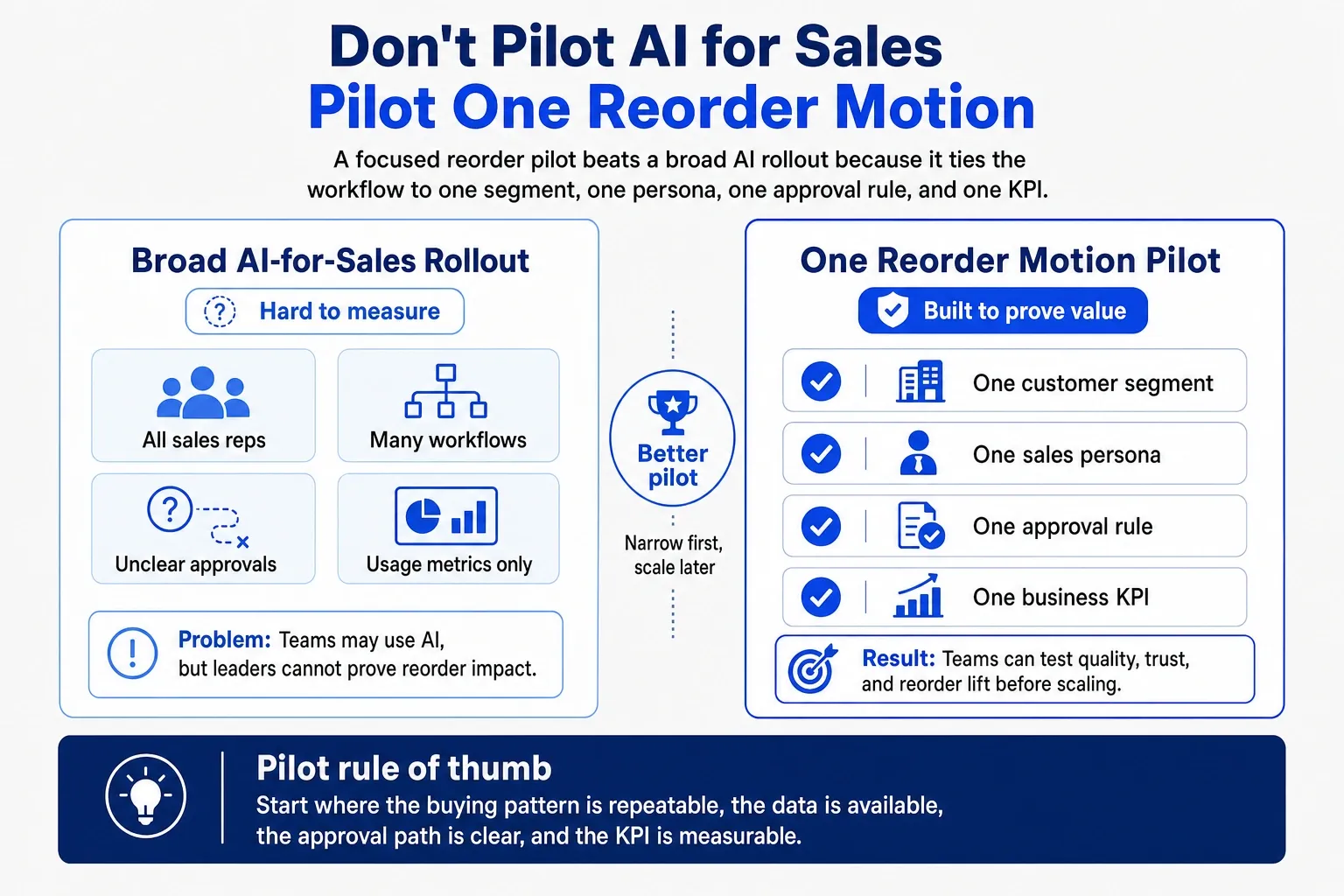
Pick one segment
Start with repeat customers who buy the same consumables every 30–60 days.
That segment gives the workflow enough pattern consistency. It also gives sales leaders a clean way to compare before and after results.
Pick one persona
Choose one user group first.
Inside sales, field reps, CSRs, sales managers, and branch teams all work differently. A workflow that tries to serve everyone usually helps no one enough.
Pick one approval rule
Define who approves the next step.
For example, reps may approve standard reorder emails, managers may approve margin exceptions, and CSRs may approve backorder updates. This keeps automation useful without removing accountability.
Pick real KPIs
Do not measure success by prompt count. Measure business movement: fewer missed reorders, faster quote follow-up, shorter CSR handoffs, fewer stale quotes, higher reorder conversion, and less time spent exporting reports.
Pilot plan
| Week | Focus | Output |
|---|---|---|
| Week 1 | Choose the reorder motion | Segment, user, baseline, KPI |
| Week 2 | Map the workflow | Signal, data source, exception, approval |
| Week 3 | Build the pilot | Cowork prompts, connected checks, task flow |
| Week 4 | Test with users | Quality review, feedback, scale-or-stop decision |
Reveation Labs often recommends this controlled path before a broad AI rollout. Our B2B AI Solutions Pilot helps teams test one targeted use case in weeks, while our AI process automation work helps teams design intelligent workflows with decision-making, exception handling, and escalation.
Final Takeaway
Microsoft Copilot Cowork can help distributor teams move faster around emails, summaries, meetings, reminders, documents, and handoffs.
But distributor reorder growth needs more than coordination. It needs reorder signals, ERP and CRM context, inventory awareness, pricing rules, approval routing, and human control.
The strongest model looks simple: use Copilot Cowork for coordination, use connected AI for reorder intelligence, and use people for judgment, approvals, and customer trust.
Before rolling this across sales, pick one reorder workflow. Map where the signal starts, which system owns the truth, who approves action, and what KPI proves value. That is where AI starts becoming operational, not just interesting.