
What Microsoft Copilot ROI actually means
Microsoft Copilot ROI is the measurable value created after you subtract the full cost of licenses, rollout effort, enablement, governance, and support from the benefit produced by better workflows. In other words, adoption is not the finish line. It is only one signal that a team may be moving toward value.
That is why it helps to separate four layers: readiness, adoption, productivity impact, and business value. A user opening Copilot in Outlook or Teams may be interesting, but it does not prove that the business is getting faster proposals, shorter resolution times, or better use of high-value employee hours.
Adoption is a leading indicator. ROI is the business outcome you can defend in an operating review or budget discussion.
The “not just the license” part matters because the subscription cost is only one layer of the investment. Companies also pay in time, training, process redesign, manager reinforcement, analytics, and governance. Strong returns show up when those pieces are aligned around a specific use case instead of a broad, vague rollout.
Why Microsoft Copilot ROI stalls after rollout
Most disappointing results are surprisingly predictable. Teams license too broadly, choose weak use cases, skip baseline capture, and then rely on usage data to tell a value story it was never meant to tell.
The biggest mistake is assuming all teams will produce the same return. Sales proposal teams, support operations, PMO groups, and executive support functions each have different workflow patterns. The better the fit between Copilot and the work itself, the easier it becomes to prove Microsoft Copilot ROI.
How to improve Microsoft Copilot ROI with a practical rollout model
The fastest path to value is usually narrow first, broad later. A focused pilot teaches you where the tool helps, where the process needs redesign, and whether the business case is strong enough to scale.
Pick one painful workflow per pilot group
Start with work that happens often and already consumes expensive human attention. Good examples include proposal drafting, meeting recap creation, internal knowledge retrieval, customer case summarization, and first-pass content creation for account teams.
Select users by role fit, not hierarchy
Seniority is not the best pilot filter. The best users are the people doing repeated knowledge work with visible output, clear manager support, and enough task consistency to compare before and after.
Capture the baseline before launch
If you do not know how long the workflow takes today, the post-rollout story will be vague. Record the current cycle time, hours spent, output quality, rework, handoff friction, or SLA performance before Copilot enters the process.
Define success in business terms
Targets should sound like operating goals, not novelty metrics. Examples include faster proposal turnaround, shorter average handle time, quicker internal response, reduced meeting follow-up burden, or better throughput per employee.
Support adoption after rollout
Habits rarely stick after a single training session. Teams need role-specific examples, manager reinforcement, and simple guidance on where Copilot should and should not be used.
Expand only after proof appears
Do not scale because licenses are available. Scale because the workflow proved its case. That usually means the team can explain what changed, how it was measured, and why the same logic should transfer to adjacent roles.
If you need a low-risk way to validate the first use case, Reveation’s AI Solutions Pilot is built around one controlled use case with clear metrics. For teams still shaping priorities, the Digital Transformation & AI Discovery Sprint is a practical way to align stakeholders, map dependencies, and choose the right first move.
Best practice: Treat the pilot as a workflow experiment, not a software launch. That shift makes the measurement cleaner and the scale decision easier.
A simple Microsoft Copilot ROI framework leaders can use
You do not need a complicated model to evaluate value. You do need a disciplined one.
Cost side: what “not just the license” means in practice
- Copilot licenses
- Admin and rollout time
- Enablement and training
- Governance and policy work
- Workflow redesign and change management
- Analytics, reporting, and review time
Benefit side: what actually creates value
- Labor hours saved on repeated work
- Faster turnaround time
- Reduced rework and coordination drag
- Higher output capacity per team
- Improved response speed for customers or internal stakeholders
- Better commercial or service outcomes where measurable
Simple formula
ROI = (Total measurable benefit − Total cost) ÷ Total cost
Worked example: a proposal team pilot
Imagine a 20-person proposal function that starts with 10 Copilot users in a controlled pilot. The direct subscription cost is only part of the picture, so the team also includes enablement time, manager support, and rollout coordination in the investment model.
Now assume those 10 users save three hours per week each on first drafts, recap creation, and research consolidation across a 12-week pilot.
That creates a measurable pool of recovered time. Even after applying a conservative haircut for imperfect adoption, the business can see whether the workflow improved enough to justify a wider rollout.
The point of the exercise is not to produce perfect finance-theater precision. It is to show whether one workflow is strong enough to earn the next wave of investment.
If your environment needs more than out-of-the-box assistance, Reveation’s Azure AI Solutions and LLM AI Solutions can support more tailored retrieval, deployment, and workflow-specific AI when general Copilot usage is not the full answer.
Where Microsoft Copilot ROI shows up fastest
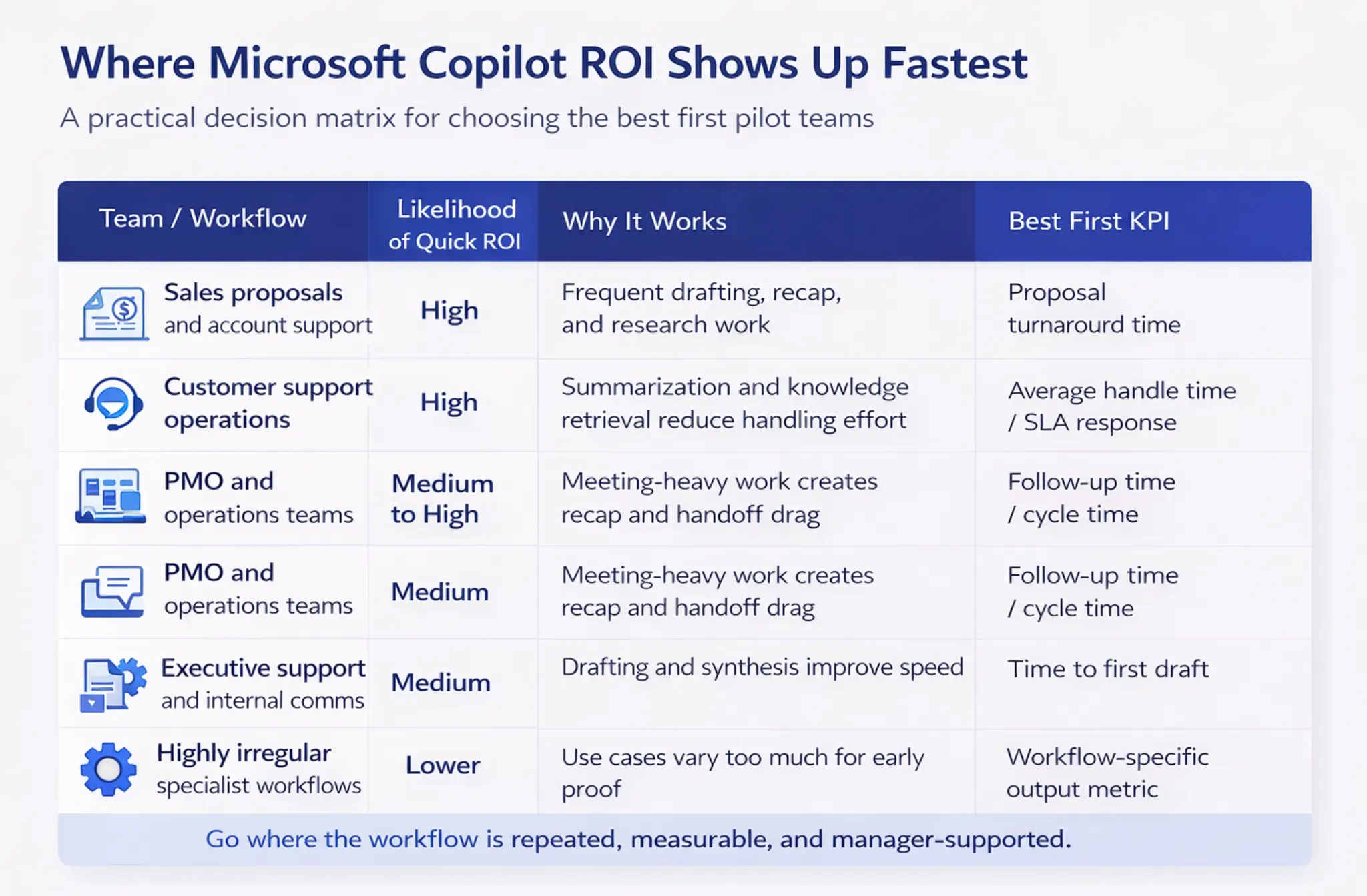
Early returns usually appear in roles with repeated knowledge work, heavy context switching, and clear before-and-after metrics.
The takeaway is simple: go where the economics are visible. If the team cannot identify the bottleneck, measure the starting point, or explain the manager's behavior needed to support the change, the rollout may still be useful, but it will be harder to prove.
What to do in the first 30 days
Leaders often know they want results but not how to structure the first month. A light operating cadence helps.
Common trap: “Everyone got access” is not an early win. “One team improved one measurable workflow enough to justify the next wave” is.
When Microsoft Copilot is worth it, and when it is not
This is the section many buyers actually need. Copilot is more likely to be worth the investment when the target users do repeated drafting, summarization, research, and coordination work; when managers can reinforce behavior; and when the business can capture a clean before-and-after baseline.
It is less likely to create strong early returns when workflows are highly irregular, success metrics are unclear, or leaders expect value without training and process change. In some cases, the better option is a more tailored workflow solution rather than broader seat expansion.
That is also where infrastructure and reporting maturity matter. If your ROI case depends on integration, analytics, and clean data flows, Reveation’s guide on Microsoft Fabric for data integration is a useful companion read, and our Microsoft Cloud Solutions Partner page adds context for teams standardizing around the Microsoft ecosystem.
Microsoft Copilot ROI comes from workflow design
The strongest Microsoft Copilot ROI stories do not begin with “Who wants a license?” They begin with “Which workflow is expensive enough to improve, measurable enough to prove, and common enough to scale?”
That is why the best rollout pattern is usually narrow first, broad later. Pick one workflow, define the baseline, support the team properly, and expand only when the business case is visible.
For organizations that want a more structured path from curiosity to proof, Reveation can help through an AI Solutions Pilot, a Discovery Sprint, or broader Azure AI implementation support. The goal is the same in each case: get to evidence before you scale.