
If you sell building materials online, the storefront is rarely the hardest part.
The hard part is making sure the new platform does not break the things your customers already trust you for: contractor pricing, branch inventory, quote history, job-site delivery, account terms, and fast repeat ordering.
Main risk
Breaking trusted ERP, pricing, inventory, and account workflows.
Better path
Pressure-test business rules before migration.
We have seen B2B ecommerce projects go sideways when teams treat replatforming like a design upgrade. For building materials suppliers and distributors, it is really an operations project. The website is only the visible layer; the real work sits in ERP logic, pricing rules, product data, fulfillment workflows, and how your sales and branch teams support customers every day.
Important: That is why we recommend pressure-testing the business rules before you migrate. If pricing, inventory, and account workflows are unclear before launch, the new platform will not fix them. It will expose them faster.
Our broader blog on B2B ecommerce replatforming makes the same point: replatforming is not just a software swap. It affects architecture, workflows, buyer experience, and long-term flexibility.
In this article
- Why building materials ecommerce replatforming is different
- What cannot break before you replatform
- Top 12 ERP and pricing checks
- Common mistakes that make replatforming feel broken
- How to pressure-test launch readiness
- How to choose the right path
Why Building Materials Ecommerce Replatforming Is Different
Building materials buyers are not casually browsing. They are usually trying to keep a job moving, match a quote, buy against an account, check availability at a branch, or reorder something they already use every week.
That changes the job of the ecommerce platform. It has to support how contractors, builders, dealers, procurement teams, sales reps, and counter teams already work.
A buyer may need lumber by board foot, drywall by sheet, fasteners by box, roofing by square, hardware by each, or bulk materials by pallet. They may also need job-site delivery, will-call pickup, branch transfers, account terms, tax exemption, and quote-based pricing.
Buyer reality
They need speed, accurate pricing, branch context, and repeat ordering.
Platform reality
It has to support operating logic behind pricing, fulfillment, service, and trust.
So when we talk about building materials ecommerce replatforming, we are not just talking about products and checkout. We are talking about the operating logic behind pricing, fulfillment, service, and trust.
Before You Replatform, Decide What Cannot Break
Before you compare platforms, define what the new platform must protect.
For most building materials teams, the answer is not “the homepage.” It is pricing accuracy, branch availability, quote continuity, account visibility, and the workflows your sales and branch teams already use to keep customers moving.
| Workflow | What Can Break | What Good Looks Like |
|---|---|---|
| Contractor pricing | Customers see the wrong contract price or quote price | Online pricing matches ERP, quote, contract, and account rules |
| Branch inventory | The site says “in stock” but the branch cannot fulfill | Availability reflects branch, warehouse, transfer, pickup, and delivery context |
| Job-site delivery | Checkout cannot handle delivery windows, distance, or fees | Delivery rules account for radius, timing, handling, fuel, and order type |
| Quote workflows | Reps create quotes offline that cannot convert online | Buyers can review, accept, and reorder from approved quotes |
| Account terms | Credit, tax exemption, or PO rules fail online | Checkout respects account status, invoice terms, tax rules, and approvals |
This is where we usually encourage teams to slow down. A platform decision made before these rules are clear often creates expensive workarounds later.
Our article on ERP and ecommerce alignment before replatforming frames this well. In many B2B environments, ERP owns customer hierarchies, contract pricing, credit limits, inventory allocations, and financial posting, while commerce should present that truth instead of redefining it.
Top 12 ERP and Pricing Checks Before Building Materials Ecommerce Replatforming
Use this section as a practical readiness checklist before platform selection, implementation, migration, or go-live.
Each check protects a workflow that can directly affect buyer trust, internal adoption, or order accuracy.
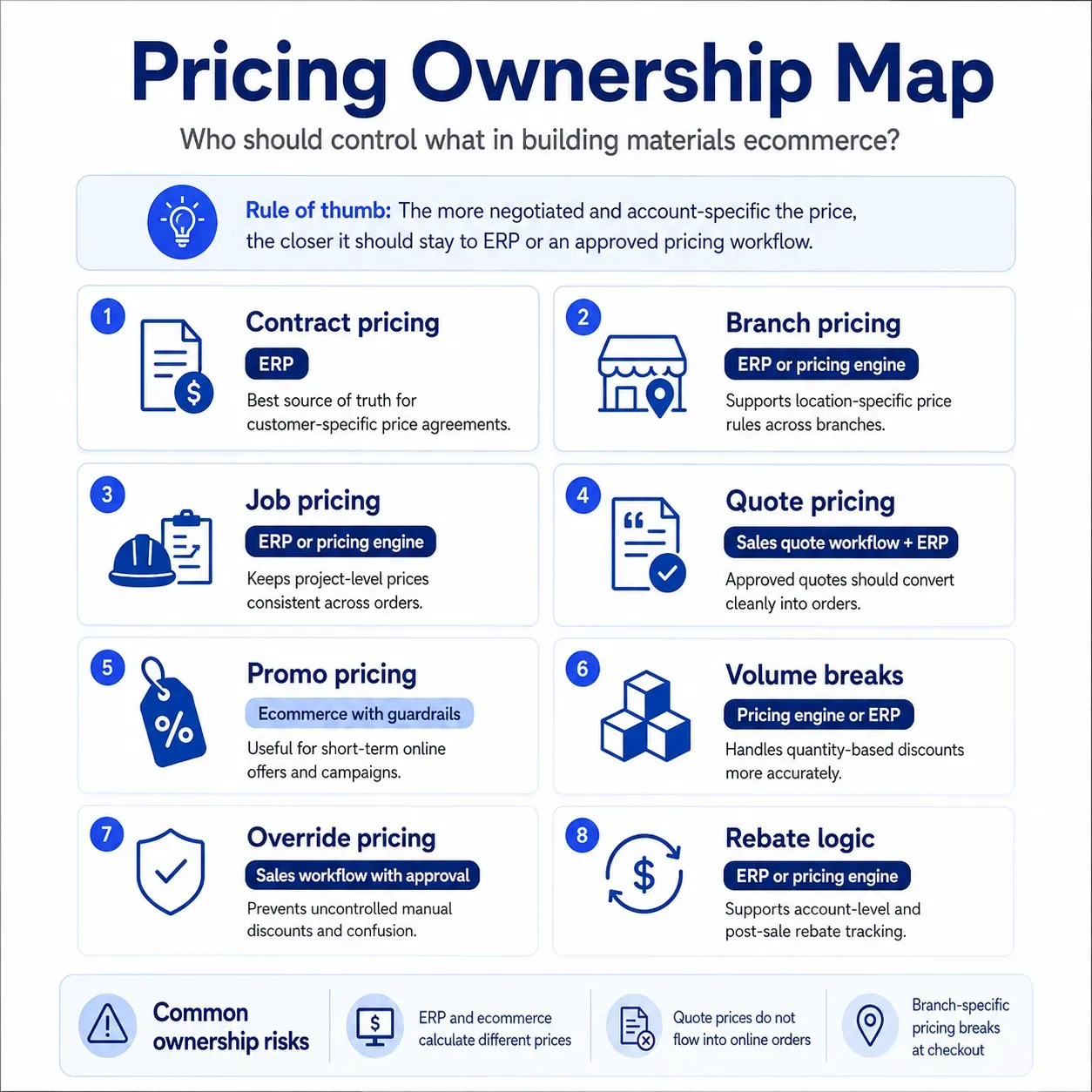
1. Confirm Who Owns Contractor Pricing
Start here because pricing mistakes are the fastest way to lose trust.
Your team needs to know whether contractor pricing lives in ERP, ecommerce, a pricing engine, sales rep quotes, spreadsheets, or some mix of all of them. If that ownership is unclear, the new platform may show one price while the invoice, quote, or sales rep shows another.
For building materials companies, pricing can include contract pricing, customer-specific pricing, branch pricing, job pricing, volume breaks, promotional pricing, quote overrides, and rebate logic.
What we would verify:
- Which system owns final sell price?
- Which system owns quote overrides?
- Which system owns customer-specific pricing?
- Which prices can ecommerce display but not change?
- What happens when ERP and ecommerce disagree?
A good setup gives customers confidence that the price they see online is the price your business will honor.
2. Map Parent-Child Accounts, Jobs, and Buyer Roles
A building materials customer is rarely just one login.
A contractor may have a parent account, several job accounts, different ship-to addresses, multiple buyers, field supervisors, accounting users, and branch-specific relationships. A builder may need one team member to order, another to approve, and another to view invoices.
If that structure is not mapped correctly, the buyer may see the wrong pricing, wrong delivery options, wrong order history, or wrong account documents.
We would not treat this as a simple customer import. We would map real account scenarios and test them before launch.
For example: Can a project manager order for Job A but not Job B? Can accounting see invoices without placing orders? Can a branch manager support a buyer without seeing unrelated accounts?
That is the level of detail that prevents adoption problems later.
3. Clean Up Units of Measure Before Migration
Units of measure can quietly break the buying experience.
Building materials products are often sold by each, box, carton, pallet, bundle, square foot, linear foot, board foot, weight, length, roll, sheet, or custom cut. If ERP, product data, and ecommerce do not agree, buyers may order the wrong quantity or misunderstand the price.
This is not just a data cleanup issue. It affects quoting, pricing, fulfillment, returns, and customer confidence.
What we would check:
- Does the product display the same unit buyers use when ordering?
- Does the price match the displayed unit?
- Can buyers convert between common units?
- Do cut lengths, bundles, pallets, and minimum quantities work correctly?
- Does the ERP receive the order in the unit it expects?
If the answer is unclear, fix it before migration. Bad unit logic gets much more visible once customers are ordering online.
4. Validate Product Data for How Buyers Actually Search
Do not just migrate SKUs. Make sure buyers can find and understand what they need.
A building materials catalog often needs dimensions, grades, finishes, colors, sizes, manufacturer part numbers, compatibility notes, spec sheets, safety documents, substitute SKUs, related products, and product images. A clean SKU is not enough if the buyer cannot confirm fit, grade, or application.
This is where search becomes operational, not cosmetic. A contractor may search by SKU, nickname, product type, dimensions, common field language, or a partial description.
We have seen similar B2B catalog complexity in our MDS Forklift B2B WooCommerce and Elasticsearch case study. That project involved 8.6M+ SKUs, real-time pricing and stock needs, and search performance challenges. MDS Forklift is not a building materials case study, so we would not position it that way. But the lesson carries over: when buyers depend on fast search, trusted availability, and accurate product data, ecommerce has to be engineered around real B2B buying behavior.
5. Test Branch-Level Inventory Visibility
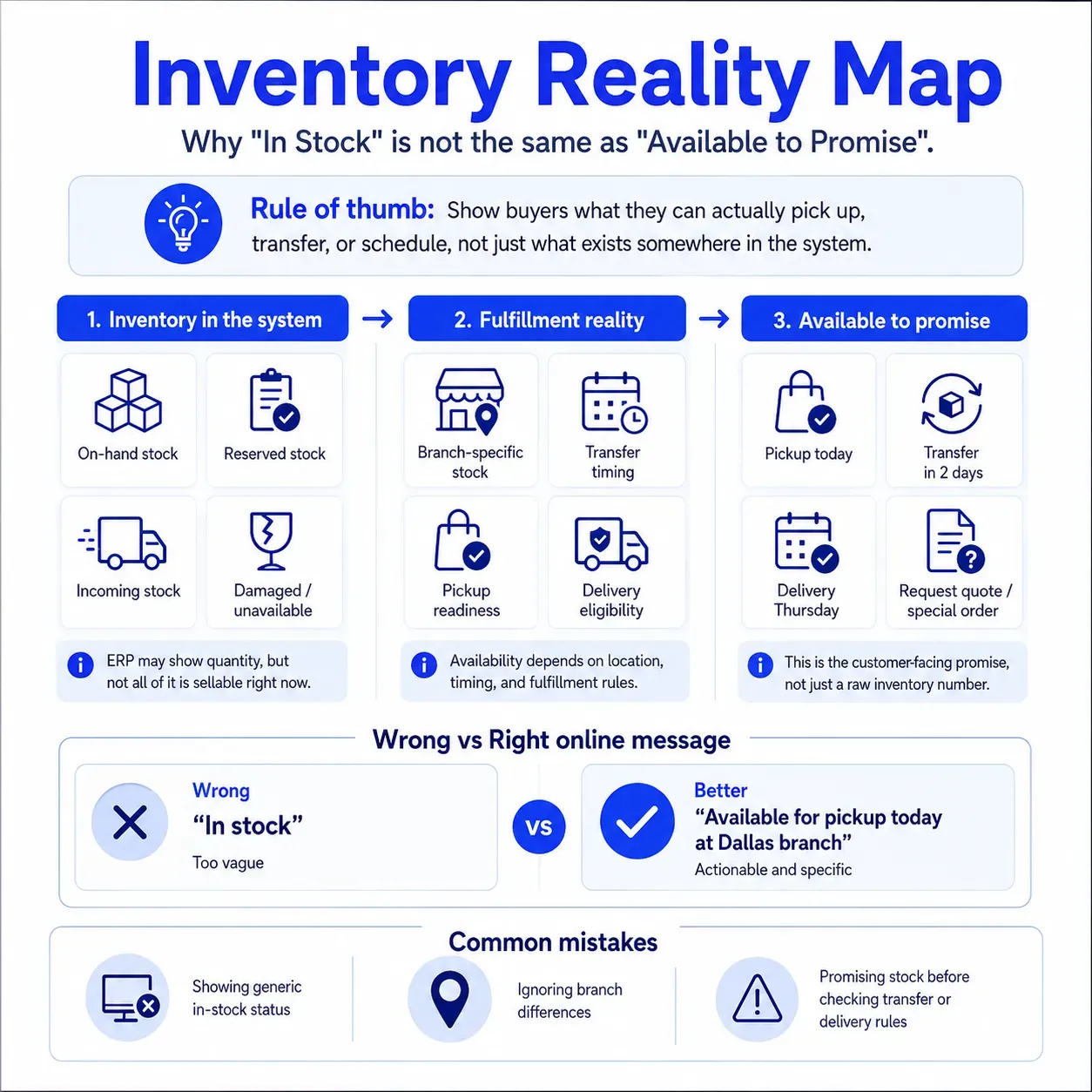
“In stock” is too vague for building materials ecommerce.
A product may be available at one branch but not another. It may be available for pickup but not delivery. It may be transferable from a warehouse but not in time for the job. It may also be reserved, damaged, pending receiving, or unavailable because of branch-specific rules.
That is why inventory visibility needs context.
We would test questions like:
- What does the customer see by default branch?
- Can they switch branch or pickup location?
- Can they see nearby branch availability?
- Can they request a transfer?
- Can the site distinguish warehouse stock from branch stock?
- Does ecommerce match what branch teams see internally?
If online inventory creates more phone calls instead of fewer, the model is not ready.
6. Separate “In Stock” from “Available to Promise”
Inventory in the system does not always mean inventory the customer can count on.
Available-to-promise should consider more than quantity on hand. It may need to account for reservations, transfers, pickup windows, truck capacity, delivery zones, branch hours, job-site date, customer terms, and order type.
This matters because buyers act on what the site tells them. If ecommerce says material is available and operations later walks it back, the customer blames the supplier, not the system.
Our B2B storefront launch checklist also separates real-time needs from slower updates. Pricing confirmation, inventory state, approval events, payment outcomes, and order status updates are the kinds of events that often need real-time or near-real-time handling because they affect buyer decisions in the moment.
For building materials, we would make that even more specific: show customers what they can actually pick up, transfer, or schedule, not just what exists somewhere in the system.
7. Check Quote-to-Order Workflows
Many building materials orders do not start with a cart. They start with a quote, estimate, takeoff, bid, rep conversation, or job-specific request.
If your ecommerce platform cannot respect that workflow, customers will keep using email, phone, and counter visits. That does not mean the platform failed technically. It means it failed to match how the business sells.
What we would test:
- Can customers view approved quotes online?
- Can they convert a quote into an order?
- Are quote prices locked, expired, or recalculated correctly?
- Can sales reps apply approved overrides?
- Can a buyer reorder from a past quote or job?
- Does ERP receive the order with the right quote reference?
This is one of the clearest places where a building materials ecommerce platform either feels built for the business or feels like a generic retail cart.
8. Confirm Freight, Fuel, Cut, Handling, and Delivery Surcharges
Building materials checkout can get messy fast.
A normal ecommerce checkout may not know how to handle fuel surcharges, delivery radius, boom truck requirements, cut fees, handling fees, pallet charges, minimum order fees, hazardous material rules, or location-based delivery pricing.
If these charges are not handled clearly, customers may see one total online and another total after the order is reviewed. That creates disputes, manual corrections, and unnecessary calls to sales or accounting.
We would decide which charges can be calculated online, which need ERP confirmation, and which should be shown as estimated until reviewed.
The goal is not always to automate every edge case on day one. The goal is to avoid surprising the customer.
9. Validate Tax, Exemption, Credit, and Account-Term Rules
Building materials customers often buy under account terms, tax exemption, credit limits, purchase order requirements, and invoice billing workflows.
These rules need to work online, not just offline. If ecommerce accepts an order that ERP later rejects, the buyer experience breaks after checkout. If ecommerce blocks a valid buyer, adoption suffers.
What we would verify:
- Tax-exempt customers are handled correctly.
- Exemption certificates are current and accessible.
- Credit holds prevent the right actions.
- Purchase order fields appear when needed.
- Invoice terms apply to the right accounts.
- Approval workflows trigger before order submission when required.
This is also where finance needs to be involved early. Ecommerce teams should not define account-term logic in isolation.
10. Support Substitutions, Backorders, and Special Orders
Material availability changes. Products get discontinued, delayed, replaced, restricted to certain branches, or marked special order only.
A vague “out of stock” message is not enough for a contractor trying to keep a job moving. The platform should help the buyer understand the next best action.
That could mean showing approved substitutes, allowing backorder requests, routing special orders to a rep, showing nearby branch options, or letting the customer request a quote.
We would also test how substitutions flow back into ERP and order communication. If a rep substitutes a product, does the customer see it? Does the invoice reflect it correctly? Does the order history remain clear?
Small gaps here can create big confusion after launch.
11. Make Repeat and Bulk Ordering Fast
Your best customers probably do not want to browse from scratch.
Contractors, builders, dealers, and procurement teams often know what they need. They want to reorder from invoices, saved lists, past jobs, quotes, templates, CSV uploads, or quick order pads.
For many building materials companies, repeat ordering matters more than homepage merchandising.
We would prioritize speed for known buyers:
- Quick order by SKU
- Saved lists by job or crew
- Reorder from invoice
- Reorder from quote
- CSV upload
- Bulk add-to-cart
- Recently purchased items
- Account-specific product lists
This is how ecommerce becomes useful instead of decorative. It reduces friction for customers and lowers manual work for internal teams.
12. Prepare Sales Reps, Counter Teams, and Branch Managers
Building materials ecommerce should not bypass your people. It should make them more effective.
Sales reps need visibility into online activity, quotes, abandoned carts, order history, account issues, and customer behavior. Counter teams need to support will-call, substitutions, pickup questions, branch inventory, and exceptions. Branch managers need confidence that ecommerce will not create fulfillment chaos.
If internal teams are not involved early, they may see the new platform as a threat or extra work. If they are involved from discovery through launch, they can help shape a platform customers actually use.
We would train internal teams before customer rollout and give them clear answers to:
- What should customers do online?
- When should customers still contact a rep?
- How do reps view ecommerce activity?
- How are online exceptions handled?
- Who owns support after launch?
Adoption does not happen just because the site is live. It happens when customers and internal teams both trust the new workflow.
Common Mistakes That Make Replatforming Feel Broken
Most failed replatforms do not fail because the design is bad. They fail because the system does not match how the business runs.
| Mistake | Why It Hurts | Better Approach |
|---|---|---|
| Choosing the platform before mapping workflows | The team discovers pricing, inventory, and account issues too late | Start with workflow discovery and system ownership |
| Treating ERP as a connector only | Pricing, credit, inventory, and order rules become unstable | Define ERP, commerce, and integration responsibilities early |
| Migrating product data as-is | Bad units, attributes, and descriptions become customer-facing problems | Clean high-value categories before launch |
| Showing inventory without fulfillment context | Customers assume stock is usable when it may not be | Separate on-hand, available, transferable, pickup, and delivery logic |
| Ignoring sales and branch teams | Internal resistance slows adoption | Involve reps, counter teams, and branch managers before rollout |
The biggest mistake is moving old problems into a new platform and calling it transformation.
Our B2B ecommerce migration checklist for distributors and wholesalers takes a similar position: migration planning should protect customer accounts, pricing, catalog data, ERP integrations, inventory visibility, order workflows, SEO, and adoption before the technical move begins.
How We Would Pressure-Test Readiness Before Launch
Before go-live, we would not only test happy-path orders.
We would test the scenarios that usually create support tickets, pricing disputes, and branch escalations.
| Area | Ready When |
|---|---|
| Contractor pricing | Sample customers see correct contract, job, quote, branch, and promotional pricing |
| Branch inventory | Availability matches branch, warehouse, transfer, pickup, and delivery rules |
| Units of measure | Products display, price, and order in units buyers understand |
| Quotes | Approved quotes can convert into accurate orders without manual cleanup |
| Account terms | Credit, tax, PO, invoice, and approval rules work before order submission |
| Search | Buyers can find products by SKU, description, dimensions, category, and common terms |
| Internal teams | Sales reps, counter staff, and branch managers know how to support online orders |
This is the difference between a technical launch and an operationally ready launch.
Practical test: A technical launch means the site works. An operationally ready launch means the site works when real customers, real pricing, real inventory, and real exceptions show up.
How to Choose the Right Replatforming Path
We would not start with, “Which platform has the best demo?”
We would start with, “Which platform can support the way this business prices, sells, fulfills, and supports customers?”
That means looking at workflow fit, integration depth, data complexity, buyer experience, and long-term flexibility. Our B2B ecommerce platform comparison recommends assessing platforms around real workflows rather than vendor messaging, with attention to pricing control, integrations, scalability, and operational fit.
For building materials teams, the right questions are practical:
- Can this platform respect ERP-owned pricing?
- Can it support job accounts and parent-child account structures?
- Can it show branch, warehouse, pickup, transfer, and delivery availability?
- Can it handle quote-to-order workflows?
- Can it support units of measure without confusing buyers?
- Can internal teams help customers without jumping across too many systems?
If those answers are unclear, do not rush the build. A discovery sprint is often cheaper than months of cleanup after launch.
Final Takeaway
Building materials ecommerce replatforming is not about making the website look newer.
It is about protecting the workflows your customers already depend on: pricing that matches their agreement, inventory they can trust, quotes they can act on, delivery that fits the job, and account tools that reduce unnecessary calls.
We recommend treating the replatform as an operating model project first and a technology project second. Once ERP ownership, pricing logic, inventory context, product data, and internal workflows are clear, the platform decision becomes much safer.
If your team is preparing for building materials ecommerce replatforming, our B2B ecommerce and customer portal solutions can help connect strategy, implementation, integrations, and customer experience into one practical roadmap.
Train internal teams before customer rollout. Sales reps, counter teams, and branch managers should understand how online orders work, where to find customer activity, how to handle exceptions, and how to explain the platform’s value to buyers.