
Migrating a B2B ecommerce site is rarely just a platform swap. For distributors and wholesalers, the risk sits behind the storefront: customer-specific pricing, account hierarchies, ERP records, inventory rules, quotes, order history, approvals, and catalog complexity.
A useful b2b ecommerce migration checklist does not start with a generic task list. It starts with three questions: what kind of site you have today, what B2B experience you are moving to, and what must keep working for that scenario on day one.
A brochure catalog that still takes orders by email is a different project than a legacy portal tied to ERP. Replacing a basic webstore is different from consolidating brands, warehouses, or channels. If you are already framing a wider B2B ecommerce replatforming program, use this checklist to name operational risk before you lock a platform or a launch date.
First, what kind of B2B website are you migrating from?
Before design, features, or vendor demos, name the current-state site. That is where hidden work lives.
Many teams think they are migrating a “website.” They are migrating years of customer behavior, sales-rep workarounds, product-data patches, pricing exceptions, and ERP-dependent workflows. The clearer the starting point, the easier it is to see what can break.
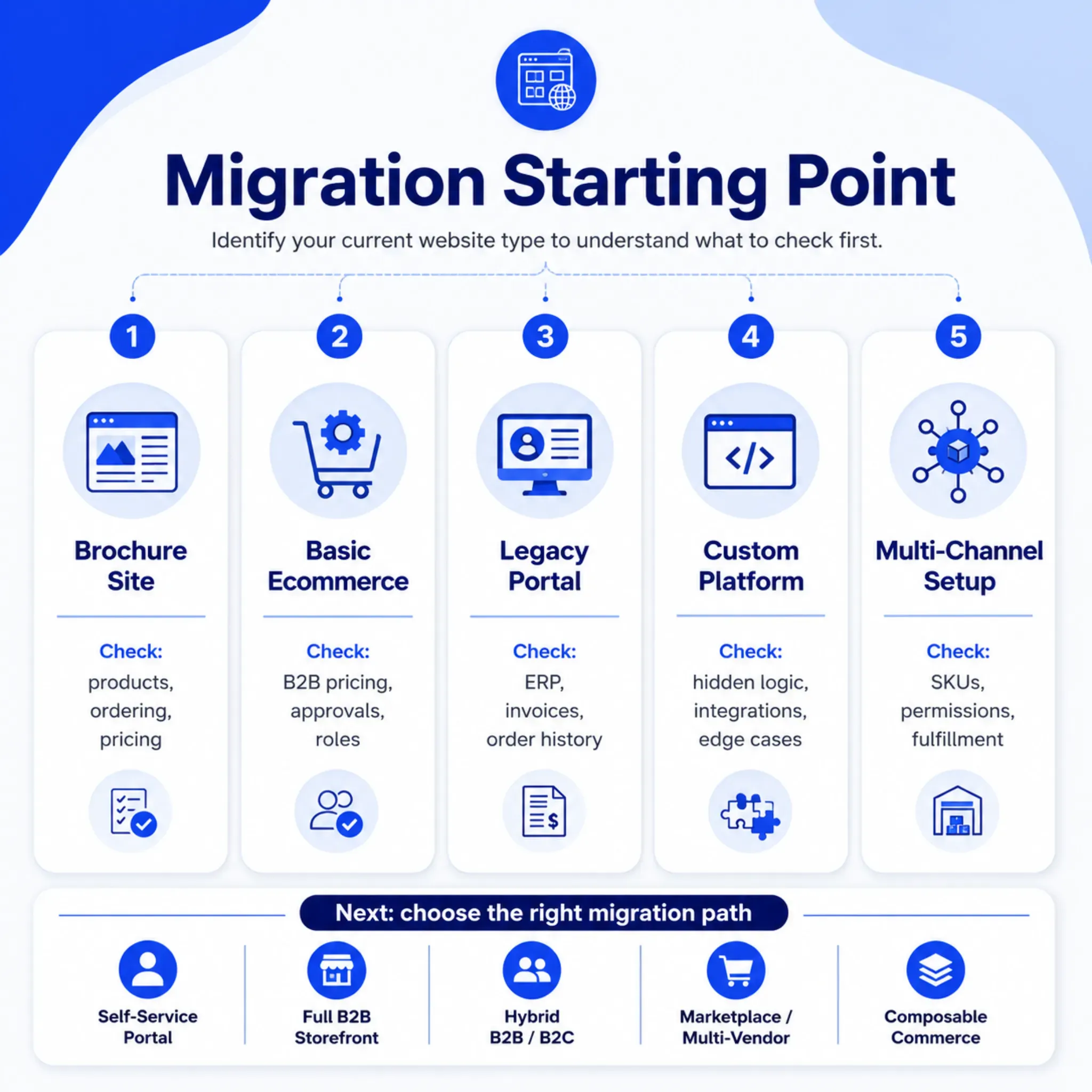
Brochure website. Products are online, but ordering still happens through reps, phone, email, PDFs, or spreadsheets.
- Check first: Buyer journeys, product data, pricing model, customer onboarding, payments, tax, shipping, and how orders enter the back office.
Basic ecommerce site. Customers can order online, but B2B needs are handled by hand or by workarounds.
- Check first: Customer groups, negotiated pricing, approvals, quick reorder, quote requests, account roles, and ERP sync.
Legacy B2B portal. Customers log in for pricing, invoices, orders, or inventory, often through an ERP-connected portal.
- Check first: ERP dependencies, login logic, invoice access, order history, inventory visibility, permissions, and day-one continuity.
Custom-built platform. The business runs on logic built over years, often with thin documentation. Those hidden rules are usually the real migration inventory, not the screens.
- Check first: Hidden business rules, automations, edge cases, integrations, reporting, and who will own future changes.
Multi-brand or multi-channel setup. Multiple catalogs, brands, buyer groups, regions, warehouses, or storefronts need to be unified or modernized.
- Check first: Catalog governance, duplicate SKUs, permissions, customer segmentation, channel rules, analytics, and fulfillment logic.
A brochure-site move is mostly about creating digital buying workflows for the first time inside a business that already sells. That is not a greenfield first storefront. A legacy portal move is about preserving jobs customers already trust while you modernize the experience.
The mistake is treating both projects like the same migration.
What type of B2B ecommerce experience are you migrating to?
Once the starting point is clear, name the destination. “New ecommerce site” is too vague for a distributor or wholesaler.
A modern B2B experience may include self-service ordering, account-specific catalogs, negotiated pricing, quick reorder, quotes, invoice access, sales-rep permissions, ERP inventory visibility, tax, shipping, and approvals. Not everything has to launch on day one. The target model still has to be clear before you plan the move.
Self-service customer portal
Existing customers log in, see their price, access invoices, reorder, and check inventory or order status. This is often the right first step when offline sales are strong and the pain is manual support.
Full B2B ecommerce storefront
The site supports product discovery, customer-specific pricing, online ordering, account management, and integrations. This fits when the website needs to be a revenue channel, not only a support tool.
Distributor marketplace or multi-vendor model
Vendor, seller, region, branch, or marketplace complexity is in scope. You need stronger governance for product data, permissions, fulfillment ownership, and reporting.
Hybrid B2B/B2C ecommerce
Some wholesalers serve trade customers and direct buyers on one platform. The checklist must split pricing, tax, shipping, catalog visibility, checkout rules, content, and experience by buyer type.
Composable or API-first commerce stack
Frontend, commerce, ERP, PIM, CMS, search, and analytics can sit in separate systems. That can fit complex distributors, but only with architecture discipline and integration planning.
If you are still comparing platforms on workflow fit, integrations, scale, and cost of ownership, use the B2B ecommerce platforms comparison. The checklist below is for migration readiness once that direction is clearer.
The B2B ecommerce migration checklist by scenario
The same list should not be used for a brochure site, a legacy portal, and a custom platform replacement. Use the scenario that matches you. The point is to name what would hurt revenue, customer trust, or operations if it broke during the move.
Scenario 1: Brochure website to B2B ecommerce
This is not adding a cart to a brochure. You are creating digital buying workflows that have lived in inboxes, phone calls, spreadsheets, PDFs, and ERP screens.
You already have products, accounts, and a way to take orders. You are not starting a company storefront from zero.
- Product structure: Can customers browse, filter, and search without a rep translating the catalog?
- Price display: Public, login-only, quote-only, or negotiated. Pick it before you design checkout.
- Offline order path: Map rep involvement, approvals, payment terms, and confirmation as they work today.
- Who goes first: Which customer groups get invited, and what onboarding they need.
- Tax, freight, terms, fulfillment: Validate these before you spend time on checkout UI.
If you skip this, you can launch a polished storefront that customers cannot use for real B2B buying.
Scenario 2: Basic ecommerce to true B2B ecommerce
This is common when a wholesaler already takes orders online but still patches B2B needs by hand. The site accepts carts. It may not support customer-specific catalogs, approvals, quotes, credit terms, or repeat purchasing.
- Workarounds: List every B2B workflow that currently lives outside the platform.
- Price and quote rules: Document groups, tiers, contract price, and quote-to-order.
- Repeat buying: Quick order, reorder from history, saved carts, bulk upload.
- Roles: Buyer, approver, finance, branch manager, sales rep.
- Sync: ERP, CRM, tax, shipping, and payments. Real time or scheduled, and who owns exceptions.
If you skip this, the new site can still behave like B2C, and sales and service keep patching the same gaps.
Scenario 3: Legacy B2B portal to modern platform
Legacy portals often look dated. Customers may still depend on them every week for invoices, order history, reorder, branch inventory, credit terms, approvals, or account price.
- Jobs they actually use: Rank portal features by how often customers use them, not by how old the UI looks.
- ERP fields: Pricing, invoices, inventory, order status, customer records. What powers each screen.
- Account hierarchy: Parent, child, branches, purchasing roles.
- History: What must move into the new platform, and what can stay reachable in ERP.
- Pilot: Test with customers who live in the current portal, not only with internal users.
If you skip this, customers lose self-service they already trust, even if the new site looks better.
Scenario 4: Custom platform to SaaS or composable commerce
Custom platforms hide business logic. A pricing exception, fulfillment rule, sales-rep override, approval flow, or report may not show up until someone tries to replace it.
- Inventory the rules: Pricing, catalog visibility, checkout, fulfillment, reporting, permissions.
- Interview the exceptions: Sales, customer service, finance, warehouse, and IT know the workarounds.
- Decide per rule: Recreate, simplify, retire, or move to another system.
- Architecture before selection: API, middleware, ERP, PIM, OMS, analytics.
- Future ownership: Who can change a rule after launch so you do not rebuild the same maintenance trap.
If you skip this, critical rules show up late as scope, budget, or post-launch fire drills.
Scenario 5: Multi-channel setup to unified ecommerce
Distributors and wholesalers grow through brands, regions, warehouses, product lines, or channels. That often means duplicate SKUs, inconsistent categories, fragmented customer records, and unclear ownership.
- Product data: Where it is duplicated or inconsistent across brands, catalogs, and channels.
- Segmentation: Region, account type, industry, pricing group, or channel.
- Fulfillment: Warehouse, pickup, backorder, substitution.
- Reporting: Which views leadership needs after consolidation.
- Governance: Who can update product data, pricing, content, and permissions.
If you skip this, you may centralize the platform and leave data, ownership, and customer experience split.
Core checks every distributor and wholesaler should run
Scenarios differ, but most distributors and wholesalers still need the same continuity checks. These are the areas that protect accounts, orders, and trust when the storefront changes.
1. Customer accounts and roles
Start with account structure. B2B buyers often have parent-child accounts, branches, multiple users, purchasing roles, credit limits, approval rules, and assigned reps.
A contractor, a branch buyer, and a purchasing manager can sit on one parent account and need different permissions. One user places orders, another approves, and finance may only need invoices.
- Who can place orders?
- Who can approve orders?
- Can buyers see invoices, quotes, and order history?
- Are groups tied to pricing, catalog visibility, shipping, or payment terms?
- What happens to inactive, duplicate, or outdated accounts?
2. Contract pricing and quote logic
Pricing is one of the largest B2B migration risks. One customer may be on negotiated price, another on list, and a third on quote-only for some categories.
Document where pricing lives today, how often it changes, and which system will be the source of truth after the move. A weak pricing migration creates margin leakage, disputes, and shadow spreadsheets in sales.
Warning: Do not treat pricing as a simple data import. B2B pricing is a workflow across ERP, reps, customer groups, contracts, quotes, approvals, and exceptions.
3. Catalog, SKU, and product data quality
Catalog data is often the messiest part of a distributor move. The issue is not only names and images. It is categories, attributes, compatibility, units of measure, substitutes, specs, documents, and search.
The same SKU may sell as each, case, box, pallet, roll, or linear foot depending on the buyer or channel. If that logic is fuzzy, customers order the wrong quantity or abandon the purchase.
Before you migrate, decide what to clean, merge, archive, or enrich. B2B catalog management for distributors is the companion when product structure is the bottleneck.
4. Inventory visibility and warehouse rules
B2B buyers need honest availability. That can mean real-time stock, branch-level inventory, backorders, lead times, substitutions, ship-from rules, or pickup.
If inventory comes from ERP or warehouse systems, confirm sync cadence and what the customer will see. A simple “in stock” flag gets hard when customers buy from different regions or have account-specific fulfillment rules.
5. ERP, PIM, OMS, CRM, tax, and shipping integrations
Integrations are where many B2B migrations slow down. Commerce may need ERP, PIM, OMS, CRM, tax, payments, carriers, EDI, analytics, and support tools.
The useful question is not only “Can it integrate?” It is “Which system writes each workflow, and what happens when a record changes?” ERP and ecommerce alignment walks through those handoffs. Keep ecommerce ERP and PIM as the service paths when you need implementation help.
When you are ready for go-live integration tests, use the B2B storefront launch checklist.
6. SEO, redirects, analytics, and tracking
Migration can damage organic visibility if SEO is a last-week task. Map product URLs, category URLs, metadata, schema, canonicals, redirects, indexation, and internal links before launch.
Plan measurement too. Decide which events, conversions, quote requests, approved carts, and account actions you need after cutover. Do not promise ranking outcomes.
7. Order history, invoices, reorders, and approvals
For B2B buyers, post-login convenience is the product. If they rely on order history, invoice downloads, saved carts, quick reorder, or approvals, those jobs belong in the scope conversation.
Not every historical record needs to land in the new commerce platform. You do need a decision: what must be accessible, what stays in ERP, and what can wait for a later phase.
Migration path decision matrix
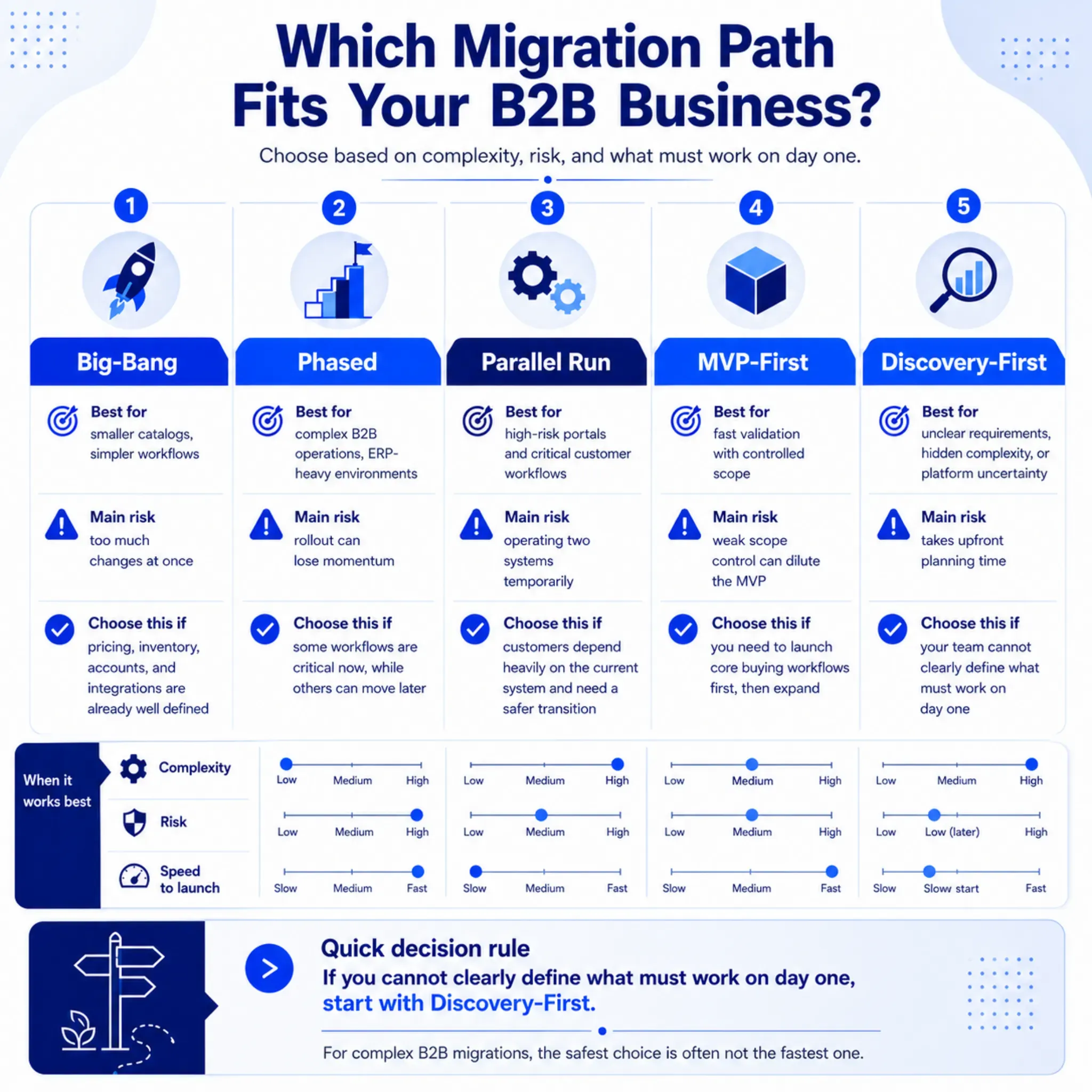
Once current site, target model, and risk areas are clear, choose the path from operational risk, not preference. Big-bang vs phased B2B migration is the deeper comparison. The matrix below is only the planning gate.
Big-bang migration. Best when catalogs are smaller, data is clean, workflows are simple, and the launch window is clear. Check whether pricing, inventory, SEO, accounts, and integrations can all be validated before you cut over.
Phased migration. Best when catalogs are complex, customer groups are many, ERP is in the critical path, or you need a regional rollout. Check which workflows are day-one critical and which can wait.
Parallel run. Best for high-risk portals or customers who need transition time. Check whether operations can support two systems without confusing buyers or internal teams.
MVP-first migration. Best when you need to validate real buying jobs before a full rebuild. Check that the MVP is a real workflow, not a smaller version of the entire wish list.
Discovery-first migration. Best when requirements are unclear, workflows are hidden, platform fit is uncertain, or integration risk is high. Check that stakeholders agree on current-state workflows, launch scope, platform fit, and risk order.
A distributor with a legacy ERP-connected portal often needs phased or parallel. A wholesaler moving from basic ecommerce to stronger B2B may launch an MVP, then add complex workflows. The safe answer depends on what must work on day one.
Practical test: If your team cannot name what must work on day one, do not start platform configuration. Start with discovery.
Common migration mistakes to avoid
B2B ecommerce migration usually fails on unclear assumptions. The technology can work while the operating model was never mapped.
Treating B2B like B2C fails because buyers need account logic, pricing, approvals, repeat ordering, credit terms, and invoice access. Start from those workflows, then design the storefront. Why B2B buyers expect a B2C experience is about the front-door expectation, not an excuse to skip account rules.
Choosing the platform first. Why it fails: fit depends on integrations, workflows, data ownership, and launch order. Better: map requirements before you sign.
Migrating all data as-is. Why it fails: old product and customer records create confusion in the new system. Better: clean, archive, deduplicate, and enrich first.
Testing only the frontend. Why it fails: the storefront can look right while order flow fails behind it. Better: test ERP, pricing, inventory, tax, shipping, order sync, and notifications.
Ignoring sales and service. Why it fails: those teams know the exceptions customers actually use. Better: include sales, CS, operations, finance, warehouse, and IT in discovery.
Launching without adoption planning. Why it fails: customers keep using phone, email, or reps if nobody introduces the new path. Better: plan onboarding, training, communications, and support before launch.
A migration is not successful because the new site went live. It is successful when customers can finish real buying jobs and internal teams do not rebuild the same workarounds.
What to do before you start the migration
The best migration work happens before the build. That does not mean months of theory. It means enough discovery to avoid expensive surprises.
Build a current-state map
Document how customers browse, request quotes, place orders, reorder, check invoices, get support, and work with reps today. Include the systems in each step.
That map shows what the new experience must preserve, improve, or deliberately drop.
Prioritize workflows by revenue impact
Not every feature deserves equal attention. Rank workflows by revenue, customer importance, operational burden, and migration risk.
Contract pricing and inventory visibility are often launch-critical. Advanced personalization or wishlists can wait for phase two.
Define launch scope vs later-phase scope
Separate “must launch” from “improve later.” That keeps the first release from collapsing under a wish list, and it gives leaders a cleaner view of budget, timeline, staffing, onboarding, and architecture.
Run discovery before committing to the build
If requirements, integrations, data quality, or rollout strategy are still fuzzy, start with discovery. A focused B2B eCommerce Discovery Sprint can map buyer workflows, catalog structure, pricing rules, and integrations before you fund the full build.
After planning, ecommerce implementation is the build path. If stakeholders are still aligning on requirements and platform direction, B2B ecommerce consulting is the earlier conversation.
Start with the migration scenario, not the platform
This checklist should not be one-size-fits-all. Distributors and wholesalers need to name the current website type, the target ecommerce model, and the scenario-specific risks.
The biggest risks are usually not visual. They are customer accounts, pricing, catalog data, ERP integrations, inventory visibility, order workflows, SEO, and adoption.
When those areas are mapped early, the work is less reactive. Instead of “which platform should we move to?”, the first question is “what must keep working for customers and operations when we move?”
If your team cannot answer that yet, discovery is the next practical step. We help B2B teams turn unclear requirements into a migration roadmap that protects continuity and sets the build up to succeed.
Ready to test your replatform readiness?
Book a scoped working session with Reveation Labs. We will help you clarify the gaps that matter before you commit the next build.