
You want dealers to check pricing, confirm inventory, place repeat orders, download invoices, and find product documents without having to call your team. One group recommends custom development, while another recommends buying an established portal platform.
Both options can work. Both can also create expensive problems when you choose before you understand pricing rules, dealer hierarchies, ERP data, permissions, support needs, and long-term ownership.
The dealer portal build or buy decision asks which capabilities you should own, which capabilities you should purchase, and which workflows justify custom development.
This article focuses on portals that manufacturers and distributors provide to channel partners for pricing, inventory, ordering, invoices, documents, warranty, service, and account management. It does not cover automotive dealer management systems.
You may still need to decide whether your business needs an account-first portal, a public storefront, or both. Our comparison of a portal or storefront addresses that earlier decision.
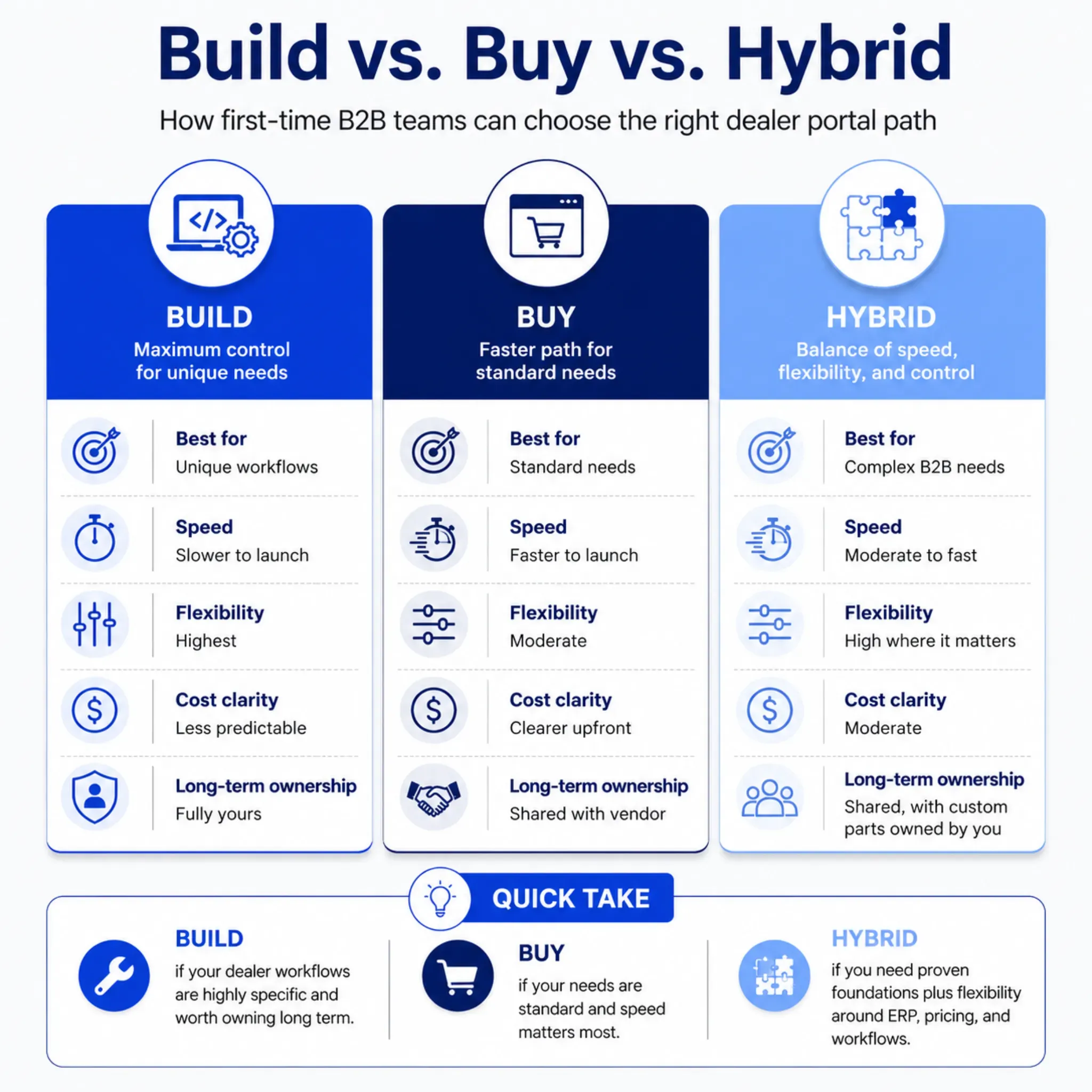
Once you know that dealers need a portal, you can compare custom, platform, and hybrid approaches through workflow fit, ownership, integration readiness, cost, risk, and adoption.
Start With the Dealer Work You Need to Improve
Do not begin with software categories. Begin with the work dealers repeat and the manual effort your team carries behind it.
A dealer may need to:
- Find the correct product, part, or replacement
- View account pricing and commercial terms
- Check inventory by branch, warehouse, or region
- Place, repeat, or track an order
- Download invoices and account documents
- Access manuals, specifications, and sales materials
- Submit a return, warranty claim, or service request
- Manage users, roles, and delivery locations
Your sales, service, and operations teams may handle the same pricing checks, order-status calls, document emails, account-access requests, and reorder entry every day. A portal should reduce that repeated work without hiding the exceptions that still require human judgment.
Our dealer portals connect account pricing, inventory, ordering, delivery information, partner management, and operational systems in one dealer-facing experience.
Separate Standard Work From Differentiating Work
A standard invoice download rarely justifies custom engineering. A manufacturer’s unusual product configuration, territory logic, quote-to-order process, or service workflow may justify it when that capability creates meaningful channel value.
Ask five questions about every proposed workflow:
- Do most B2B portal platforms already support this workflow?
- Does the workflow differentiate how you serve dealers?
- Which system owns the information it requires?
- How often do its rules change?
- What measurable value would customization create?
This exercise prevents you from building standard capabilities and prevents you from buying software that cannot support the work that matters.
What You Take On When You Build
A custom portal gives you direct control over the experience, workflows, architecture, and roadmap. You can design around unusual dealer hierarchies, pricing logic, approvals, product configuration, territories, service claims, or other processes that established platforms handle poorly.
That control creates value when the workflow sits at the center of your channel strategy. It also creates permanent ownership.
When you build, your team owns:
- Product management and roadmap priorities
- User research and experience design
- Application architecture and development
- Identity, permissions, and account security
- Hosting, deployment, and monitoring
- Automated and manual testing
- Integration failures and data exceptions
- Accessibility and performance
- Incident response and dealer support
- Maintenance, upgrades, and technical debt
The first screens may move quickly. Pricing, inventory, permissions, order exceptions, shipping, documents, and system failures usually determine the real schedule.
The dealer portal build or buy choice must compare long-term product ownership, not only initial development effort. A custom portal fits best when you have a clear product owner, reliable engineering capacity, an integration strategy, and a funded roadmap after launch.
AI Can Accelerate Work, but It Cannot Own the Product
AI-assisted development can accelerate prototyping, code generation, test preparation, and documentation. It cannot make architecture decisions, accept security accountability, validate every integration rule, monitor production, or maintain the system after business requirements change.
Your team still needs people who understand the business rules and can support the portal for several years.
Build when control creates strategic value. Do not encode every legacy exception simply because custom development makes it possible.
What You Depend On When You Buy
Dealer portal software can give you established capabilities for login, account management, catalog access, cart, checkout, orders, documents, and notifications. A platform can reduce the amount of standard functionality you need to design, secure, test, and maintain.
That advantage matters when your first goal involves faster self-service for common dealer tasks. It also gives you a vendor relationship and a set of platform boundaries.
When you buy, you depend on:
- The vendor’s roadmap and release schedule
- API coverage, limits, and stability
- Extension and customization rules
- Security features and vendor controls
- Hosting and service commitments
- License, user, storage, or transaction pricing
- Upgrade compatibility
- Support quality and response times
- Data export and contract exit terms
The dealer portal build or buy decision should never rely on a polished demonstration alone. A vendor may show a strong catalog and dashboard without testing your dealer hierarchy, account pricing, branch inventory, backorders, partial shipments, credit rules, invoice structure, or approval process.
Ask These Questions Before You Sign
| Area | Questions to Ask |
|---|---|
| Workflow fit | Which requirements use configuration, supported extensions, or custom code? |
| APIs | Which capabilities can you read and write through supported APIs, and which limits apply? |
| Data ownership | Can you export accounts, products, orders, documents, configurations, and activity in usable formats? |
| Security | How does the platform handle SSO, MFA, roles, audit records, account isolation, and deactivation? |
| Integrations | Who owns mapping, monitoring, retries, error handling, and exception resolution? |
| Releases | How will vendor upgrades affect your configurations, extensions, and integrations? |
| Commercial terms | How can license, user, storage, service, or transaction pricing change? |
| Exit | What happens to your data, extensions, integrations, and support when you leave? |
A platform does not need to support every future request on day one. It must support the workflows that create the first measurable value without forcing your team to fight the product every week.
When a Hybrid Portal Creates the Best Fit
A hybrid approach combines purchased foundations with targeted custom work. It does not mean buying a platform and customizing every screen until upgrades become difficult.
Strong hybrid plans draw a clear boundary between standard capabilities and workflows that create meaningful channel value.
Platform Plus Integrations
You buy authentication, account management, catalog, cart, checkout, and order capabilities. You customize ERP pricing, inventory allocation, dealer tiers, account entitlements, territory rules, and order routing.
This model often fits manufacturers and distributors whose dealer-facing needs look familiar but whose operational rules remain complex.
Portal Foundation Plus Custom Workflows
You buy the secure account shell, permissions, document access, notifications, and basic navigation. You build selected workflows such as quotes, approvals, warranty claims, registrations, service requests, or channel-program management.
Commerce Core Plus Custom Experience
You buy commerce services for catalogs, customers, carts, and orders. You build the dealer-facing interface and channel-specific journeys on top of those capabilities.
This model gives you more control over the experience without forcing you to rebuild core commerce functions. It also requires strong ownership of the front end, APIs, testing, hosting, and monitoring.
A practical boundary: Buy capabilities the market has already solved. Build workflows that create measurable channel value. Simplify rules that no longer serve the business.
Check Your Readiness Before You Compare Costs
You cannot compare sourcing options accurately until you know what the portal must connect, protect, and operate. Weak data, unclear integration ownership, or missing support capacity can make every option expensive.
Product and Account Data
Confirm which systems own dealer accounts, billing and delivery locations, product records, customer catalogs, pricing, inventory, orders, shipments, invoices, documents, returns, and claims.
Large or technical catalogs often need governed product data before dealers can search, compare, and reorder reliably.
ERP and Integration Ownership
Map every dealer-facing field to its source system. Decide whether pricing, inventory, credit, order status, and shipment information require real-time, near-real-time, or scheduled updates.
Our ERP integration work connects commerce with the systems that manage customers, pricing, inventory, finance, supply chain, and orders.
Define the source of truth, data direction, update frequency, failure response, retry logic, monitoring, and exception owner for every critical integration.
Identity, Permissions, and Security
Map the dealer hierarchy before you configure access. A dealer organization may include owners, buyers, approvers, finance users, service teams, and branch employees with different permissions.
- Single sign-on and multifactor authentication
- Role-based permissions
- Dealer, branch, and account hierarchy
- Account and data separation
- Audit records and session controls
- User invitation and account deactivation
- Data retention, backup, and recovery
- Vendor and internal security responsibilities
Buying software does not transfer all security responsibility to the vendor. You still own configuration, access policies, integrations, oversight, and incident coordination.
Internal Ownership
Name the person who will own the portal after launch. Define who approves priorities, reviews dealer feedback, resolves data problems, coordinates vendors, manages releases, and measures adoption.
Pause the dealer portal build or buy discussion when no team can own the selected path. Fix that operating gap before you commit to technology.
Compare the Cost of Ownership Across Several Years
Launch cost gives you an incomplete comparison. Use the same three- or five-year period for each option and include the expenses that appear after the first release.
Initial Work
Build: Discovery, architecture, UX, development, and testing
Buy: Licensing, implementation, configuration, and training
Hybrid: Licensing, integration design, and custom extensions
Infrastructure
Build: Hosting, deployment, monitoring, security, and recovery
Buy: Included services, premium tiers, storage, and usage fees
Hybrid: Platform services plus custom hosting or middleware
Integrations
Build: Custom integration development and permanent maintenance
Buy: Connectors, configuration, vendor services, and API constraints
Hybrid: Integration layer, custom logic, and coordinated support
Ongoing Ownership
Build: Product team, engineering, support, maintenance, and upgrades
Buy: Subscriptions, support, configuration, and upgrade work
Hybrid: Platform fees plus ownership of custom components
Change and Exit
Build: Refactoring, technical-debt reduction, and architecture changes
Buy: Price changes, data extraction, contract exit, and migration
Hybrid: Platform migration plus transfer or rebuild of extensions
The dealer portal build or buy comparison must use the same assumptions for scope, integrations, security, support, transaction volume, dealer growth, and service levels. Do not compare a complete custom product with a lightly configured platform demonstration.
Use ranges instead of false precision. Test what happens when dealer users grow, a critical integration fails, transaction volume changes, or a vendor adjusts its pricing model.
Scope the First Release Around Dealer Adoption
Do not begin with one universal feature list. Start with the dealer tasks that combine high value, reliable data, manageable integration risk, and a strong likelihood of adoption.
One manufacturer may begin with replacement-part ordering, availability, and technical documents. One distributor may begin with account pricing, repeat ordering, invoices, and branch inventory.
Prioritize Workflows Through Value and Readiness
Score each candidate workflow through:
- Request volume
- Internal handling cost
- Dealer frustration
- Commercial importance
- Data reliability
- Integration complexity
- Security risk
- Adoption probability
- Time to measurable impact
Select a small number of tasks that dealers perform frequently. A focused release gives you a clearer rollout, faster feedback, and a better test of the sourcing decision.
Our launch-readiness checklist shows why teams need clear ownership for pricing, inventory, account rules, integrations, failures, and post-launch monitoring.
Pilot With Dealers Who Represent Real Complexity
Select a pilot group with meaningful variation. Include large and small dealers, different regions, different pricing structures, frequent and occasional buyers, and users who create significant manual work today.
Train dealers around tasks rather than a feature list. Show them when to use the portal, which information they can trust, and how they should report a blocker.
Your sales and service teams must reinforce the new process. Dealers will not change their habits when employees continue completing every portal-supported task through email.
Measure Adoption and Operating Impact
- Activated dealer accounts
- Monthly active dealers
- Completion by workflow
- Digital order share
- Repeat-order completion
- Order-status contacts
- Invoice-download usage
- Search success
- Error and exception rates
- Dealer satisfaction
- Internal support effort
Expand the portal when dealers complete the first workflows reliably and your team can support the operating model.
Use a Weighted Scorecard to Make the Decision
A scorecard turns assumptions into an explicit decision. Assign each factor a weight based on its importance, then score build, buy, and hybrid options from one to five.
Workflow Uniqueness
Build: Several differentiating workflows
Buy: Mostly standard workflows
Hybrid: Standard foundation with selected unique workflows
Launch Urgency
Build: Flexible timeline
Buy: Fast launch required
Hybrid: Fast foundation with phased customization
Engineering Capacity
Build: Dedicated product and engineering team
Buy: Limited ownership capacity
Hybrid: Focused internal team or delivery partner
Integration Complexity
Build: Unusual but well-understood logic
Buy: Supported connectors and standard rules
Hybrid: Complex back-end logic with standard portal needs
Data Readiness
Build: Governed data and mature APIs
Buy: Data fits platform configuration
Hybrid: Data can improve through phased integration
Security Requirements
Build: Your team can own the full control model
Buy: Vendor capabilities meet the requirements
Hybrid: Both sides have clear responsibilities
Long-Term Control
Build: Full ownership creates strategic value
Buy: Vendor ownership reduces the burden
Hybrid: You own the differentiating extensions
Vendor Dependence
Build: Full portability matters
Buy: Platform dependence remains acceptable
Hybrid: An exit plan covers packaged and custom components
Adoption Readiness
Build: Dealers need highly tailored workflows
Buy: Standard tasks will drive adoption
Hybrid: Dealers need standard tasks plus selected custom journeys
Use the scorecard as a structured discussion rather than a mathematical answer. Review the assumptions with channel operations, sales, service, finance, IT, security, and representative dealers.
- Mostly build signals: Evaluate a custom portal and fund permanent product ownership.
- Mostly buy signals: Configure an established platform and validate vendor fit carefully.
- Mixed signals: Define a specific hybrid model rather than accepting a vague compromise.
- High need but low readiness: Improve data, integrations, identity, and ownership first.
The dealer portal build or buy decision becomes clearer when every preference connects to an operating consequence.
Avoid the Mistakes That Increase Cost and Risk
Choosing Software Before Mapping Workflows
Product demonstrations make complex dealer operations look simple. Map real account structures, pricing rules, regional inventory, backorders, quantities, shipping logic, credit rules, and approvals before you compare products.
Calling Every Exception Differentiation
Some rules create channel value. Others survive because nobody simplified an old process. Challenge each rule before you customize around it.
Rebuilding Standard Capabilities
Authentication, password recovery, account profiles, catalog browsing, carts, order history, notifications, and document libraries rarely differentiate the business. Build them only when an important requirement makes established options unsuitable.
Treating Integrations as a Later Phase
Pricing, inventory, products, accounts, orders, invoices, and documents shape the entire portal. Late integration decisions force changes to screens, data models, permissions, and error handling.
Comparing License Cost With Development Cost
A platform subscription and an initial development estimate do not represent equivalent cost categories. Compare the complete operating models across the same period, scope, service levels, and growth assumptions.
Ignoring Dealer Hierarchy and Exit Terms
Weak account mapping can expose the wrong pricing, invoices, documents, or claims. Weak exit terms can trap your data and extensions inside a platform that no longer fits.
Confirm identity rules, account separation, data export, customization ownership, contract termination, API access, and migration support before you commit.
Launching Without Adoption Ownership
Technology does not change dealer behavior by itself. Assign owners for communication, training, dealer support, internal reinforcement, analytics, and early fixes.
How We Help You Choose and Deliver the Right Portal
We do not begin by recommending custom development or a platform. We begin with your dealer workflows, operational systems, ownership capacity, and measurable goals.
We help you:
- Map dealer and internal workflows
- Separate standard capabilities from genuine differentiation
- Audit ERP, PIM, CRM, pricing, inventory, and document readiness
- Assess identity, permission, and security requirements
- Compare custom, platform, and hybrid options
- Build a multi-year ownership model
- Define integrations, monitoring, and exception handling
- Scope a focused first release
- Pilot with representative dealers
- Measure adoption and operational impact
Our implementation services take the selected approach through design, integration, testing, deployment, rollout, and continuous improvement.
We recommend the smallest portal approach that can create reliable dealer self-service without adding unnecessary technical debt. That may mean configuring a platform, building a differentiating workflow, or combining a proven foundation with targeted customization.
The right dealer portal build or buy decision should make dealers easier to serve and give your team an operating model it can sustain after launch.