
Copilot automation can reduce repetitive work across meetings, email, reporting, document review, and internal coordination. But Microsoft Copilot does not automatically transform every manual process into a complete business workflow.
In practice, Microsoft Copilot automation can operate at several levels. Microsoft 365 Copilot helps employees draft, summarize, analyze, and retrieve information. Power Automate and Copilot Studio become more relevant when work needs to move through triggers, approvals, connected applications, or governed actions.
The deciding factor is not prompt quality alone. It is whether the workflow has dependable inputs, clear ownership, appropriate permissions, a review step, and an outcome the business can measure.
Core takeaway
Copilot creates the most value when it reduces manual effort inside a workflow that already has clear inputs, outputs, and ownership.
Common mistake
Buying licenses first and searching for valuable use cases later often creates activity without measurable workflow improvement.
Leadership question
Which repetitive tasks have stable inputs, a clear owner, an identifiable review step, and an outcome we can measure?
What this article will help you do
- Understand what Copilot automation means in a business environment
- Compare Microsoft 365 Copilot, Power Automate, and Copilot Studio
- Evaluate seven Microsoft Copilot automation use cases
- Select a first workflow based on risk, readiness, and measurable value
What Is Copilot Automation?
Copilot automation is the use of Microsoft Copilot products to reduce the manual effort involved in creating, understanding, routing, and acting on business information. It can assist an employee with one task, support a predefined workflow, or help an agent perform governed actions across connected systems.
The term covers different levels of automation. Summarizing a Teams meeting is not the same as creating a task, requesting approval, updating a record, and notifying the next person. Both may be described as automation using Copilot, but they have different technical and governance requirements.
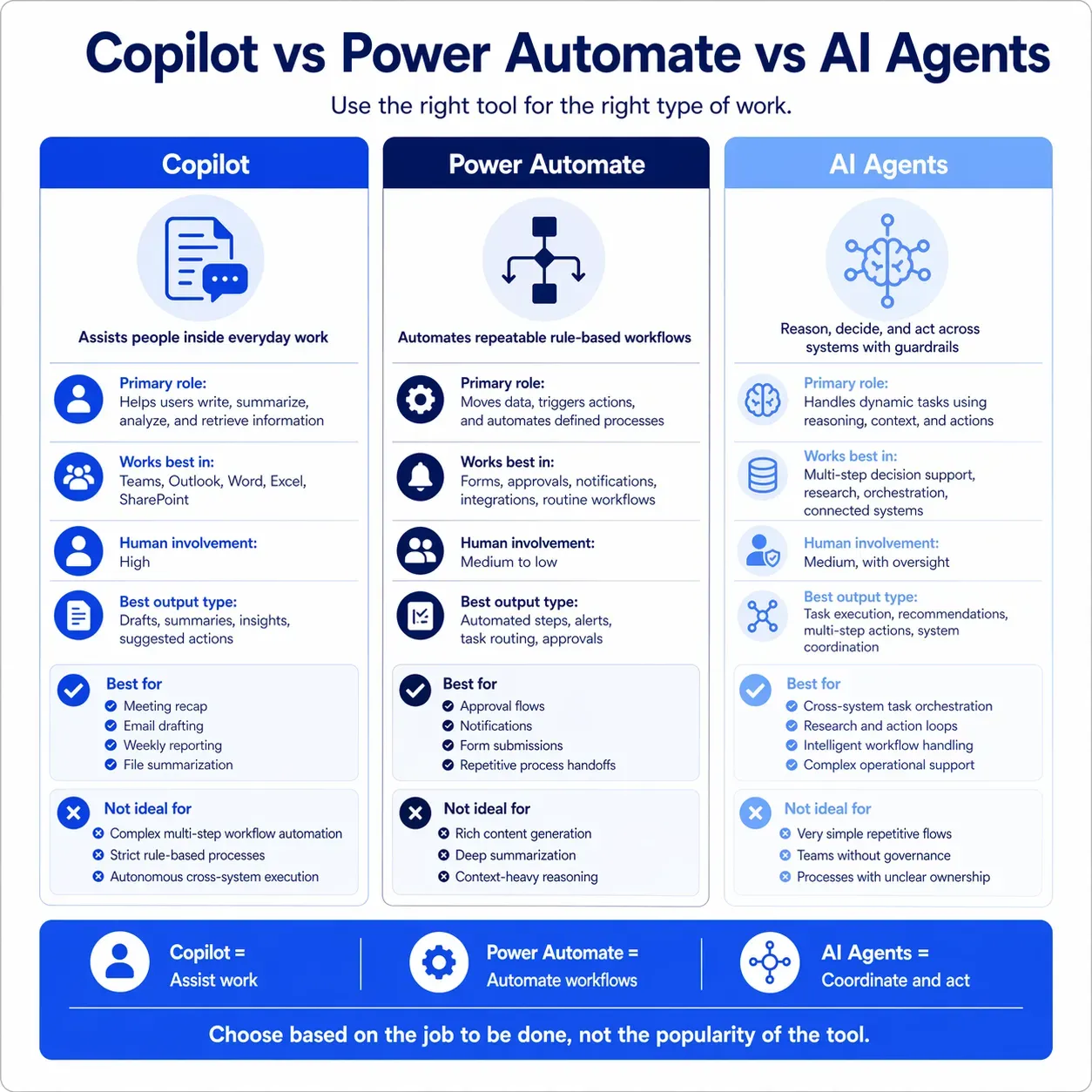
Simple distinction: Microsoft 365 Copilot helps people complete work. Power Automate helps work move through repeatable steps. Copilot Studio helps organizations build agents and flows that use knowledge, tools, and actions.
These categories can overlap. A business may use Microsoft 365 Copilot to prepare an output, Power Automate to move it through a process, and Copilot Studio to provide an agent experience around the same workflow.
When a process spans several applications, business rules, decisions, and exceptions, the organization may need a broader AI process automation approach rather than relying on one Copilot feature.
Why Microsoft Copilot Automation Is a Leadership Priority
Leaders are exploring business automation with Copilot because knowledge work is filled with email, meetings, document review, reporting, information searches, and manual follow-ups. These activities keep the organization moving, but they can also prevent skilled employees from focusing on decisions, customers, and execution.
A UK cross-government Microsoft 365 Copilot experiment involving 20,000 employees reported average time savings of 26 minutes per working day. More than 70% of participants also reported spending less time searching for information and completing mundane tasks, according to the published government findings.
That result should not be treated as a guaranteed outcome for every company. Value depends on the role, workflow, source information, adoption support, and how consistently Copilot is used for suitable tasks.
Important: A Copilot license does not create ROI by itself. ROI appears when a recurring workflow becomes faster, more consistent, easier to complete, or less dependent on manual coordination.
That is why rollout planning should begin with business outcomes rather than usage targets. A practical Microsoft Copilot ROI model connects adoption to measurable workflow improvement.
Which Microsoft Copilot Automation Tool Fits the Task?
The widely used Copilot automation tools for drafting, workflow execution, and agent-led actions solve different parts of the same problem. The right choice depends on whether an employee needs assistance, a process needs orchestration, or an agent needs to interpret and act on a request.
| Microsoft tool | Best suited to | Common examples | Typical human role |
|---|---|---|---|
| Microsoft 365 Copilot | Drafting, summarizing, analyzing, retrieving, and transforming information in the flow of work | Meeting recaps, email drafts, document creation, data analysis, and knowledge retrieval | Prompt, review, edit, approve, and apply judgment |
| Power Automate | Moving work through triggers, rules, approvals, applications, and services | Notifications, task creation, approvals, record updates, file movement, and request routing | Define the workflow and review exceptions or high-impact actions |
| Copilot Studio | Building agents and agent flows that use connected knowledge, tools, and actions | Employee support, guided requests, service workflows, and multi-step agent experiences | Set permissions, guardrails, testing, escalation, and oversight |
A practical selection rule
Start with the action the business needs. Choose Microsoft 365 Copilot for employee assistance, Power Automate for repeatable process steps, and Copilot Studio when an agent must interpret a request and use connected tools.
Some workflows will need more control, integration, or business-specific logic than standard Copilot capabilities provide. In those situations, a comparison of Microsoft Copilot vs custom AI can help clarify whether a packaged, custom, or hybrid approach fits the problem.
7 Microsoft Copilot Automation Use Cases That Reduce Manual Work
The following Microsoft Copilot automation use cases focus on recurring work that can be measured. Each example identifies the likely tool, the human responsibility, and a practical outcome to track.
The goal is not to automate tasks with Copilot simply because the feature is available. The goal is to reduce effort without weakening accuracy, ownership, or control.
1) Turn Meetings Into Action-Ready Outputs
Recurring meetings create predictable follow-up work: reviewing the discussion, finding decisions, writing a recap, identifying actions, and confirming ownership. Microsoft 365 Copilot can summarize a Teams meeting, identify open questions, and prepare a recap for review.
Best-fit tool: Microsoft 365 Copilot in Teams
Human responsibility: Confirm decisions, owners, priorities, and deadlines
Measure: Time required to prepare and distribute an approved meeting recap
2) Prioritize Email and Draft Responses
Email is a practical starting point for Copilot AI automation because it is frequent, text-heavy, and easy to compare before and after adoption. Copilot can summarize long threads, identify decisions and requests, and prepare a context-aware response.
Best-fit tool: Microsoft 365 Copilot in Outlook
Human responsibility: Review tone, accuracy, recipients, and external commitments
Measure: Response-preparation time and the number of messages requiring correction
3) Turn Business Data Into Recurring Reports
Reporting is one of the clearest examples of automation with Copilot because it combines repeatable inputs with a visible output. Microsoft 365 Copilot can support analysis and first-draft creation, while Power Automate can manage scheduled distribution or surrounding workflow steps.
Best-fit tools: Microsoft 365 Copilot, with Power Automate when scheduled actions are required
Human responsibility: Validate the source data, analysis, and executive message
Measure: Report-production time, revision cycles, and stakeholder acceptance
4) Retrieve Answers From Files and Internal Knowledge
Employees often lose time searching SharePoint, opening several documents, and rebuilding project context. Microsoft 365 Copilot can help retrieve and summarize information the user already has permission to access.
This use case depends heavily on source quality. Duplicated policies, outdated drafts, inconsistent file names, and unclear ownership can make a fluent answer difficult to trust.
Best-fit tool: Microsoft 365 Copilot
Human responsibility: Verify high-impact decisions against the original source
Measure: Search time, repeated questions, and time required to rebuild project context
5) Convert Meeting Actions Into Task Workflows
A meeting summary becomes more useful when approved actions enter the team’s task-management process. Copilot can identify likely actions, while Power Automate can help create tasks or notify owners after the review step.
This is where assistance begins to become workflow automation. The team needs an agreed task system, deadline standards, clear ownership rules, and a process for handling exceptions.
Best-fit tools: Microsoft 365 Copilot, Power Automate, and a task system such as Planner
Human responsibility: Approve task wording, ownership, priority, and due dates
Measure: Time from meeting completion to task assignment and action completion rate
6) Structure Sales Notes and Follow-Ups
Sales teams repeat similar administrative work after discovery calls, demonstrations, account reviews, and customer meetings. Copilot can summarize the conversation, identify risks and questions, and prepare a follow-up message.
When the workflow includes updating a CRM, assigning an action, or creating an approval request, it may also require Power Automate, Copilot Studio, or an existing CRM integration. An unreviewed summary should not automatically become the system of record.
Best-fit tools: Microsoft 365 Copilot, with workflow automation when CRM actions are required
Human responsibility: Confirm commercial details, risks, commitments, and customer-facing language
Measure: Follow-up speed, CRM completeness, and sales-administration time
7) Connect Cross-Team Requests to Shared Context and Action
Cross-functional work slows down when a request, supporting files, approval, conversation, and status update live in different places. Copilot can summarize the available context, while Power Automate or Copilot Studio can route the request and trigger the next governed step.
This pattern is especially relevant in B2B operations, where sales, service, operations, finance, and IT frequently coordinate around customer and system exceptions. Our guide to using Microsoft Copilot for business in B2B ecommerce shows how Copilot can support coordination without taking ownership of pricing, integrations, or go-live decisions.
Best-fit tools: Microsoft 365 Copilot, Power Automate, or Copilot Studio depending on the actions required
Human responsibility: Review exceptions and decisions affecting customers, finance, or compliance
Measure: Request turnaround time, manual handoffs, exception volume, and completion rate
What these Copilot automations have in common
- The work happens frequently
- The inputs are identifiable and reasonably consistent
- The output has a clear user or next step
- A human remains accountable for important decisions
- Time, quality, or turnaround improvement can be measured
What Copilot Can Automate and Where Human Review Still Matters
Copilot can reduce the effort involved in writing, summarizing, analyzing, searching, categorizing, and preparing work. When connected to automation tools, the wider solution can also create tasks, request approvals, update systems, route information, and initiate predefined actions.
What it cannot do is repair an undefined process by itself. It cannot resolve missing ownership, make contradictory information reliable, or decide how an undocumented exception should be handled.
| Expectation | Practical reality | Leadership implication |
|---|---|---|
| Copilot will automate an entire workflow | Different stages may require Copilot, automation tools, integrations, and human review | Design the process before selecting products |
| Copilot understands all business information automatically | Output depends on context, access, source quality, connectors, and configuration | Prepare the information environment before scaling |
| Better prompts will fix weak results | Prompts help but cannot replace process structure or reliable information | Treat prompting as one part of workflow design |
| Copilot replaces Power Automate | The tools often perform complementary roles | Match each step to the appropriate capability |
| Governance can wait until after rollout | Existing permissions and data practices shape what Copilot can surface and act on | Review access and controls before expansion |
How to Choose Your First Copilot Automation
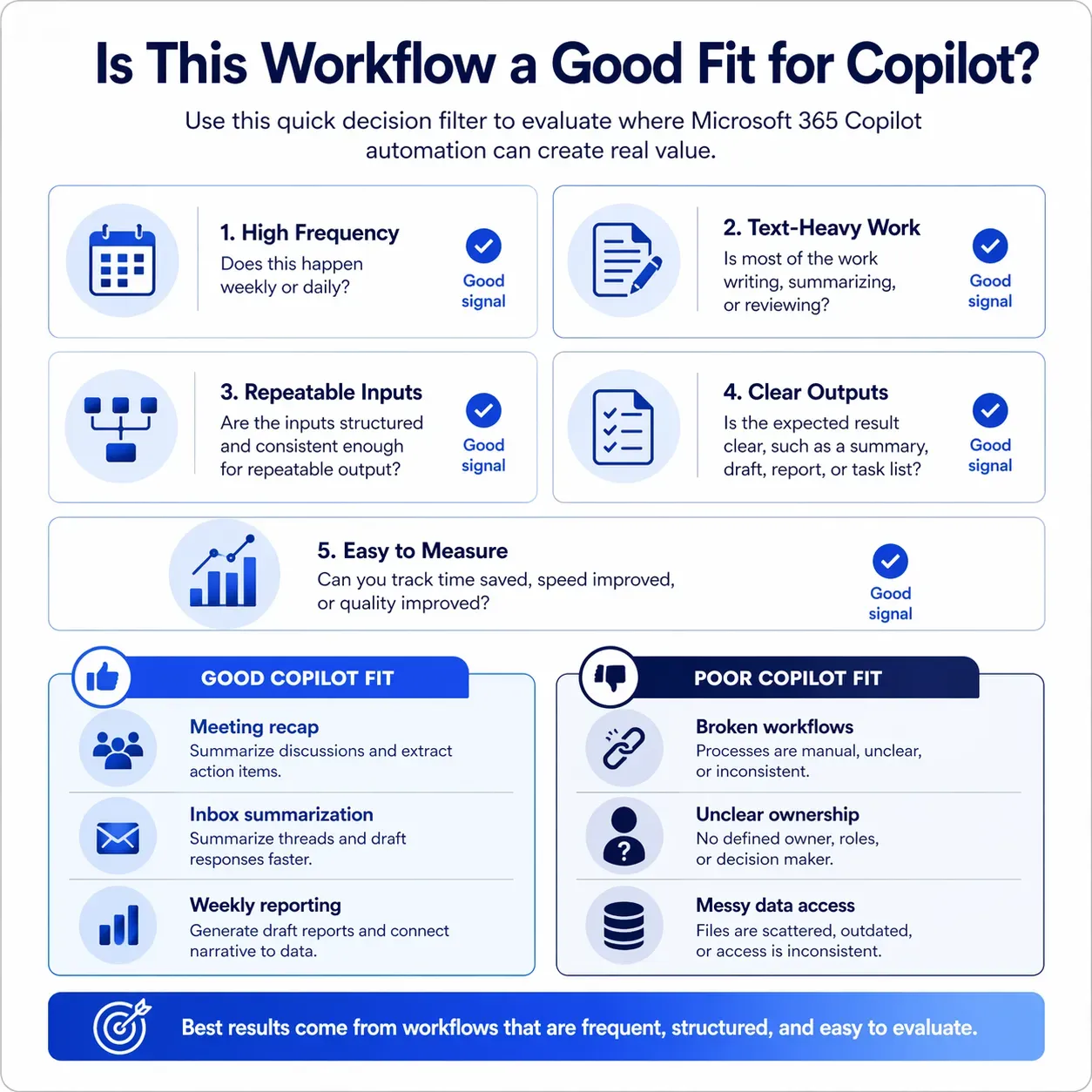
The best first automation is usually not the most ambitious process. It is a frequent, visible, low-risk workflow with stable inputs, an accountable owner, and a result that can be measured without months of analysis.
Choose this first
A recurring workflow with clear inputs, a visible output, limited risk, and a natural human review point.
Avoid this first
A cross-enterprise process with disputed data, unclear ownership, many exceptions, or high-risk automatic actions.
Look for this signal
The team already agrees that the current process is repetitive, slow, inconsistent, or dependent on manual follow-up.
Strong first pilots: Meeting recaps, recurring reports, email-thread summaries, document summarization, and reviewed task creation usually provide clearer learning than high-risk autonomous workflows.
Where Copilot Automation Breaks
1) The Team Starts With Licenses Instead of Workflows
A broad license rollout does not tell employees where Copilot should be used, what an acceptable output looks like, or how the result changes the workflow. Without role-specific use cases, baseline measurements, and practical enablement, usage can increase while business value remains unclear.
Licensing does not create adoption on its own. We have seen stronger results when teams pair access with clear workflows, role-specific enablement, and fewer manual follow-ups—an adoption gap we discussed in our LinkedIn post on whether Microsoft Copilot is changing how work gets done.
2) Data and Content Are Poorly Structured
If files are duplicated, outdated, inconsistently named, or stored without ownership, Copilot may still produce an answer. Users may not know whether the answer is based on the correct source.
Employees may then verify every output manually, reducing much of the expected time saving and weakening long-term trust.
3) Permissions and Governance Are Weak
Microsoft 365 Copilot works within the access available to the user. If existing permissions are too broad, inconsistent, or poorly understood, sensitive information may appear in an unintended context.
Workflows that perform actions need additional controls, including authentication, authorization, logging, escalation, approval rules, exception handling, and defined points for human intervention.
4) The Team Treats Prompting as Process Design
A better prompt can improve a draft, summary, or analysis. It cannot define missing ownership, remove unnecessary approvals, repair inconsistent data, or decide how an exception should be handled.
The recurring failure pattern: Teams try to scale Copilot before they establish workflow ownership, reliable information, review standards, and a measurable definition of success.
The 4-Layer Copilot Automation Model
Copilot automation becomes easier to plan when leaders separate content support from context, data, and actions. Most teams begin with low-risk content tasks. More operational value becomes possible when those tasks connect to reliable information and governed workflow actions.
Layer 1: Content
Emails, documents, presentations, and summaries
Lower complexity and a practical starting point for role-based productivity.
Layer 2: Context
Meetings, chats, files, and organizational knowledge
Reduces context rebuilding and helps employees find relevant information.
Layer 3: Data
Reports, records, connected applications, and business metrics
Improves analysis but requires trusted definitions and data ownership.
Layer 4: Actions
Tasks, approvals, notifications, system updates, and agent workflows
Creates greater operational impact but requires orchestration, governance, and exception handling.
Key insight: Content and context create productivity gains. The larger operational opportunity appears when trusted data and governed actions connect the output to the next step.
As the solution moves toward Layer 4, businesses may need to compare Copilot, Copilot Studio, custom AI, and agent-led execution. Our guide to choosing the next AI move after Microsoft Copilot provides a practical way to evaluate those options.
A Practical 30-Day Copilot Automation Pilot
A focused pilot helps the organization determine whether a use case is valuable before increasing licenses, integrations, or implementation complexity. The goal is not to prove that Copilot can produce an output. It is to prove that the complete workflow becomes better.
| Pilot stage | Main activity | Required output |
|---|---|---|
| Week 1 | Select one workflow, document its current steps, identify the owner, and record baseline performance | Workflow map, baseline, success measures, and risk review |
| Week 2 | Configure access, templates, prompts, workflow steps, and review requirements | A testable process with defined human controls |
| Week 3 | Run the workflow with a controlled group and record corrections, exceptions, feedback, and processing time | Pilot evidence and documented failure patterns |
| Week 4 | Compare results with the baseline and decide whether to improve, scale, redesign, or stop | An evidence-based implementation decision |
Measure these pilot outcomes
- Time required to complete one workflow cycle
- Turnaround speed from request to approved output
- Number and severity of corrections
- Output quality based on an agreed review standard
- Manual handoffs removed from the process
- Appropriate adoption within the target team
A narrow pilot may show that Microsoft 365 Copilot is sufficient. It may also reveal that the workflow needs Power Automate, Copilot Studio, a custom integration, or process redesign before it can deliver meaningful value.
From Copilot Assistance to Agent-Led Automation
Microsoft 365 Copilot is often the right starting point when the desired outcome is a better draft, summary, analysis, or answer. Power Automate becomes more relevant when the output must initiate repeatable actions across applications.
Copilot Studio or another agent-led approach may be appropriate when the system must interpret a request, select tools, use connected knowledge, complete several steps, and respond to different outcomes. That flexibility also increases the need for testing, permissions, monitoring, escalation, and human oversight.
An organization should not move toward autonomous execution simply because the technology is available. It should move when the workflow is understood, the actions are governable, the information is reliable, and the expected value justifies the added complexity.
Businesses evaluating this stage can explore how agentic and autonomous AI combines multi-step execution with oversight and practical guardrails.
Conclusion: Start With One Workflow, Not Another AI Tool
Copilot automation works best when it is connected to a clear business problem. Microsoft 365 Copilot can reduce effort across writing, summarization, analysis, meetings, and knowledge retrieval. Power Automate and Copilot Studio can extend that value into workflows, integrations, approvals, and governed actions.
Start with the work
Select a repetitive workflow with identifiable friction, clear ownership, and a measurable outcome.
Match the tool
Decide whether the use case requires employee assistance, workflow orchestration, an agent, or a combination.
Prove the outcome
Compare time, speed, quality, corrections, and throughput before expanding the rollout.
The next step is not more prompting or broader licensing. It is finding one workflow where Microsoft Copilot automation can reduce real effort without removing accountability.