
Most companies are no longer asking whether to adopt AI. They are trying to decide where AI should create value first, how much control they need, and how quickly they need results.
For most business leaders, the clearest distinction is this: Microsoft Copilot is usually a productivity layer, while custom AI is usually a workflow layer. Copilot helps employees work faster inside Microsoft tools. Custom AI helps the business redesign how work gets done across systems, rules, content, and customer experiences.
That difference matters because the cost of choosing the wrong path is real. Companies can overspend on licenses and still fail to change workflows, or invest in a custom build before they have a clear use case, governance model, or rollout plan. The smarter move is to match the AI approach to the business problem, not to the hype cycle.
Key idea: Copilot is usually a productivity layer. Custom AI is usually a workflow layer. That framing makes the decision much easier.
Why leaders are comparing Microsoft Copilot and custom AI now
AI adoption has moved from experimentation to operational pressure. Many organizations want near-term productivity gains, but they also know some of their highest-value opportunities sit in specialized workflows, fragmented knowledge systems, and customer-facing processes. One tool rarely solves both problems equally well.
That is why this decision is becoming more urgent in boardrooms and leadership teams. Buying an AI tool is not the same as creating business value with it. Value depends on adoption, workflow redesign, governance, and execution discipline.
If your company is evaluating this choice as part of a wider AI roadmap, the better framing is not “Which AI product is best?” It is “Which AI approach best fits our operating model, data boundaries, and expected ROI?” That is also the mindset behind Reveation’s AI-enabled digital transformation approach.
Microsoft Copilot vs custom AI: quick executive comparison
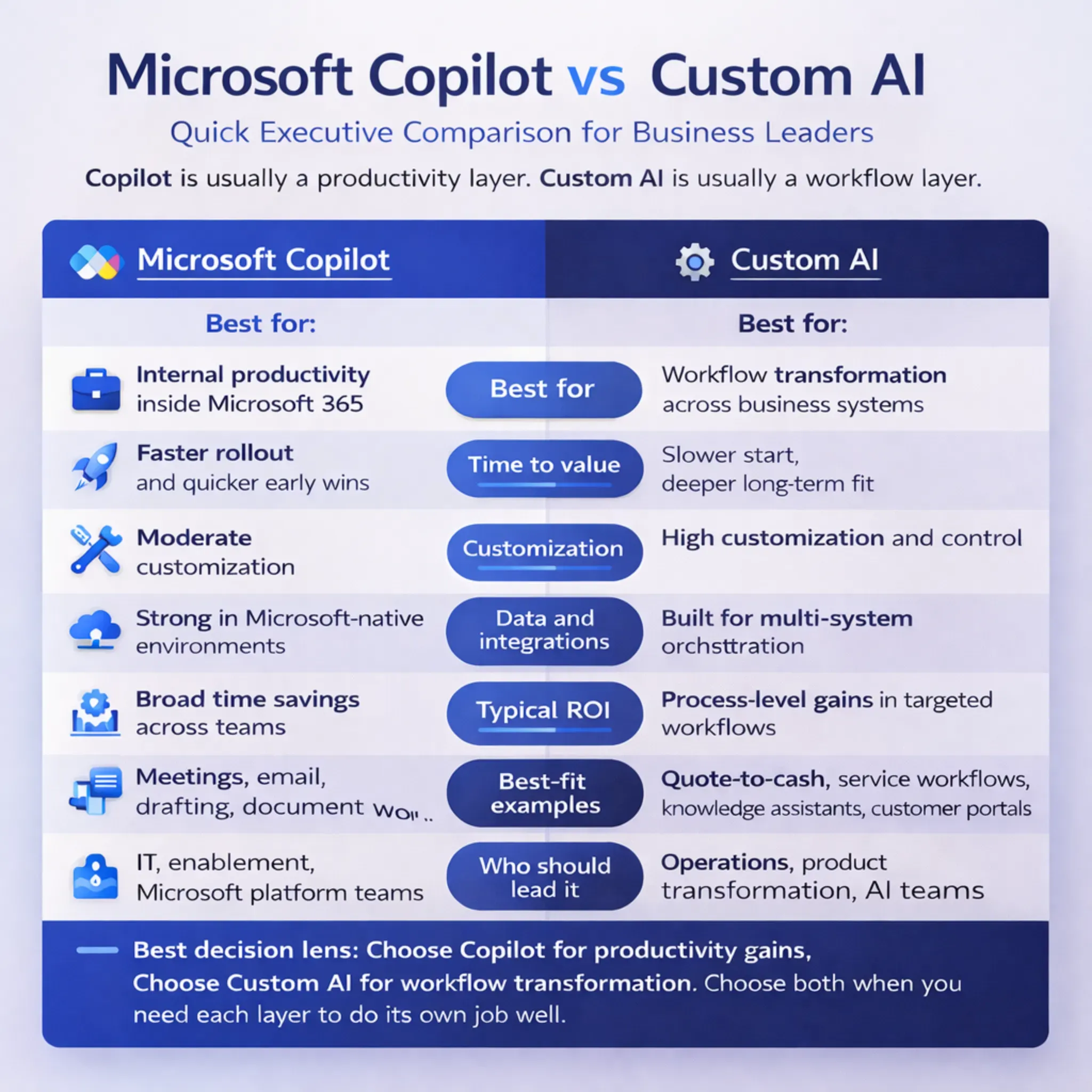
At a high level, Copilot usually wins on speed, familiarity, and broad rollout potential. Custom AI usually wins on specificity, orchestration, and the ability to shape AI around how your business actually works.
Microsoft Copilot
- Best for improving day-to-day productivity inside Microsoft 365
- Usually owned first by IT or enablement teams
- Fastest ROI comes from broad time savings
- Strong fit for internal productivity and Microsoft-native work
- Risk: expectations rise faster than workflow impact
Custom AI
- Best for redesigning workflows, experiences, and decisions
- Usually owned by product, operations, or transformation teams
- Fastest ROI comes from improving a specific high-value workflow
- Strong fit for proprietary operations and external experiences
- Risk: scope, integration, and governance can grow too fast
| Executive question | Microsoft Copilot | Custom AI |
|---|---|---|
| What is it best at? | Improving day-to-day productivity inside Microsoft 365 | Redesigning workflows, experiences, and decisions around your business |
| Who usually owns it first? | IT, enablement, Microsoft platform teams | Product, operations, digital transformation, or cross-functional AI teams |
| Fastest path to ROI | Broad time savings across knowledge workers | Measurable gains in a specific high-value workflow |
| What breaks first? | Expectations that it will transform complex processes on its own | Scope, integration, and governance if the use case is vague |
| What is hardest to change later? | Low adoption after a broad rollout | Poor architecture or weak workflow definition |
| Best fit | Internal productivity and Microsoft-native work | Proprietary workflows, external experiences, and differentiated operations |
What Microsoft Copilot is really for
Microsoft Copilot is strongest when employees already live inside Microsoft 365. It is built to support work in tools like Teams, Outlook, Word, Excel, and PowerPoint, which makes it attractive for organizations that want AI inside familiar workflows rather than through a separate product experience.
That matters because ease of adoption is often the first real lever of ROI. If your teams struggle with meeting overload, too much document review, scattered communications, repetitive drafting, or slow knowledge work, Copilot is often the fastest way to improve the day-to-day experience of work.
But the biggest mistake companies make with Copilot is assuming productivity software automatically becomes workflow transformation. It does not. If the real business problem is approvals across systems, industry-specific decision logic, retrieval from fragmented knowledge bases, or customer-facing orchestration, Copilot alone may not be enough.
That is why the discussion around Microsoft Copilot ROI should go beyond license cost. Real value comes from rollout quality, enablement, governance, support, and whether the tool changes outcomes that matter.
Best fit for Copilot: broad productivity improvement across Microsoft-heavy teams that need faster drafting, summarization, collaboration, and knowledge support.
What custom AI is really for
Custom AI becomes the better option when the workflow itself is strategic. That includes work like claims review, quote generation, compliance analysis, knowledge retrieval, service orchestration, document-heavy operations, and partner or customer experiences that need to reflect your own rules and systems.
Take a quote-to-cash example. A sales team may use Copilot to summarize emails, prepare meeting notes, or draft proposals faster. But if the business needs AI to pull product rules, customer terms, pricing exceptions, ERP data, and approval logic into one guided workflow, that is usually a custom AI problem.
Custom AI is also the stronger path when the user experience needs to be yours. That is especially true for customer portals, partner applications, domain-specific assistants, and AI agents that must take controlled actions across systems.
This is where services like generative AI agents, RAG-based knowledge solutions, document search and knowledge assistance, and semantic search become highly relevant. Model capability matters, but workflow context and knowledge access matter just as much.
Best fit for custom AI: high-value workflows that need business rules, deeper integrations, retrieval control, approvals, action-taking, and a differentiated user experience.
Where companies get this wrong
The most common mistake is buying Copilot to solve a process problem. If the real issue is handoffs across teams, approvals across systems, inconsistent rules, or fragmented business knowledge, a productivity layer may help at the edges without fixing the bottleneck at the center.
The second mistake is overbuilding custom AI too early. Some teams jump into a large AI program before they have defined the workflow, governance model, exception paths, or success metrics. That usually creates complexity before it creates value.
The third mistake is treating governance as a cleanup phase. In practice, permissions, approval logic, observability, escalation, and content quality shape trust from the start.
Warning: The most expensive AI mistake is not choosing the wrong label. It is choosing a tool that does not match the job.
| Mistake | What it sounds like | What it usually means |
|---|---|---|
| “We bought Copilot, so transformation should follow.” | AI is expected to fix process issues by itself | The company has not defined workflow-level change |
| “We need a custom platform for everything.” | AI ambition outruns use-case clarity | Scope and cost will likely grow too fast |
| “We will solve governance after launch.” | Speed is prioritized over control | Trust and adoption problems will surface later |
| “This is a tool choice.” | Technology is treated as the strategy | The real decision is operating-model fit |
When Microsoft Copilot is the right fit
Copilot is the right fit when the top goal is broad productivity improvement across a Microsoft-heavy workforce. That usually means summarization, drafting, collaboration support, meeting follow-up, basic knowledge assistance, and day-to-day acceleration inside familiar tools.
It is also the better starting point when leadership wants to move fast and learn from real usage before investing in deeper AI architecture. Copilot can give the organization a practical on-ramp to AI adoption without requiring a full custom application strategy on day one.
Choose Copilot first if:
- Your teams already work mainly inside Microsoft 365.
- Your first KPI is time saved across many employees.
- You want to reduce drafting, meeting, and document friction quickly.
- You need a lower-friction way to build AI familiarity across the business.
A useful rule is this: if your biggest complaints sound like “too many meetings,” “too much reading,” “too much drafting,” or “too much searching inside Microsoft work,” Copilot is probably a strong first move.
When custom AI is the right fit
Custom AI is the right fit when the workflow is high value, repeatable, and too specific for a general productivity assistant. That often includes tasks with business rules, approvals, knowledge grounding, action-taking, and dependencies across more than one system.
It is also the better investment when the business wants a differentiated experience rather than a generic assistant layer. That could mean a customer-facing AI advisor, a guided service workflow, a domain-specific knowledge copilot, or an internal agent that does more than generate text.
Leaders should also lean custom when they need control over prompts, actions, retrieval methods, UI, escalation, and how AI fits into an existing process. Those design choices can be the difference between an interesting demo and an operational system.
For that level of control, many organizations explore platform AI solutions and Azure AI implementation support to make the system scalable, governed, and durable.
Choose custom AI first if:
- The workflow is strategic, repeatable, and high value.
- You need AI to work across multiple systems and business rules.
- You want a differentiated customer or employee experience.
- You need deeper control over retrieval, actions, UI, and escalation.
Why hybrid is often the smartest answer
For many enterprises, the best answer is not binary. It is layered. Copilot improves broad employee productivity inside Microsoft, while custom AI handles the workflows where the business needs deeper orchestration, stronger grounding, or a differentiated experience.
This hybrid view is more realistic than forcing a winner. It lets companies capture near-term gains while still building targeted AI capabilities around the parts of the business that create the most strategic value. It also prevents the common mistake of expecting one tool category to do the job of another.
A practical sequence looks like this: start where Microsoft-native productivity gains are easiest, identify the workflows that still create delay or inconsistency, then build custom AI around those bottlenecks. That is a cleaner investment path than trying to transform everything at once.
In many cases, the strongest strategy is hybrid: use Copilot for broad productivity and custom AI for the workflows that actually differentiate the business.
A simple decision framework for business leaders
| Question | Lean toward Copilot | Lean toward custom AI |
|---|---|---|
| Is the goal to improve how employees work in Microsoft tools? | Yes | No |
| Is speed to rollout more important than workflow differentiation? | Yes | No |
| Do you need AI to act across multiple systems or business rules? | Usually no | Usually yes |
| Is the workflow customer-facing or strategically unique? | Usually no | Usually yes |
| Do you need deep control over retrieval, UI, actions, and escalation? | Moderate control is enough | High control is required |
| Is the first KPI time saved across many users? | Often yes | Sometimes |
| Is the first KPI cycle-time or quality gain in one process? | Sometimes | Often yes |
The simplest way to make the call is to ask where the value should land first. If you want AI embedded into everyday work, Copilot is often the better first step. If you want AI embedded into how the business operates, custom AI is usually the stronger bet.
Final takeaway
Microsoft Copilot and custom AI are not competing in exactly the same category. One is primarily about making work inside Microsoft faster and easier. The other is about designing AI around your workflows, decisions, knowledge, and customer experiences.
That is why the smartest decision is not based on features alone. It comes from understanding whether your next priority is productivity, process transformation, or both. Companies that get this right tend to waste less budget, create clearer ROI, and build more durable AI adoption.
For Reveation’s audience, the most practical next step is to evaluate the top three workflows where AI could save time, improve quality, or remove friction. Once those workflows are clear, the choice between Copilot, custom AI, or a hybrid model usually becomes much easier.
Strategic takeaway
Start with the business problem, not the tool label. Use Copilot where productivity gains matter most, use custom AI where workflow transformation matters most, and combine both where the business needs speed plus strategic differentiation.