
Microsoft Copilot adoption is easy to report. Active users, app usage, prompts, and repeat activity can show whether teams are engaging with the tool.
The harder question comes after adoption: what should we do with the signals Copilot is producing?
For a broader foundation on license cost, workflow baselines, rollout planning, and early ROI measurement, start with our article on Microsoft Copilot ROI. This article takes the next step: using Copilot metrics and user intent signals to decide whether to optimize adoption, build agents, use Copilot Studio, or extend into Azure AI.
When AI adoption becomes a board-level priority, we help teams connect strategy to practical execution through our AI-enabled digital transformation work. The goal is not only to prove Copilot has value. The goal is to understand what the business is asking AI to do next.
Adoption metrics
Whether people are using Copilot
Intent signals
What users repeatedly ask AI to do
Business signals
Whether work improved
Why Copilot Metrics Need a Second Layer
Most Copilot reporting starts with adoption. That makes sense. Leaders need to know whether licensed users are active, which apps they use, and whether usage is growing.
Microsoft’s Copilot measurement model separates readiness and adoption, productivity impact, and business value/ROI across reporting experiences such as Copilot Dashboard, Microsoft 365 admin center, Copilot Studio, and Copilot Analytics.
That structure is useful, but it still needs interpretation. A dashboard can show what happened. Leaders still need to decide what the pattern means.
A team may use Copilot heavily for meeting summaries, but still struggle with follow-through. A sales team may use Copilot to draft content, but still need CRM data, pricing history, and approval workflows. A support team may use Copilot to summarize tickets, but still need a trusted knowledge layer to answer accurately.
Usage shows behavior. Intent shows demand.
The strongest AI roadmap comes from reading both together.
The Difference Between Copilot Metrics and Copilot Intent
Copilot metrics tell us what users did. Copilot intent tells us what users were trying to accomplish.
That distinction matters because the next AI investment should not be based only on activity. It should be based on repeated demand, workflow friction, data gaps, and tasks users keep trying to push onto AI.
| Signal Type | What It Shows | Example | Why It Matters |
|---|---|---|---|
| Adoption metrics | Whether people are using Copilot | Active users, licensed users, app usage | Shows if the rollout has momentum |
| Engagement metrics | Whether usage is becoming a habit | Repeat usage, feature-level activity | Shows if Copilot is becoming part of work |
| Productivity metrics | Whether users are getting assistance | Copilot-assisted actions, summaries, drafts | Shows where effort may be reduced |
| Intent signals | What users repeatedly ask AI to do | “Pull CRM data,” “compare policy,” “draft follow-up” | Shows unmet workflow demand |
| Business signals | Whether work improved | Faster response, fewer handoffs, better throughput | Shows whether AI created business value |
The most useful insight usually appears when these signals are combined. High usage with shallow intent may mean Copilot is working as a productivity assistant. High usage with repeated workflow requests may mean the business needs agents, integrations, or Azure-backed AI.
What Copilot Dashboard Data Can and Cannot Tell You
Copilot Dashboard helps organizations understand readiness, adoption, impact, and sentiment. Microsoft describes it as a way to see how employees use Copilot across apps and features, with views into adoption and impact patterns.
This data is useful for early visibility. It can show where usage is growing, which groups are active, and whether Copilot is being used across Microsoft 365 apps.
But dashboard data does not automatically explain the business reason behind the behavior. Leaders still need to ask better follow-up questions.
How to Read Copilot Metrics More Strategically
| Dashboard Pattern | Possible Meaning | Better Follow-Up Question |
|---|---|---|
| High usage in Teams and Outlook | Users are reducing meeting and email burden | Are follow-ups faster or more complete? |
| High usage in Word or PowerPoint | Users are drafting and shaping content | Are first drafts reducing cycle time? |
| High usage in Copilot Chat | Users are exploring broad assistance | What questions are being repeated most often? |
| Low usage in a licensed group | Use cases may be unclear or poorly matched | Is this group a good fit for Copilot? |
| High usage but weak business feedback | Activity may not be tied to measurable work | Which workflow is actually improving? |
| Repeated requests for system-specific help | Users may need data or workflow integration | Should we build an agent or Azure AI workflow? |
This is where we see many teams miss the bigger opportunity. They treat Copilot metrics as a scorecard instead of a discovery layer.
How to Use Copilot Intent Signals
Copilot intent signals are the repeated asks behind user behavior.
They may appear in prompt patterns, feedback sessions, manager observations, support questions, workflow reviews, or pilot retrospectives. The exact source can vary, but the goal is the same: identify what users keep trying to get AI to do.
For example, a single prompt asking for CRM data may not mean much. A repeated pattern across the sales team means something different. It may show that sellers want Copilot to move from content assistance into workflow execution.
Intent Signal Examples
| Repeated User Intent | What It May Reveal | Best Next Move |
|---|---|---|
| “Summarize this meeting and draft follow-ups” | Microsoft 365 productivity need | Improve Copilot prompts and adoption habits |
| “Find the policy that applies to this customer issue” | Knowledge retrieval gap | Build a trusted knowledge experience |
| “Create a proposal using CRM data and past pricing” | Sales workflow automation need | Explore an agent or system integration |
| “Update the customer record after this call” | Need for action across business systems | Consider Copilot Studio or Azure AI |
| “Compare this document against our contract rules” | Review and compliance workflow need | Build a governed AI assistant |
| “Pull ERP data and explain what changed” | Enterprise data integration need | Explore Azure AI and data pipelines |
For teams that need Copilot-like experiences grounded in internal documents, policies, and product knowledge, RAG-based content systems can close the gap. This is often the point where AI value shifts from general productivity to trusted business execution.
The Scale, Optimize, or Extend Decision
Once Copilot usage and intent signals are visible, leaders need a clear decision path.
The question is not simply “Is Copilot working?” The better question is “What kind of AI capability does this workflow need next?”
Some teams need better enablement. Some need stronger workflow design. Others need custom agents, data integrations, or Azure AI.
| What the Signals Show | What It Means | Recommended Move |
|---|---|---|
| High adoption, simple use cases, positive feedback | Copilot is helping with everyday productivity | Scale carefully to similar roles |
| High adoption, weak workflow impact | Users are active, but value is unclear | Optimize use cases and manager reinforcement |
| Low adoption, clear business need | The use case may be valid, but rollout failed | Improve enablement before expanding |
| High repeated intent around internal knowledge | Users need trusted answers from company data | Build retrieval or knowledge-agent capability |
| High repeated intent around system actions | Users want AI to complete work, not just assist | Explore agents or workflow automation |
| Strong need for proprietary data and integrations | Standard Copilot is not enough | Extend with Azure AI |
| Sensitive or governed workflows | Control, compliance, and auditability matter | Use Copilot Studio or custom architecture |
For teams that need help turning these patterns into a roadmap, our broader B2B and AI services can help prioritize which workflows should be optimized, automated, or rebuilt with AI.
When Standard Microsoft 365 Copilot Is Enough
Standard Microsoft 365 Copilot is often enough when the work stays inside Microsoft 365 and the task is mostly assistance-based.
That includes drafting, summarizing, preparing, searching, rewriting, and organizing information. These use cases can still create value, especially when teams have repeated knowledge work and managers reinforce the right habits.
Good fit examples include:
In these cases, the next move may not be another AI build. It may be better prompts, stronger adoption support, clearer use-case playbooks, and tighter measurement.
When Agent Builder or Copilot Studio Makes More Sense
Some workflows need more structure than a general-purpose assistant can provide.
Microsoft’s Agent Builder lets users create agents in Microsoft 365 Copilot using natural language. Microsoft positions Copilot Studio as a low-code platform for building agents and agent flows with connectors, orchestration, and more advanced control.
Agent Builder can be useful when a person or small team needs a focused assistant for a narrow task. Copilot Studio becomes more relevant when the workflow needs broader deployment, stronger governance, connectors, or multi-step logic.
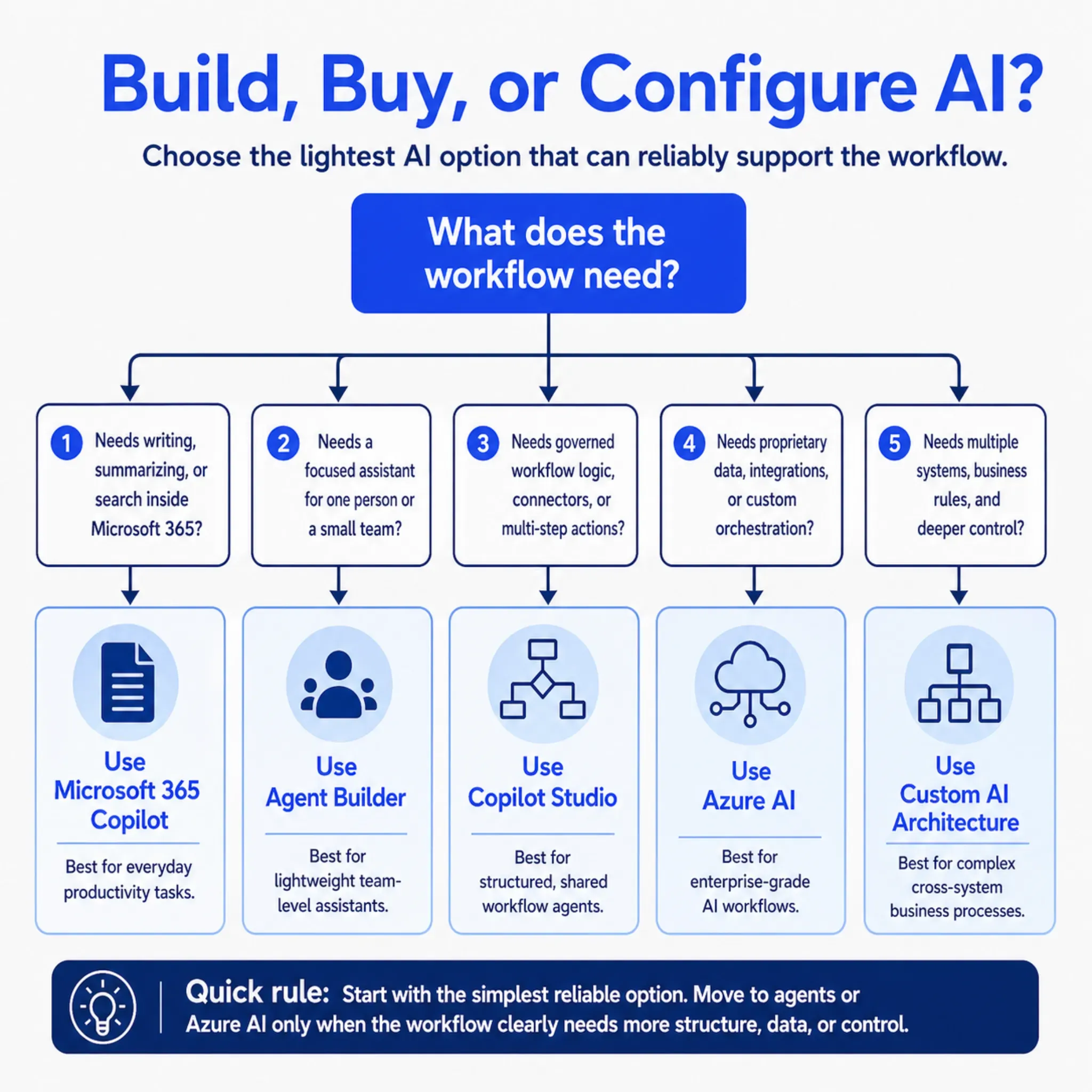
Need
Personal or small-team assistant
Better Fit: Agent Builder
Need
Department-level agent
Better Fit: Copilot Studio
Need
Governed workflow with business rules
Better Fit: Copilot Studio
Need
Agent connected to multiple systems
Better Fit: Copilot Studio or Azure AI
Need
Enterprise-grade AI workflow with custom data
Better Fit: Azure AI
If a workflow needs a specialized assistant instead of a general-purpose Copilot, we can design generative AI agents around that role or process. The best agents are not built because the technology is available. They are built because the same workflow demand keeps showing up in the data.
When Azure AI Becomes the Better Path
Azure AI becomes more relevant when the workflow depends on proprietary data, custom models, document processing, integrations, security requirements, or orchestration beyond Microsoft 365.
This is usually where the ROI conversation changes. The value is no longer only about helping individuals move faster. It becomes about improving a business process.
Azure AI may be the better path when:
- Copilot cannot access the right business data
- The workflow spans CRM, ERP, ecommerce, or service platforms
- Teams need custom retrieval over internal documents
- AI must classify, extract, validate, or route information
- The business needs stronger control over model behavior
- The output must fit a governed operational process
When standard Copilot is not enough, we often help teams extend Microsoft AI through Azure AI solutions. Azure is especially useful when the workflow needs custom data pipelines, document processing, model orchestration, or secure integration with enterprise systems.
When AI has to connect with ERP, CRM, ecommerce, or legacy systems, our enterprise solutions work helps make the implementation usable in the real business environment.
A Better Way to Run the Copilot Review Meeting
Many Copilot review meetings focus on usage charts. That is useful, but incomplete.
A stronger review meeting should combine metrics, business feedback, and next-step decisions. The output should be a roadmap, not just a report.
Questions to Ask in the Review
| Question | Why It Matters |
|---|---|
| Which teams use Copilot repeatedly? | Shows where adoption is forming |
| Which workflows show the clearest improvement? | Separates activity from business value |
| Which prompts or requests keep repeating? | Reveals intent signals |
| Where does Copilot stop short? | Identifies gaps in data, workflow, or integration |
| Which use cases only need better enablement? | Prevents unnecessary custom builds |
| Which use cases need agents or automation? | Points to the next AI investment |
| Which workflows need Azure AI? | Identifies enterprise-grade opportunities |
The review should end with one of four decisions for each major workflow:
Scale
Copilot usage is strong and the workflow impact is visible
Optimize
Adoption exists, but process design or enablement needs work
Pause
The use case does not show enough business value yet
Extend
Repeated intent signals point to agents, integrations, or Azure AI
This makes Copilot metrics useful beyond reporting. They become a planning tool for the next stage of AI adoption.
How We Help Turn Copilot Signals Into an AI Roadmap
The most useful work often starts with a focused review of Copilot usage, workflow fit, and intent signals.
We look at where Copilot is helping, where adoption is weak, where users are asking for more than Copilot can deliver, and which workflows are strong candidates for agents or Azure AI. Then we help teams define a practical next move.
That may include:
We have also written about how generative AI ROI shows up in B2B ecommerce growth when AI is tied to revenue workflows. The same idea applies to Copilot signals: value becomes clearer when AI is tied to a measurable business process.
Practical takeaway:
Do not stop at “people are using Copilot.” Look at what they keep asking Copilot to do. Those repeated asks often reveal the next AI opportunity.
Final Takeaways
Microsoft Copilot ROI data is most useful when it helps leaders make the next decision.
Adoption metrics show whether people are using Copilot. Intent signals show what people want AI to do next. Business signals show whether the work actually improved.
The strongest next move may be better Copilot adoption, a focused agent, a governed Copilot Studio workflow, or an Azure AI solution connected to enterprise systems. The right answer depends on what the signals show.
If your team has Copilot usage data but still does not have a clear AI roadmap, we can help turn those signals into practical next steps through our AI-enabled digital transformation, Azure AI, and custom agent work.