
You usually do not notice an automotive ecommerce migration mistake until a buyer searches for the right part and loses trust.
A dealer enters a part number and lands on the wrong replacement. An installer sees “in stock,” places an urgent order, and later learns the part sits in a warehouse three states away. A fleet buyer logs in and sees pricing that does not match the contract your sales team already approved.
That is why automotive ecommerce migration is not just a platform move. It is a workflow migration across fitment data, catalog rules, ERP pricing, inventory visibility, fulfillment, returns, and customer support.
Definition: Automotive ecommerce migration is the process of moving an automotive parts ecommerce experience, customer data, product catalog, pricing rules, integrations, and order workflows from one platform or architecture to another. For automotive aftermarket B2B teams, the migration also has to protect how dealers, installers, fleets, jobbers, distributors, and repair shops actually buy.
Here are 12 mistakes to avoid before your new platform becomes a more expensive version of the old one.
Why Automotive Aftermarket Migration Is Different
Automotive aftermarket buyers do not browse like casual shoppers. They often arrive with a VIN, year/make/model (YMM), OEM number, interchange number, known part number, or compatibility question.
That means your ecommerce migration has to protect more than product pages. It has to protect buyer confidence, order accuracy, pricing reliability, and fulfillment promises.
For B2B teams, the complexity is even higher. Dealers, installers, fleets, distributors, and jobbers often need different pricing, permissions, catalogs, shipping rules, approval flows, and support paths.
At Reveation Labs, we look at automotive ecommerce migration as an operating model project, not only a storefront project. We help teams plan B2B ecommerce solutions around how buyers search, order, reorder, and get support.
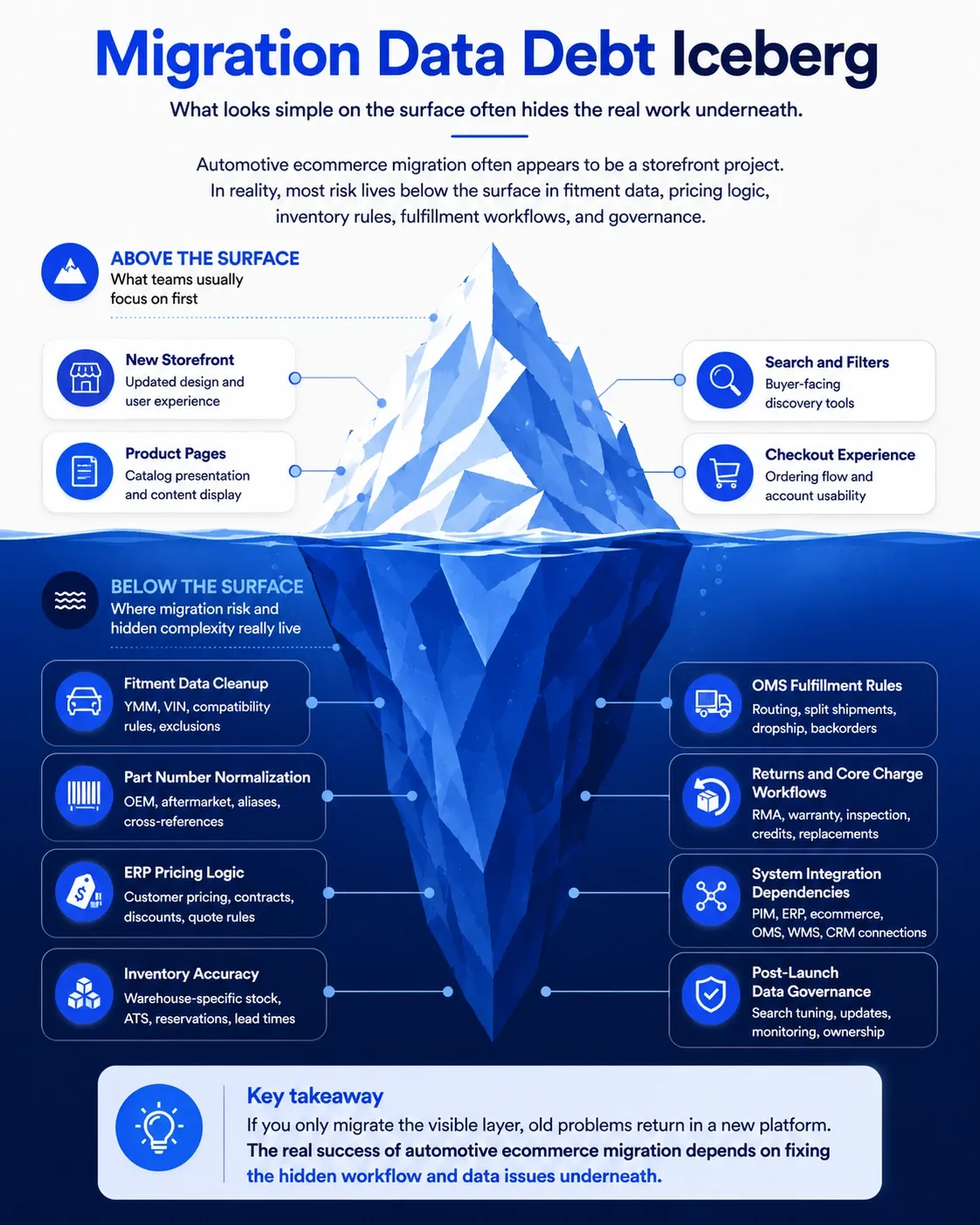
Quick way to think about it: automotive ecommerce migration succeeds when the buyer can find the right part, see the right price, trust the availability, and complete the order without calling for help.
| Migration risk | Why it matters in automotive ecommerce |
|---|---|
| Fitment | Prevents wrong-part orders and compatibility confusion. |
| Part numbers | Supports OEM, aftermarket, alias, and cross-reference search. |
| ERP pricing | Protects customer-specific terms, discounts, and contract rules. |
| Inventory | Shows realistic availability by warehouse, allocation, and lead time. |
| OMS | Handles split shipments, dropship, backorders, and order status. |
| Returns | Supports RMA, warranty, core returns, credits, and replacements. |
1. Bad Fitment Data
Bad fitment data is one of the fastest ways to lose buyer confidence. If a brake pad, filter, lighting component, sensor, tire, or replacement part appears compatible but is not, the buyer does not see a data issue. They see an unreliable ordering experience.
Before migration, clean the fitment data behind your catalog. Check YMM data, trim-level rules, engine variations, vehicle attributes, compatibility notes, exclusions, and product-to-vehicle relationships.
Do not treat fitment as a late-stage content task. It should be a core migration workstream because it directly affects search, filtering, conversion, returns, and buyer confidence.
2. Messy Part Numbers
Part numbers are not simple product IDs in automotive ecommerce. A single product may have an internal SKU, manufacturer part number, OEM number, aftermarket number, old number, new number, alias, and competitor cross-reference.
Buyers may search with any of those numbers. If your migration does not preserve those relationships, high-intent buyers can type the exact number they have and still get weak results.
Build a part-number mapping plan before migration. Decide which numbers display publicly, which numbers support search, which numbers connect to replacements, and which numbers remain internal.
3. Missing Replacement Logic
Automotive aftermarket catalogs change constantly. Parts get discontinued, manufacturers issue supersessions, alternative brands become available, and replacement recommendations shift over time.
If your old system handled this manually, migration gives you a chance to make the logic clearer. Without that work, buyers hit dead ends when a part is unavailable or outdated.
Map superseded parts, substitutes, alternates, kits, and replacement recommendations before launch. Show buyers what changed, why the recommended part is relevant, and whether fitment still applies.
4. Legacy Catalog Problems
A migration can make catalog problems more visible. Duplicate products, inconsistent attributes, thin descriptions, missing images, and confusing categories do not disappear because the interface looks better.
This is where product information management matters. We help teams use PIM for ecommerce to centralize product data, support migration, enrich catalog content, and connect product information with commerce and ERP systems.
Before migration, decide which fields matter most for buying decisions. For automotive aftermarket teams, that often includes fitment, brand, part type, dimensions, material, warranty, installation notes, compliance details, and related parts.
5. Weak Search Experience
Automotive ecommerce search should not depend only on categories. Your buyers may search by VIN, YMM, part number, OEM number, symptom, product type, brand, or cross-reference.
Some buyers know exactly what they need. Others need the site to guide them from vehicle information to compatible parts.
Support exact-match part-number search, compatibility filters, synonym handling, typo tolerance, and guided paths for buyers who start with vehicle information instead of product names. Also review zero-result searches before and after launch so you can catch missing aliases, bad mappings, or weak metadata.
6. Pricing Sync Issues
Pricing errors are painful in any ecommerce migration. In automotive aftermarket B2B, they can damage account relationships quickly.
Dealers, installers, fleets, jobbers, and distributors often have different price lists, discounts, contract terms, volume breaks, credit rules, quote approvals, and regional pricing logic. If ecommerce shows one price while ERP or sales shows another, customers stop trusting the platform.
Define which system owns price, discount, tax, freight estimate, customer terms, and quote approval. We help teams connect ecommerce with ERP so pricing, inventory, orders, catalog, and customer data stay aligned.
For complex quote scenarios, CPQ may also matter. We support CPQ solutions for pricing rules, approval workflows, quote-to-order automation, and integration with CRM, commerce, and ERP.
Migration check: test account pricing with real customer accounts, not only demo users. Include dealer pricing, installer tiers, fleet contracts, quote approvals, and order minimums.
7. Inventory Confusion
“In stock” can mean too many things. It may mean the item exists somewhere in the network, sits in the nearest warehouse, is reserved for another order, is delayed, or is available only through dropship.
Automotive aftermarket buyers often care about speed. A repair shop, dealer, or fleet buyer needs to know whether a part can arrive today, tomorrow, or next week.
Before launch, validate available-to-sell quantity, warehouse-specific availability, reserved stock, transfer availability, dropship availability, backorder status, and lead time by location. We help teams define these rules through OMS order fulfillment planning so availability promises match real operations.
8. Fulfillment Gaps
Fulfillment gaps usually appear after the order is placed. The storefront accepts the order, but the back office may not know how to route it.
Automotive orders may need split shipment, dropship, warehouse transfer, partial fulfillment, backorder handling, or customer-specific delivery rules. If these workflows are not mapped before migration, your operations team becomes the integration layer.
An OMS can help when order volume, channels, and fulfillment logic become too complex for manual processes. We provide OMS implementation support for order flow from commerce to ERP and fulfillment, and we build OMS integrations across ecommerce, ERP, WMS, CRM, and other systems.
A better migration plan tests fulfillment exceptions before go-live. That includes partial shipments, canceled lines, backorders, substitutions, failed payments, address issues, and tracking updates.
9. Returns and Core Charges
Returns are not an afterthought in automotive aftermarket ecommerce. Some products have warranty rules, some need RMA approval, and some involve core charges, deposits, inspection, replacement timelines, or restocking logic.
If your migration only focuses on product discovery and checkout, post-purchase workflows can break. Customers may not know how to return a part, claim a warranty, submit documents, or send back a core.
Map core return windows, core eligibility, inspection status, warranty claim documents, replacement versus credit rules, restocking fees, and RMA visibility for account users. These details reduce support bottlenecks and make the full order lifecycle easier for buyers.
10. Rushed Customer Rollout
Not every customer group should move at the same time. Dealers may need account hierarchies, installers may care most about speed and fitment, fleets may need approvals, and jobbers may need quick reorder flows.
A rushed rollout treats all customer groups the same. That creates adoption risk because the new platform may work for one buyer type while frustrating another.
Start with a pilot group that reflects real buying complexity. Test search, fitment lookup, account pricing, checkout, fulfillment, invoices, returns, and support escalation before opening the platform to everyone.
If your migration is part of a broader platform change, our guide to B2B ecommerce replatforming explains why teams need to rethink systems, workflows, and buyer experience together.
11. Untrained Internal Teams
Your customers will not adopt a platform your own team does not trust. Sales, support, counter teams, warehouse teams, and account managers need to understand what changed and how to handle exceptions.
Do not wait until launch week to train internal teams. Give them scripts, demo accounts, escalation paths, and clear ownership rules.
Training should cover search, fitment, account pricing, order status, returns, and support handoffs. It should also explain what the new platform is supposed to reduce, not just where buttons are located.
12. No Data Governance
Launch day is not the end of automotive ecommerce migration. Fitment data changes, parts get replaced, suppliers update attributes, warehouses shift stock, pricing rules change, and new customer contracts appear.
Without data governance, quality slowly decays. Search gets weaker, catalog confidence drops, and internal teams start building spreadsheets around the platform again.
After launch, monitor zero-result searches, part-number searches with no match, fitment-related returns, top searched discontinued SKUs, pricing exception tickets, inventory mismatch reports, and support tickets by issue type.
We connect PIM, CPQ, OMS, and ERP through product data and integration management so product data, quotes, and orders follow a more reliable source of truth.
Automotive Ecommerce Migration Checklist
Use this checklist before go-live. It will not catch every edge case, but it will expose the areas most likely to create customer frustration.
| Migration area | What to validate before launch | Why it matters |
|---|---|---|
| Fitment data | YMM, trim, engine, exclusions, compatibility notes | Prevents wrong-part orders |
| Part numbers | OEM, aftermarket, aliases, old numbers, cross-references | Helps buyers find exact parts |
| Replacement logic | Supersessions, substitutes, alternates, discontinued products | Prevents dead-end searches |
| Product data | Attributes, images, descriptions, categories, related parts | Improves buyer confidence |
| Search | VIN, YMM, part number, keyword, typo handling, synonyms | Reduces support dependency |
| Pricing | Account terms, discounts, volume rules, quotes, approvals | Protects customer trust |
| Inventory | Warehouse, ATS, reserved stock, lead times, backorders | Prevents false availability |
| Fulfillment | Dropship, split shipment, backorder, routing, tracking | Reduces order exceptions |
| Returns | RMA, warranty, core charges, credits, replacements | Improves post-purchase experience |
| Rollout | Pilot groups, internal training, feedback loops | Lowers launch risk |
Final Thoughts
Automotive ecommerce migration works best when you migrate the workflow, not just the storefront.
Your buyers need accurate fitment, searchable part numbers, trusted pricing, clear inventory, reliable fulfillment, and simple post-purchase support. Your internal teams need clean data, connected systems, and clear ownership.
At Reveation Labs, we help B2B teams plan ecommerce migrations around how the business actually sells, fulfills, and supports customers. If your automotive aftermarket platform is moving to a new system, start by mapping the workflows that create buyer confidence.
The platform matters. But the migration succeeds when the buyer can find the right part, see the right price, trust the availability, and complete the order without calling for help.
The safest rollout is usually phased. Start with a pilot group that reflects real customer complexity, such as dealers, installers, fleets, or jobbers, then test search, fitment, pricing, inventory, checkout, fulfillment, returns, and support workflows before expanding.