If your ACES and PIES process works today, what actually needs to change with ACES 5.0 and PIES 8.0?
That is the question Product Data, Catalog, PIM, and IT teams need to answer now. The new standards change how product information, digital assets, packaging data, and supporting reference data are handled, but the impact will differ from one company to another.
For some teams, the work may sit in field mappings or validation. For others, it may show up in the PIM, supporting reference data, integrations, or what trading partners expect to receive.
The Auto Care Association released ACES 5.0 and PIES 8.0 on April 2, 2026. Its official release also included updated schemas for VCdb, Qdb, PCdb, PAdb, and the Brand Table.
What Changed in ACES 5.0 and PIES 8.0?
ACES 5.0 expands support for application-related digital assets and multilingual data. PIES 8.0 adds new packaging and digital asset capabilities. Both updates also come with newer supporting reference database schemas.
| Area | Before | With ACES 5.0 / PIES 8.0 |
|---|---|---|
| ACES digital assets | More limited application-level asset handling | Vehicle- and part-specific non-diagram assets can be communicated in the App Segment |
| Asset descriptions | More limited description handling | ACES supports multiple descriptions for a digital asset |
| Manufacturer labels | MfrLabel could be communicated in one language | ACES 5.0 allows MfrLabel to be communicated in multiple languages |
| Packaging information | Existing PIES packaging structure | PIES adds Extended Producer Responsibility packaging data |
| Package configurations | More limited pack-level structure | PIES supports multiple package configurations at a single pack level |
| PIES digital assets | Existing asset handling | PIES adds file hashing and record sequencing |
| Reference data | Previous supporting schemas | Updated VCdb, Qdb, PCdb, PAdb, and Brand Table schemas |
The table gives you the release-level view. What matters next is how those changes connect to the product and application data your team already manages.
How ACES 5.0 Affects Application and Fitment Data
ACES 5.0 expands support for vehicle- and part-specific digital assets, multiple asset descriptions, and multilingual MfrLabel data.
What is MfrLabel? It is the manufacturer label field used inside the ACES App Segment. It lets a manufacturer provide its own label for a specific application. In earlier ACES versions, that label could be communicated in one language. ACES 5.0 allows the MfrLabel element to repeat so the same application can include manufacturer labels in multiple languages.
For catalog teams, the main question is whether the information required by these newer structures already exists in the systems supplying the ACES output.
If it does, your team may mainly need to review mappings and validation. If it does not, simply switching to the new ACES structure will not give you complete data.
If you need a refresher on the role each standard plays, Virto explains how ACES and PIES work together across fitment and product data.
How PIES 8.0 Affects Product Data
PIES 8.0 adds Extended Producer Responsibility packaging data, multiple package configurations at a single pack level, digital asset file hashing, and record sequencing. Those capabilities can change what your catalog or PIM needs to store and what your output process needs to support.
Take packaging as an example: if a product ships in more than one package configuration, PIES 8.0 can support that. Your catalog or PIM still needs to store those configurations clearly before they can be included in the final output.
The same applies to digital assets. File hashing and sequencing only help when the systems behind the PIES output can supply and maintain the information they require.
How Existing Mappings Can Be Affected
Focus on mappings tied to fields or structures that changed in ACES 5.0 or PIES 8.0. Older transformation rules, lookup tables, or partner-specific logic can still shape the final result even when the original product data is correct.
Product data normally passes through several systems before it becomes the final ACES or PIES output. Each handoff gives older rules or mappings another place to affect what eventually gets sent.
How Product Data Becomes ACES and PIES
ACES 5.0 and PIES 8.0 may change the final output, but the data behind that output is created, enriched, mapped, and checked across several systems first.
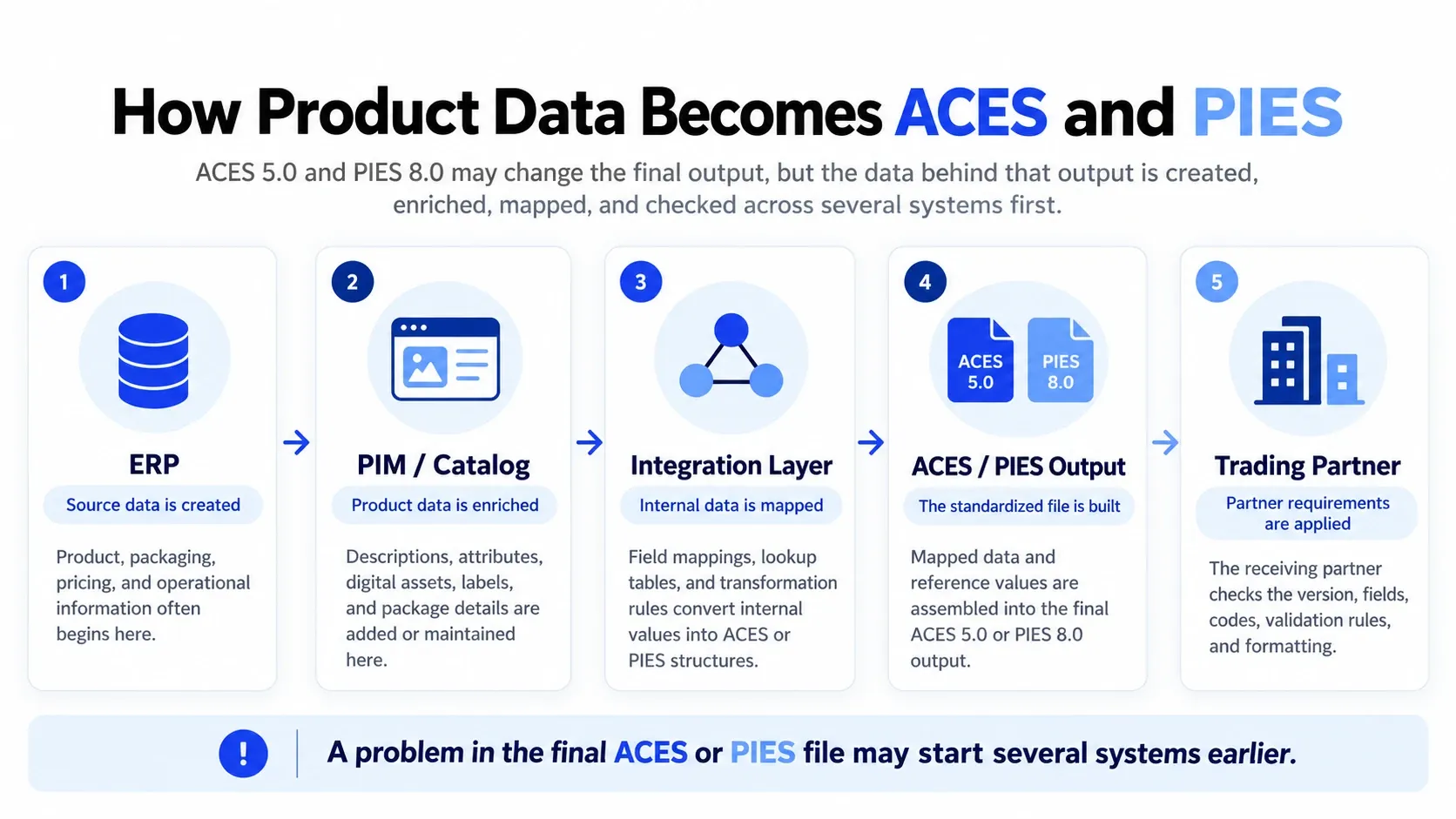
The source data can be right while the final output is still wrong. An older mapping can send the right value into the wrong field, leave it out, or transform it using logic written for the previous structure.
In complex catalog environments, we often find older exceptions and transformation rules sitting behind newer systems. That is why we look at the logic around a field, not only the value stored in the PIM or ERP.
Supporting Reference Databases Changed Too
ACES and PIES do not carry every vehicle, product, attribute, qualifier, or brand value on their own. They rely on supporting reference databases so different aftermarket companies can use the same standardized codes and terminology.
For example, VCdb standardizes vehicle and equipment configurations used with ACES, while Qdb supplies qualifiers that add more detail to an application. PCdb organizes product classifications, PAdb standardizes product attributes, and the Brand Table keeps brand identification consistent.
| Reference database | What it helps standardize | Where teams may notice the impact |
|---|---|---|
| VCdb | Vehicle and equipment configurations | Fitment and application mappings |
| Qdb | Application qualifiers | Conditions and details attached to fitment records |
| PCdb | Product classifications | Product categorization and related mappings |
| PAdb | Product attributes | Attribute values and product-data mappings |
| Brand Table | Brand identification | Consistent brand codes across trading partners |
The 2026 release updated the schemas for VCdb 2.0, Qdb 2.0, PCdb 2.0, PAdb 5.0, and Brand Table 2.0. That means teams should not look at the ACES or PIES version in isolation.
A catalog may contain the right product or fitment information while an internal lookup still points to an older reference code or structure. That can affect application relationships, product classifications, attributes, qualifiers, or brand information before the data reaches a trading partner.
ACES / PIES schema → Supporting reference database → Internal mapping
Keep all three aligned. A file can follow the new technical structure and still carry the wrong coded data if an older reference value or mapping remains underneath it.
How ERP, PIM, Catalog, and Integrations Work Together
ACES and PIES data rarely lives in one place. ERP, PIM, catalog tools, DAM systems, and middleware can each hold or change part of the final record.
An ERP might hold packaging or operational data while the PIM manages descriptions, attributes, and digital assets. An integration layer then maps those values into the structure required by ACES or PIES.
We see the same challenge in B2B catalog management, where several systems can touch the same product record but still need clear responsibilities.
Where is the data first created?
Where is it enriched?
Where is it transformed?
Where is it validated?
Which system sends the final output?
Those answers tell you which team and system need attention when a standard changes. They also stop teams from making changes in the PIM when the real issue sits in middleware, a lookup table, or an older export rule.
Why One ACES and PIES Version May Not Work for Every Partner
Trading partners can adopt newer ACES and PIES versions on different timelines. Your company may be ready for ACES 5.0 or PIES 8.0 while another partner still expects a previous version.
Partners can also apply their own requirements around fields, codes, validation, or formatting. Your team may therefore need to support different output requirements during the transition.
Before changing a live output, confirm which version each major trading partner accepts and whether it applies any additional requirements.
Validation Goes Beyond the Schema
Schema validation tells you whether the file follows the expected technical structure. It does not tell you whether every code, mapping, relationship, or business rule inside that file is correct.
That distinction matters because a technically valid file can still carry the wrong product value, outdated reference code, or incorrect mapping. The trading partner may also apply checks that go beyond the standard schema.
| Validation layer | What it checks |
|---|---|
| Schema validation | Does the file follow the required structure? |
| Reference-data validation | Are the codes and relationships valid? |
| Mapping validation | Did the source data land in the right place? |
| Business-rule validation | Does the output still represent the product correctly? |
| Trading-partner validation | Can the trading partner accept and use the data? |
Auto Care's Catalog Assessment Reporting Tool supports ACES 5.0 and PIES 8.0 files. Teams can use it alongside their own mapping, reference-data, business-rule, and trading-partner checks.
What This Means for Product Data, Catalog, PIM, and IT Teams
The same ACES and PIES update can land differently across teams. Knowing which part you own makes it easier to focus on the changes that actually affect your work.
Product Data
Check whether the required values, packaging information, attributes, and reference codes exist and are current.
Catalog
Review fitment relationships, classifications, digital assets, labels, and how supporting reference data is applied.
PIM
Confirm that new or changed fields can be stored, maintained, and passed into the required output structure.
IT / Integration
Review mappings, transformation rules, reference lookups, validation, and support for different trading-partner versions.
How to Prepare for ACES 5.0 and PIES 8.0
You do not need to turn the update into a large transformation program. Start with the parts of the standards that actually affect the data and trading partners you work with today.
1. Check what changed for your data
Compare the new structures with the fields, assets, packaging information, and reference data you actually use.
2. Trace the affected mappings and systems
Identify where the data starts, where it changes, and which rules shape the final ACES or PIES output.
3. Confirm trading partner requirements
Check which versions your major partners accept and whether they apply additional field, code, or validation requirements.
4. Test before switching
Use real product records, validate the affected data, and confirm what the trading partner actually receives and accepts.
What Your Team Should Know Before Updating
The goal is not to change everything because the standards changed. It is to identify the parts of your current process that genuinely depend on the new schemas, reference data, mappings, or partner requirements.
- Which ACES and PIES versions are our current files built for?
- Which VCdb, Qdb, PCdb, PAdb, and Brand Table versions do we use?
- Which fields, mappings, or custom rules are affected?
- Which systems hold or transform that data?
- What versions do our trading partners accept?
- What partner-specific requirements apply?
- How do we validate both the structure and the data?
- Can we support more than one version during the transition?
Once those answers are clear, the transition becomes much easier to scope. Your team can focus on the fields, mappings, reference data, systems, and partners that actually need attention instead of treating ACES 5.0 and PIES 8.0 as a full rebuild.
At Reveation Labs, we work with manufacturers and distributors that manage complex catalogs, PIM and ERP dependencies, and multiple connected systems. When we look at an ACES and PIES transition, we focus first on those connections so teams can see what actually needs to change before they update production data.