
If you run B2B ecommerce for a manufacturer or distributor, greenfield vs replatforming is a business choice. Either you need a new way to sell and serve accounts, or you need a stronger platform under the workflows you already have.
Choose greenfield when how you sell today cannot support how customers should buy. Choose replatforming when the selling model still works and the stack blocks search, contract pricing, inventory, integrations, or scale. Choose an audit first when nobody can say who is allowed to change catalog, price, or ERP rules, or how soon you need a working result.
McKinsey reports that 71% of B2B companies now offer ecommerce, and companies that offer it drive roughly one-third of revenue through digital channels. Gartner reports that 67% of B2B buyers prefer a rep-free experience, while a later Gartner release says 70% prefer a completely digital, self-service buying experience. Those figures describe pressure on the channel; they do not tell you which path to fund.
A prettier storefront will not settle it. You still have to name the business change you need first.
Greenfield vs Replatforming
Check the table against your catalog, ERP, and how soon you need a working result.
| Situation | Best path |
|---|---|
| Your buyer journey needs a fundamental redesign | Greenfield |
| Your platform limits scale, integrations, or UX | Replatforming |
| Your ERP rules and data ownership lack clarity | Audit first |
| Your team needs faster wins with lower disruption | Phased modernization |
| You plan to launch a new digital business model | Greenfield |
| Your workflows work, but the technology slows growth | Replatforming |
Greenfield changes the business experience. Replatforming changes the commerce foundation. Phased modernization reduces risk before either move.
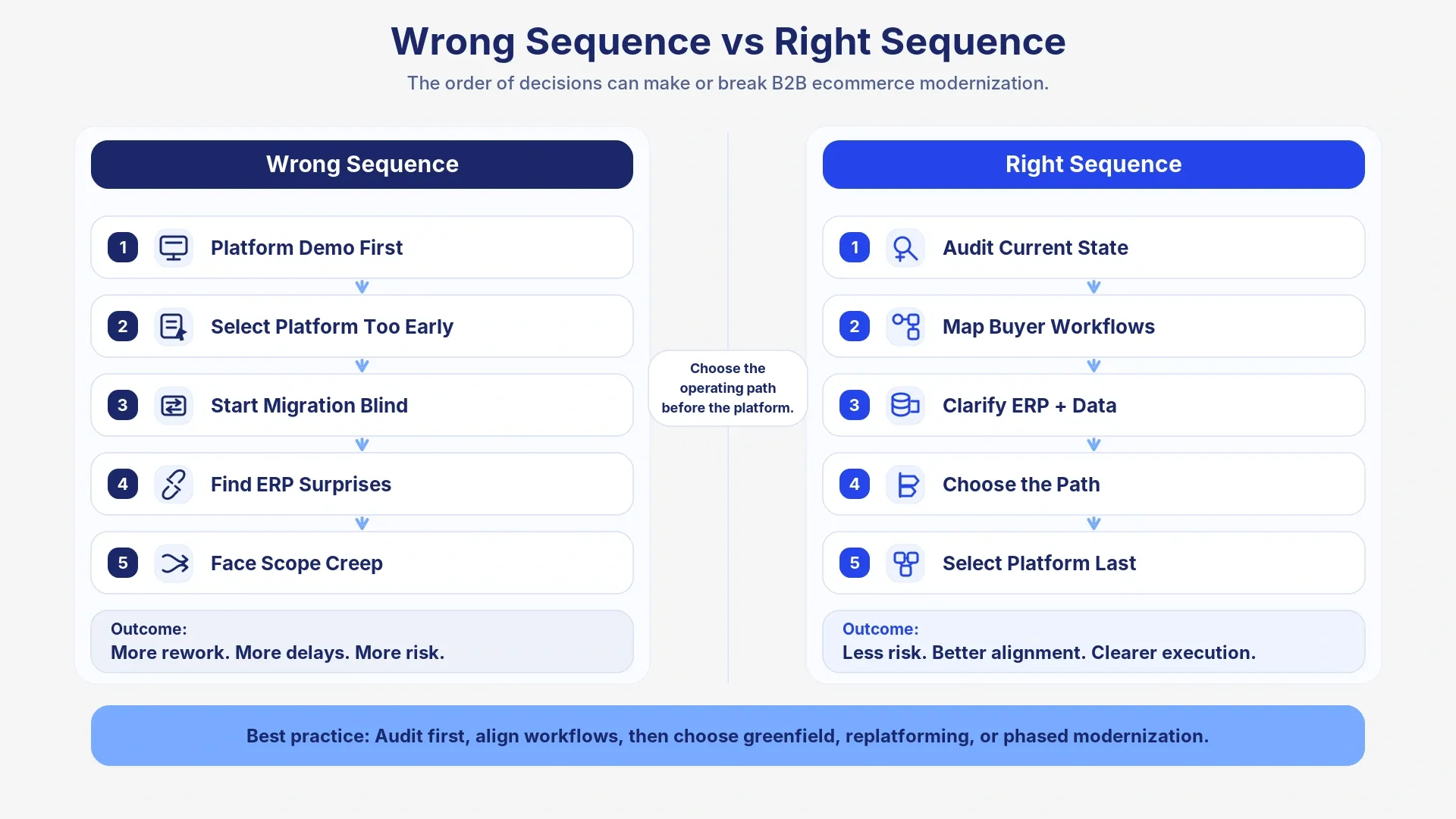
Key point: Pick the path before you pick the platform. Catalog, ERP, and capacity decide more than a demo.
What Greenfield Means in B2B Ecommerce
A greenfield ecommerce implementation gives you a clean slate. You set how buyers purchase, how orders move, how data flows, and what the stack looks like, from scratch.
Greenfield fits when the current site still assumes a simpler buyer than you have now. The site may take basic orders, while accounts need quotes, role-based approvals, dealer portals, subscriptions, account-specific catalogs, or multi-location purchasing.
That freedom creates risk. Every stakeholder can add a new idea. Without a small first release, real buyer tests, and someone who can say no, the project grows faster than the business case.
When greenfield makes sense
Greenfield makes sense when you need a fundamentally new experience: a distributor marketplace, dealer portal, customer self-service hub, or a hybrid of buying, invoices, tickets, documents, warranties, and order history.
Decide whether customers need a storefront, a portal, or both. Customer portal vs B2B ecommerce storefront walks through how those experiences differ when accounts need login, orders, and documents in one place.
Greenfield also fits when the current architecture cannot support what you already promised customers: account-level personalization, better product discovery, customer-specific catalogs, contract-aware ordering, or services the stack cannot host without a rebuild.
When greenfield creates risk
Do not choose greenfield only because the current platform feels messy. A clean slate only helps if you can change how people work, not only the software.
Greenfield creates risk when teams skip the hard questions.
- Product data: who is allowed to change it?
- Contract pricing: where does it live?
- ERP rules: which ones should the site show?
- Approvals vs reorder: which customers need a workflow, and which need fast reorder from invoices?
A new build will not fix unclear ownership of catalog, price, or ERP rules. It will only make those gaps more expensive once development starts.
What Replatforming Means in B2B Ecommerce
Replatforming moves you from one ecommerce platform to another while improving the foundation behind the buyer experience. In B2B, that move touches ERP, PIM, OMS, CRM, CPQ, pricing, inventory, tax, freight, payment terms, customer accounts, approvals, and fulfillment.
B2B ecommerce replatforming is more than copying the old site onto a new one. Migration moves data and workflows. Replatforming also changes the architecture those workflows sit on.
Replatforming does not mean “smaller” or “less strategic.” It means the business model still works, and the current platform is what slows you down.
When replatforming makes sense
Replatforming makes sense when buyers already need the same core workflows, but they need them to work. They need accurate contract pricing at login, searchable catalogs, trusted inventory, easy reorder, invoice access, order status, and fewer calls for routine tasks.
You see it when internal teams live in workarounds: catalog updates need engineering, ERP sync breaks often, and sales places routine orders because buyers cannot trust the portal.
If every catalog change already feels like a project, signs your B2B ecommerce platform is holding you back lists the operational signs. A slow search box is not always a reason to rebuild.
When replatforming becomes a mistake
Replatforming fails when you move old problems onto a newer platform. A better platform cannot rescue messy product data, undocumented ERP rules, unclear pricing logic, or buyer journeys no one has tested.
Teams also choose platforms too early. A polished demo can hide gaps in account hierarchies, order complexity, integrations, and whether your own team can actually run the site.
When you are comparing vendors, how to choose a B2B ecommerce platform walks through demos and scoring on your data. Know whether you are rebuilding the model or replacing the stack before you sit through those demos.
Do not replatform to look modern. Replatform when the current foundation blocks scale, and you know which workflows must improve.
Why B2B Ecommerce Makes This Decision Harder
B2B ecommerce does not stop at cart and checkout. The platform has to support negotiated pricing, customer-specific catalogs, quote requests, approval limits, bulk ordering, multi-ship-to accounts, payment terms, freight rules, tax logic, reorder lists, sales-assisted workflows, and fulfillment visibility.
That complexity changes the greenfield vs replatforming decision. A simple platform comparison can miss the workflows that carry the most operational risk.
Before a rebuild or migration, get ERP and the site pointing at the same price, stock, and customer records. ERP usually already holds customer records, pricing, inventory, order status, tax, shipping, fulfillment, and financial handoffs. If teams do not agree on those rules, commerce delivery slows down.
If ERP and the site disagree on price or stock, do the ERP ecommerce alignment work before you pick a path.
Failed approaches that create risk
| Failed approach | Why it creates problems | Better move |
|---|---|---|
| “Just migrate the current site” | You preserve broken workflows and old assumptions | Map buyer journeys and operating workflows first |
| “Let the platform decide the process” | You force complex B2B buying into generic features | Define must-have workflows before selection |
| “Clean data later” | Product, pricing, and customer data issues slow launch | Audit data readiness before implementation |
| “ERP will handle it” | Teams hide integration complexity until testing | Clarify ERP ownership and rules early |
| “Launch everything at once” | Scope expands and adoption drops | Prioritize an MVP and phase the rollout |
The usual miss is order. Teams pick software before they agree how customers should buy, how orders should flow, and what ERP still has to be true.
When Greenfield Is the Better Choice
Greenfield works best when the current ecommerce experience no longer matches the future business. You need more than a new platform. You need a new way for customers, sales, service, and operations to work together.
Choose greenfield when you plan to launch a new digital sales channel, dealer network, distributor marketplace, or customer portal. Those need new logins, new order paths, new ERP connections, and a plan for how accounts will actually start using it.
Greenfield also fits when the current architecture cannot support what buyers expect: one login for commerce and support, contract-aware search, reorder from previous invoices, account-specific documents, or approval workflows that match how each customer buys.
Strong greenfield signals
- Current buyer journey: creates constant offline work.
- Future model: needs a portal, marketplace, or hybrid commerce experience.
- Current stack: cannot support account-level personalization.
- Workflows: quote, approval, reorder, or service need a redesign, not a skin.
- Constraint: the existing system limits the business model, not just the website.
Ship a small first release, test it with real accounts, and connect ERP in the order the business can actually operate. Do not design the full experience before those pieces hold.
When Replatforming Is the Better Choice
Replatforming works best when the business model still makes sense, and technology can no longer support it well. You do not need to reinvent how the company sells. You need a stronger commerce foundation for the workflows you already know matter.
Choose replatforming when buyers struggle with search, performance, reorder, account tools, pricing visibility, inventory accuracy, checkout, or order status. Choose it when internal teams rely on manual fixes because integrations break or customizations slow every change.
Replatforming also helps when the current platform cannot support growth. Larger catalogs, new regions, new channels, and customer-specific workflows expose weak architecture quickly.
Strong replatforming signals
- Contract pricing or inventory: buyers cannot see numbers they trust.
- Catalog updates: move too slowly for merchandising or ops.
- Sales: still handles routine reorder by hand.
- Integrations: need constant correction.
- Customizations: raise maintenance cost every quarter.
- Accounts: the platform cannot support hierarchies, approvals, or quote workflows cleanly.
A good replatform keeps what already works and replaces what slows growth. It does not turn every platform issue into a full business redesign.
When Neither Path Makes Sense Yet
Sometimes the best answer to greenfield vs replatforming is neither yet.
Audit first when nobody can explain how the current setup actually runs. Sales, operations, IT, and buyers often blame different systems for the same missed orders and wrong prices.
A large project will make that confusion louder. Get the facts on catalog, pricing, and ERP before you commit a year of budget.
Warning signs you need an audit first
- Product data: no single owner for quality.
- ERP rules: change by customer, region, sales rep, or exception, and nobody can list them.
- Ecommerce ownership: teams disagree on what the site is even for.
- Buyers: have not tried the new buying path with real accounts.
- Internal work: still runs on spreadsheets and manual approvals.
- Customer-specific pricing, catalogs, and roles: lack documentation.
- Leadership: wants a platform name before anyone can explain how buying should work.
Greenfield vs Replatforming Decision Matrix
Read across a row for the path that matches how you sell. A demo you liked is not a reason to pick greenfield or replatform if catalog, ERP, and capacity say otherwise.
| Decision factor | Choose greenfield when... | Choose replatforming when... | Audit first when... |
|---|---|---|---|
| Business model | You need a new way to sell and serve accounts | Your model works, but the platform slows it down | Teams disagree on the model |
| Buyer experience | Current workflows no longer fit buyers | Buyers need faster, cleaner self-service | You have not validated buyer needs |
| Catalog ownership | You can define new catalog standards and assortment rules | Catalog needs cleanup, but teams can still use it | Nobody owns SKU quality, attributes, or who may change them |
| ERP complexity | You need to redesign how commerce uses ERP | Your team can integrate ERP logic into a new platform | No one owns ERP rules clearly |
| Data readiness | Your team can define new data standards | Data needs cleanup, but teams can use it | Product, pricing, or customer data lacks trust |
| Time to value | Leadership accepts a longer transformation | You need a structured migration timeline | You need proof and quick wins before a major move |
| Risk tolerance | You accept higher change management | You want controlled migration risk | Unknowns create too much delivery risk |
| Internal capacity | Teams can support redesign and adoption | Teams can support migration and testing | Teams already carry too much operational load |
Choose the path first, then compare platforms. A vendor shortlist only helps after you know which workflows, integrations, and catalog rules the platform has to carry.
Audit, Prioritize, Then Modernize in Phases
You do not have to bet the year on one giant project. If the team is stuck arguing greenfield vs replatform, start with the catalog, pricing, and reorder problems people already complain about.
Sometimes that work turns into a replatform plan. Sometimes it turns into a new portal, a data cleanup, or a move by region or product line. You will know which one after you see where the friction actually is.
Phase 1: Audit the current reality
Look at the systems that already create tickets: the platform, ERP, catalog, pricing, customer roles, approvals, and the order path. Then talk to buyers and the people who take the phone calls. The workarounds they already use will tell you what to fix first.
Phase 2: Prioritize the highest-impact fixes
Some issues need a new platform. Others need cleaner data, a better reorder screen, or a written rule for who can change price. Do not treat every complaint as a rebuild.
| Quick win | Why it helps | Path it supports |
|---|---|---|
| Clean top product data gaps | Improves search and buyer trust | Replatforming or phased modernization |
| Clarify ERP ownership | Reduces integration risk | All paths |
| Map approval workflows | Prevents missed B2B requirements | Greenfield or replatforming |
| Improve reorder UX | Creates fast buyer value | Phased modernization |
| Validate self-service needs | Prevents overbuilding | Greenfield or phased modernization |
Phase 3: Build, migrate, or modernize incrementally
After that, you can choose what to build next. That may be a portal MVP, a platform migration, a storefront redesign, or a rollout by region, product line, or customer group.
Match the Path to the Business Change
The greenfield vs replatforming decision should not start with a preferred vendor. It should start with the business change you need.
Choose greenfield when the company needs a new buyer experience, a new way to sell, or a new digital channel. Choose replatforming when the model works, but the platform slows integrations, performance, self-service, or scale. Choose phased work when you need clarity before you commit to either path.
The right path should help buyers place routine orders faster, help teams reduce manual corrections, and give leadership a plan the business can actually run.
Ready to test your replatform readiness?
If who can change catalog and ERP rules is still fuzzy, or you do not know how soon you need a result, book a B2B eCommerce Discovery Sprint.