
Introduction
A modern commerce platform should do three things well: connect cleanly to your core systems, make buying easy for customers, and let your teams ship improvements without fear.
When the platform can’t do those things, the business compensates with people and process. That’s when growth looks “fine” on the surface, but the operating model underneath is quietly breaking.
There’s also a compounding effect: every workaround becomes a dependency. Every dependency makes future changes slower.
Eventually, your teams stop proposing improvements because they already know how hard it will be to implement.
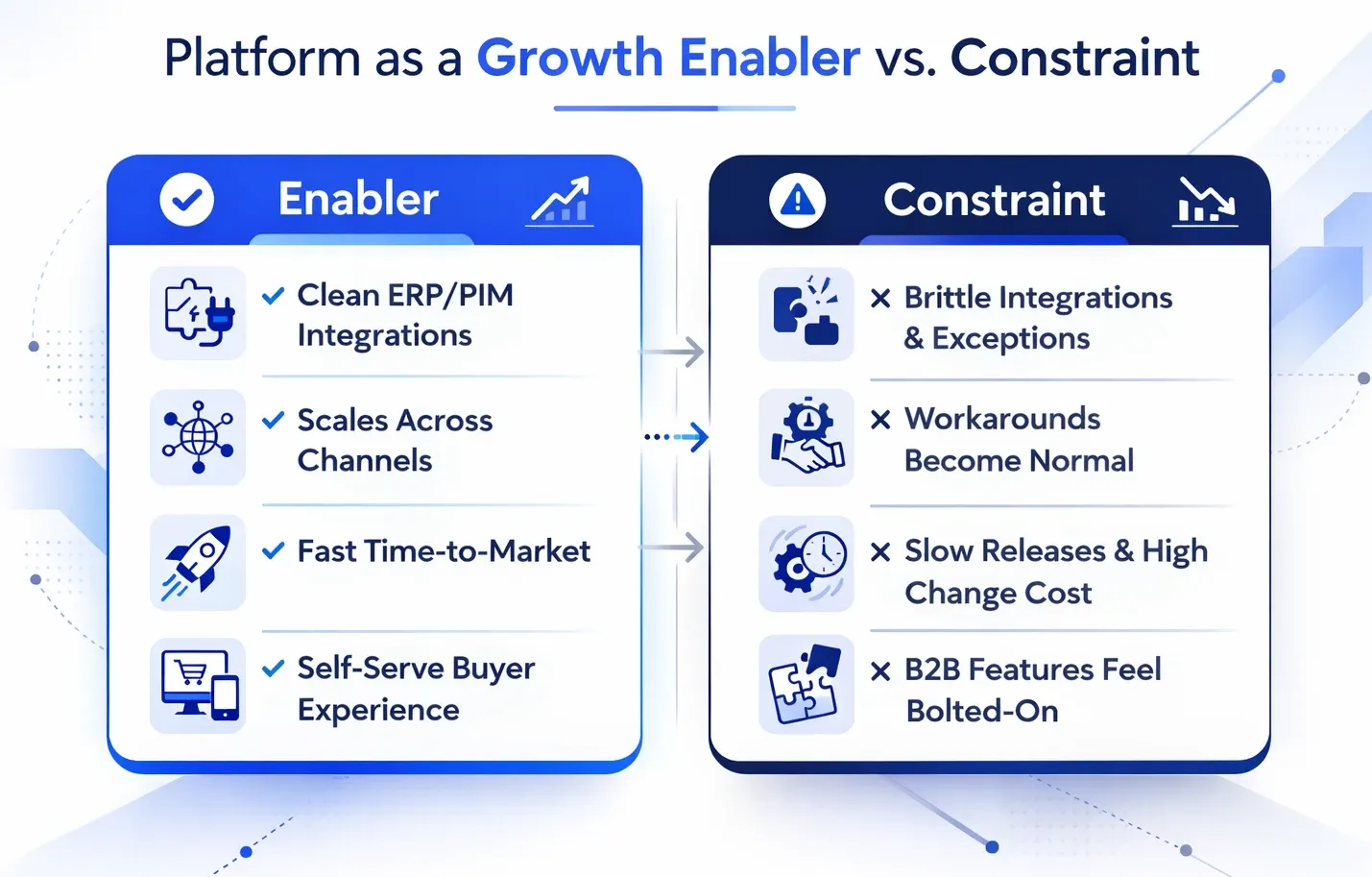
Below are four signs that show up again and again in legacy B2B commerce environments. For each one, we’ll cover what it looks like, why it happens, and what to do next.
If you’re already seeing 2–3 of the signs below, consider a short audit on B2B eCommerce platforms to quantify the impact and map your safest path forward.
Quick gut-check: If “workarounds” are now part of your standard operating procedure, you’re likely paying a hidden tax in speed, margin, and customer experience.
Sign 1: Integration and Scalability Limits
If your commerce platform can’t integrate reliably with the systems that run your business, it will always be fragile, no matter how good the storefront looks. This is typically the first “hard” sign that a platform has become a constraint.
ERP order + inventory sync breaks
When ERP sync is weak, the symptoms spread fast: wrong stock, delayed updates, order exceptions, and credit/payment terms that don’t match what buyers see online. You’ll often end up with “integration babysitters” whose job is to monitor exceptions and manually fix what should be automated.
- Orders fail to sync to the ERP or require manual correction
- Inventory is stale or delayed, especially during peak demand
- Customer-specific terms (tax, freight, payment, credit limits) don’t flow consistently
- The business “trusts the ERP,” not the storefront
Before you decide “integration is broken,” get specific: where do failures occur (order creation, pricing, fulfillment status, returns)? This is where a structured review, like Reveation’s eCommerce tech stack advisory, helps separate fixable issues from architectural limits.
PIM/catalog complexity becomes a blocker
Many older platforms weren’t built for deep catalog models or for content-as-a-differentiator. They treat product data like a “description field,” not a strategic asset that powers discovery and conversion. If merchandisers can’t ship catalog improvements weekly without engineering involvement, you’re operating below modern standards.
- Adding new attributes/specs requires developer work
- Category management becomes spreadsheet-driven
- Enriched content is hard to scale (CAD, spec sheets, compliance docs)
- Localization creates duplication and errors
Multi-channel expansion stalls
Channels aren’t just “new front ends.” They require clean data contracts, consistent pricing logic, unified customer identity, and stable inventory/order events. When the platform isn’t designed for that, every channel adds operational load instead of reducing it.
If channel expansion is a strategic priority, plan your architecture around it. In many cases, replatforming isn’t about shiny features; it’s about building a stable integration layer and data model that scales across channels. For an operating-model lens on this (especially integration governance), see Reveation’s newsletter: The 2026 B2B Commerce Playbook.
Sign 2: Rigid UX and Poor Buyer Experience
B2B buyers don’t compare you to other B2B sites; they compare you to the best digital experiences they use every day. If your platform forces a one-size-fits-all UX, you’ll feel it in conversion rates, call volume, and sales friction.
Account-based experiences are hard
True B2B requires account hierarchies, role-based permissions, and customer-specific logic (pricing, payment, shipping, approvals). Platforms that were designed for B2C-first commerce often treat these needs as “add-ons,” not core workflow. That gap turns into daily friction for buyers and sales teams.
- Permissions are too coarse (everyone sees everything, or nothing works right)
- Customer-specific catalogs require hacks or duplication
- Sales-assisted buying and self-serve buying don’t connect cleanly
Mobile and speed suffer
When platforms are over-customized, performance and UX often degrade together. Search is especially revealing: if it can’t handle synonyms, spec-based filtering, and messy B2B product data, buyers will bounce. Treat search and product discovery as revenue infrastructure, not “a UI feature.”
If you want a clear view of where discovery is heading, Reveation’s breakdown of B2B eCommerce trends reshaping 2026 (product discovery) is a useful benchmark.
Self-serve gaps create hidden costs
Self-serve isn’t just about convenience; it’s cost-to-serve, retention, and speed. If customers can browse but can’t manage their account, reorder easily, view invoices/terms, or track orders, you’ll see it as avoidable support volume and slower repeat purchasing.
Simple diagnostic: List the top 10 reasons buyers contact your team. If 5+ should be self-serve, your platform is likely driving unnecessary cost and friction.
Sign 3: Slow time-to-market and high change cost
This is the sign that convinces leadership. When the platform makes change expensive, the business becomes less competitive because you can’t adapt fast enough.
Every “small” change becomes a project
Over time, customizations accumulate in ways that make behavior unpredictable. Testing becomes harder, release confidence drops, and teams slow down to avoid breaking production. When “minor” improvements take weeks and releases become rare, the platform is the bottleneck.
- Lead time from idea to production keeps increasing
- Releases need heavy QA and still ship with hotfixes
- Teams avoid touching critical flows because they’re fragile
If you want a strategic framing for this, Reveation’s take on why flexible eCommerce platforms will win big is essentially a time-to-market argument disguised as “platform strategy.”
Customizations create compounding maintenance debt
Custom work isn’t inherently bad. The problem is when customizations substitute for core capabilities the platform should provide—pricing logic, permissions, workflows, and integrations. That’s when upgrades stall and knowledge becomes trapped in a few developers (or a single vendor).
A useful exercise: inventory customizations and label them as differentiators (keep), compensators (remove), or accidents (replace). If compensators and accidents dominate, the replatforming signs are stacking up.
Vendor lock-in reduces flexibility (and increases cost risk)
Lock-in isn’t just commercial—it’s architectural. When your platform is tightly coupled to custom code and proprietary workflows, your options narrow. If it feels like you can’t swap components (search, CMS, pricing logic) without a major rewrite, that’s lock-in by dependency.
Sign 4: Inability to support modern B2B needs
Modern B2B commerce isn’t “B2C with bulk orders.” It’s relationship-based buying with complex pricing, negotiated terms, multi-user accounts, and repeat workflows. If your platform can’t support these cleanly, your digital channel will plateau.
Pricing complexity becomes a spreadsheet operation
When customer-specific pricing lives outside the platform, you get margin surprises, quote/order mismatches, and internal mistrust. This is one of the most common eCommerce platform limitations that quietly blocks scale.
Quoting/RFQ workflows don’t fit
Quoting is a workflow problem, not a page problem. It needs structured states (request → configure → price → approve → convert → fulfill) and clear handoffs across systems. If your platform can’t represent those states without heavy customization, that’s a clear signal you’ve outgrown it.
Portals + personalization lag behind expectations
Strong portals reduce support load while improving retention. If “My Account” can’t manage users, ship-to locations, saved lists, invoices, or approvals, it’s not a portal; it’s a thin history page. That gap pulls your customer service and sales teams into tasks buyers expect to self-serve.
AI-ready foundations are missing
AI doesn’t fix broken foundations. If product data is inconsistent, search is weak, and content isn’t structured, “AI initiatives” become demos instead of outcomes. Your platform and data model should enable AI-assisted discovery, not block it.
If you’re evaluating options, avoid vendor checklists and compare paths based on outcomes. This guide on B2B eCommerce solutions for replatforming is a solid starting point.
Common “fixes” that fail
When platform pressure builds, teams often reach for quick fixes. They can help short-term, but many create more coupling, more tool sprawl, and more cost to change. Here are the patterns we see most often.
Decision lens: Repair vs. modernize vs. replatform
The goal isn’t perfection, it’s a path that reduces risk while restoring speed. Use this matrix to align stakeholders on what “next” should actually mean. If you want help running the evaluation, Reveation also offers B2B eCommerce consulting for strategy and selection.
Repair (optimize current platform)
Best when… Core platform is sound; issues are isolated (e.g., one integration)
Red flags if you choose it: You’re fighting fundamental limits (pricing, permissions, workflow)
Typical outcome: Short-term stability, limited long-term flexibility
Modernize (selective upgrades + architecture cleanup)
Best when… You can decouple components (search/PIM/CMS) and simplify
Red flags if you choose it: Customizations are deep; upgrades are risky; lock-in is high
Typical outcome: Better performance and UX, moderate time-to-market gains
Replatform (new core commerce foundation)
Best when… Multiple signs are present; the change cost is rising; growth is blocked
Red flags if you choose it: You lack clear requirements, data readiness, or rollout plan
Typical outcome: Restored speed + scalable integrations + stronger buyer experience
A practical rule: if you’re seeing integration fragility, great change cost, and modern B2B feature gaps, repairs won’t be enough. That’s when replatforming becomes the most conservative move, not the most aggressive one.
Get clarity before you rebuild more workarounds
When a platform is holding you back, the symptoms show up everywhere: integration exceptions, buyer frustration, slow releases, and brittle customizations.
The business can keep compensating, but it will get more expensive every quarter. The fastest path to growth is usually the one that restores both speed and stability.
If you’re seeing these replatforming signs, the next step isn’t “pick a new platform.” The next step is to document requirements, quantify operational drag, and choose a rollout plan that reduces risk. If you’re exploring implementation paths, Reveation’s Shopify Plus implementation partners page is a helpful snapshot of how teams approach speed-to-market safely.