See where Copilot helps your migration team move faster, where it should stay out, and when Reveation should step in for the ecommerce, ERP, and workflow complexity.
You are moving B2B customers from phone orders, email threads, rep-managed quotes, and manual account updates into a new ecommerce portal.
Sales has pricing exceptions in spreadsheets. Operations knows fulfillment rules that never made it into a formal document. Finance needs payment terms to stay accurate.
IT needs the ERP connection to work without slowing orders down. Customer service needs answers before customers start asking questions. Leadership wants the migration to move forward, but nobody wants AI making risky business decisions.
That is the moment Microsoft Copilot for business can help. Not by migrating the platform. Not by approving pricing logic. Not by replacing your ERP, ecommerce team, or implementation partner.
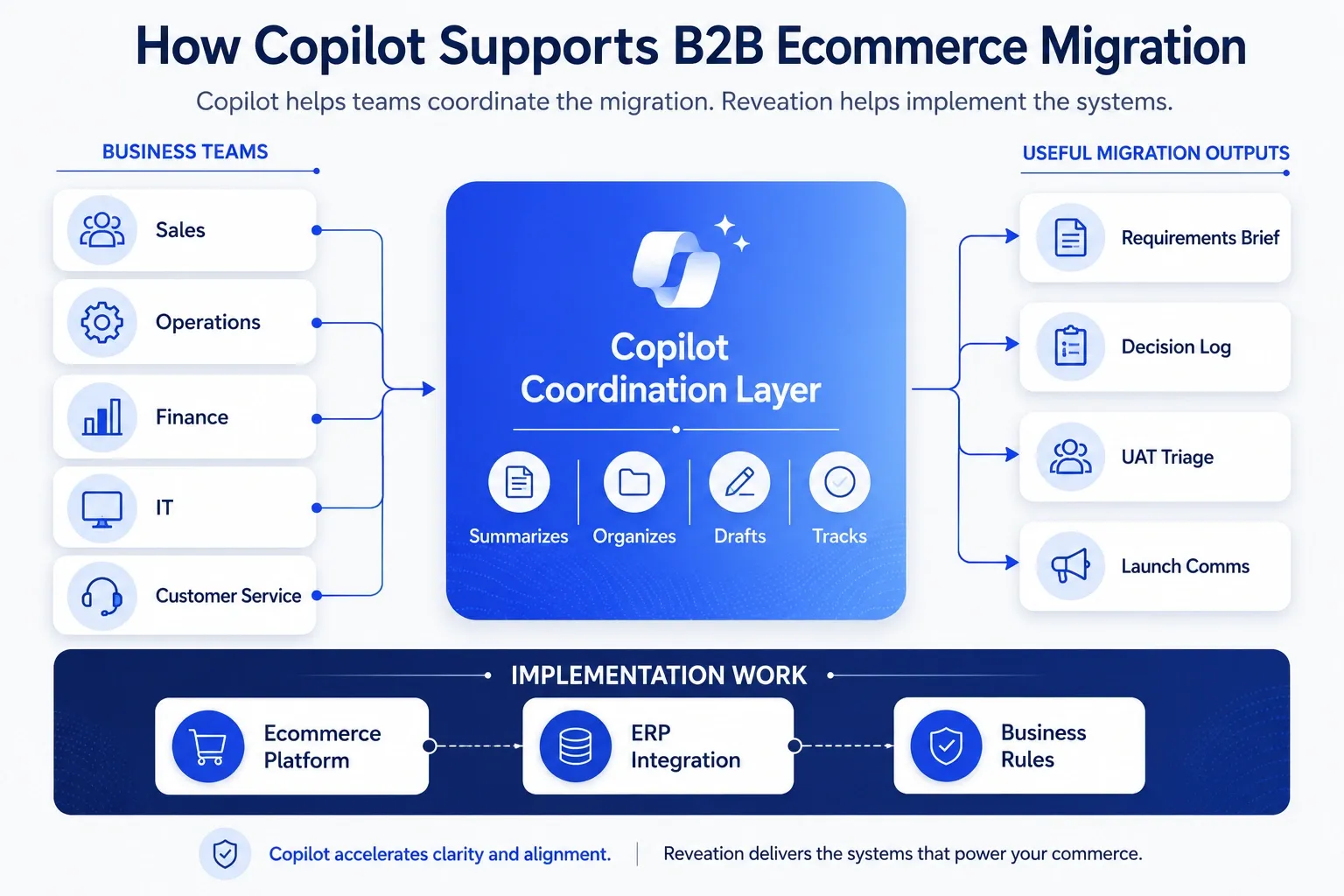
Copilot helps your team keep the migration work organized. It turns meetings into decisions, scattered notes into action lists, UAT feedback into priorities, and launch pressure into clearer communication.
At Reveation, we do not treat Copilot as a shortcut for ecommerce migration. We treat it as a support layer around the human work that usually slows migration down.
What you will get here: a practical way to use Copilot during B2B ecommerce migration, copy-paste prompts your team can reuse, outputs worth saving, and a clear line between Copilot work and implementation work.
Microsoft describes Copilot for small and medium businesses as AI integrated into familiar Microsoft 365 tools. That makes it useful for migration coordination because most project work already happens in meetings, documents, spreadsheets, email, and shared files. Microsoft 365 Copilot for
Small and Medium Business position it around everyday business work, not ecommerce platform execution.
Where Copilot Fits
Use Copilot for the work around the migration. It helps your team organize, summarize, draft, compare, and follow up. That matters because SMB migrations usually involve many people who each know one part of the business.
Copilot fits best when your team needs help with meeting summaries, requirements cleanup, decision logs, UAT notes, launch communication, training drafts, internal FAQs, and follow-up tasks.
It does not replace your ecommerce platform, ERP partner, QA process, data owner, or business owner. If your migration includes customer-specific pricing, ERP inventory, product catalogs, account-based buying, order approvals, and customer portals, you still need structured ecommerce implementation work.
We cover that broader migration path in our B2B ecommerce migration checklist for distributors and wholesalers. This page focuses on the AI-assisted team workflow around that work.
Why SMB Migrations Stall
Most SMB migrations do not stall because the team lacks effort. They stall because the work moves through too many informal channels.
A customer exception sits in a rep’s inbox. A pricing rule lives in finance’s spreadsheet. An ERP limitation comes up in one meeting but never reaches the platform team. Then UAT starts, and everyone sees the gaps at once.
| Migration problem | What usually happens | How Copilot helps |
|---|---|---|
| Requirements stay scattered | Notes live in emails, calls, chats, and spreadsheets. | Copilot turns notes into structured summaries. |
| Pricing rules confuse teams | Sales, finance, and ERP owners explain rules differently. | Copilot creates open questions and decision logs. |
| UAT feedback gets noisy | Teams mix bugs, preferences, and training issues together. | Copilot groups feedback by theme and urgency. |
| Launch communication starts late | Teams wait until go-live week to write instructions. | Copilot drafts internal updates and FAQs. |
| Adoption feels uneven | Sales and service keep using old workarounds. | Copilot creates role-based training notes. |
The value does not come from “using AI.” The value comes from cleaner handoffs during a high-pressure migration.
Keep Copilot Away From Risk
Copilot can help your team think, write, summarize, and organize. It should not make final decisions on technical design, customer rules, data accuracy, security, or go-live approval.
Your team should review every output before it reaches customers, systems, or leadership.
| Copilot can support | Copilot should not own |
|---|---|
| Summarizing stakeholder meetings | ERP integration logic |
| Drafting test scripts from requirements | Data validation approval |
| Organizing UAT feedback | Customer-specific pricing rules |
| Creating launch FAQs | Security and access decisions |
| Turning notes into task lists | Platform architecture |
| Drafting internal updates | Go-live approval |
Use Copilot to speed up preparation. Keep humans accountable for accuracy and risk.
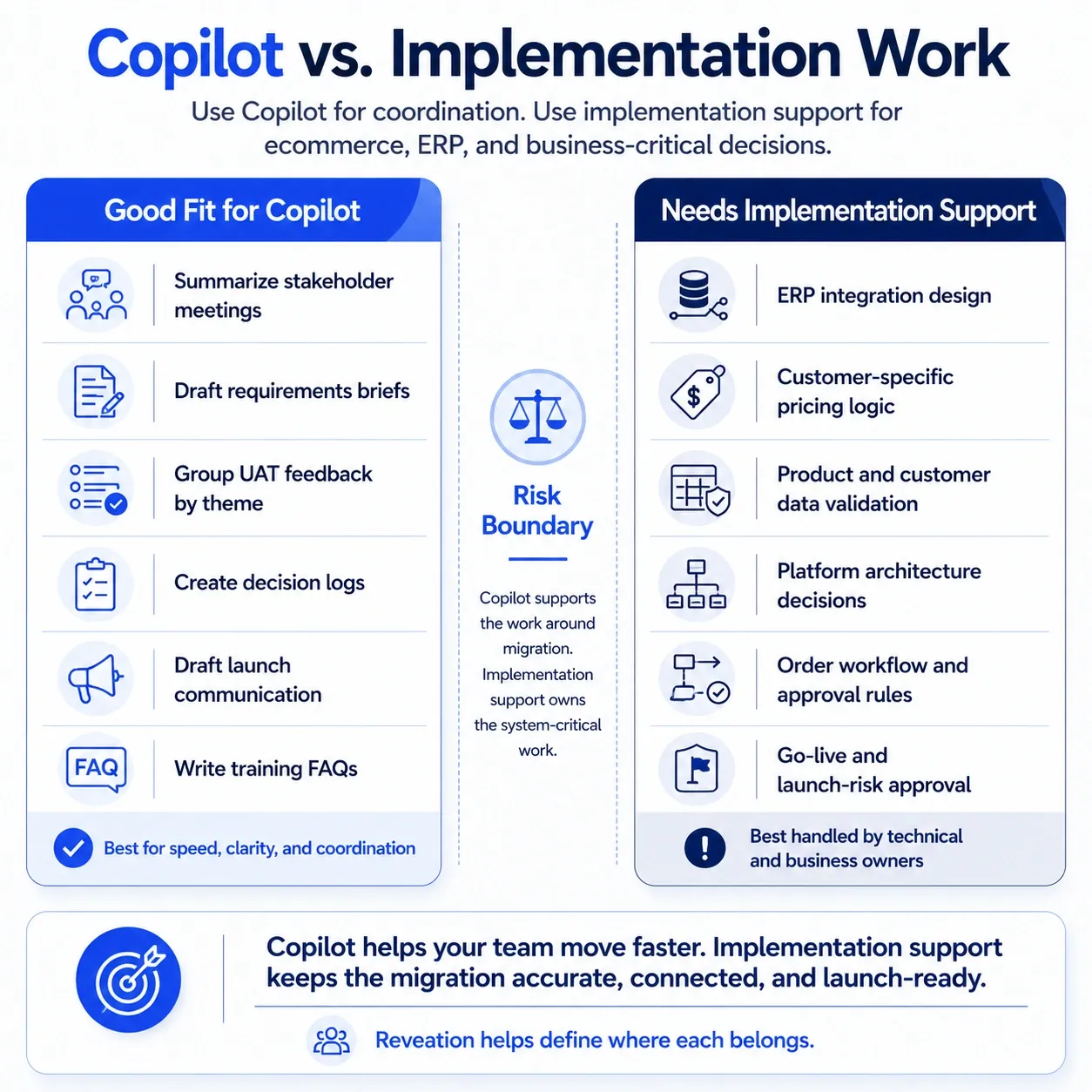
If your workflow needs system actions, business rules, or deep integration, Copilot may not be enough. We explain that decision point in our Microsoft Copilot vs custom AI breakdown, where we compare productivity support with business-specific AI workflows.
Use Copilot by Stage
Do not tell your team, “Use Copilot to be more productive.” That instruction creates random usage and weak results.
Give each team a specific migration task and a specific output to create.
| Migration stage | Copilot use case | Output to save |
|---|---|---|
| Discovery | Summarize stakeholder calls. | Requirements brief |
| Planning | Turn notes into open decisions. | Decision log |
| Data cleanup | Group catalog or customer data issues. | Cleanup tracker |
| Build | Summarize sprint updates. | Weekly risk summary |
| Testing | Cluster UAT feedback. | Issue priority list |
| Launch | Draft internal and customer updates. | Launch communication pack |
| Post-launch | Summarize support patterns. | Adoption improvement list |
This table gives your team a practical starting point. Pick one stage, create one saved output, and expand after the team sees value.
Start With Discovery
Discovery creates the raw material for the migration. It also creates confusion when nobody captures decisions the same way.
Use Copilot after stakeholder calls to turn rough notes into a clear migration brief.
Prompt to use
Summarize these migration notes for a B2B ecommerce project. Organize the output into business requirements, open questions, pricing rules, ERP dependencies, customer experience concerns, risks, and next actions. Flag anything that needs confirmation from sales, operations, finance, or IT.
Save the output as a requirements brief. Share it before the next meeting. This habit helps your team avoid repeated conversations.
Clean Up Data Work
B2B ecommerce migration depends on product, customer, pricing, and account data. Most SMBs know their data has issues. They just need a better way to group the cleanup work before it slows the project.
Prompt to use
Review these catalog cleanup notes. Group the issues into missing data, inconsistent naming, duplicate items, pricing questions, image or document gaps, ERP mismatches, and items that need business owner review. Create a priority list based on migration risk.
Do not let Copilot approve the data. Let it help your team see the cleanup work clearly.
For complex B2B commerce environments, we help teams connect ecommerce decisions to portals, ERP, customer accounts, pricing, inventory, and order workflows through our B2B Commerce & Customer Portals work.
Sort UAT Faster
UAT gets messy because users report everything at once. A sales rep may report a bug, a missing training step, a pricing exception, and a personal preference in the same message.
Copilot helps your project lead sort those notes before the implementation team reviews them.
Prompt to use
Organize this UAT feedback for a B2B ecommerce migration. Separate true defects, data issues, training questions, change requests, pricing concerns, account access issues, and launch blockers. Create a table with owner, severity, next action, and recommended follow-up question.
That output gives the team a cleaner triage view. It also helps everyone stop treating every comment like a launch blocker.
Prepare Launch Comms
Launch week tests the people side of migration. Sales needs to explain what changed. Customer service needs answers. Operations needs escalation paths.
Customers need simple instructions. Leaders need confidence that the team can handle the first wave of issues.
Prompt to use
Create a launch communication pack for a B2B ecommerce migration. Include an internal sales update, customer service talking points, a customer email draft, a short FAQ, and a list of issues that should escalate to the ecommerce team. Keep the tone clear, practical, and calm.
Review every line before you send anything. Your team knows the customer relationships, account exceptions, and launch risks better than AI does. Copilot creates the first draft; your people make it accurate.
For more practical workflow ideas, our article on Microsoft 365 Copilot automations that actually work shows how teams can connect Copilot to daily work instead of treating it like a one-off chat tool.
Save These Outputs
Do not let useful Copilot work disappear inside chat history. During migration, your team should save the outputs that reduce repeated work.
These assets create project memory.
| Save this | Why it matters |
|---|---|
| Requirements brief | Aligns sales, operations, finance, IT, and leadership. |
| Decision log | Stops the same debate from coming back every week. |
| ERP dependency list | Helps technical teams focus on integration risk. |
| UAT issue tracker | Separates launch blockers from nice-to-have changes. |
| Launch communication pack | Helps sales and service explain the change. |
| Training FAQ | Reduces confusion after go-live. |
| Post-launch improvement list | Turns support patterns into future enhancements. |
This is where Microsoft Copilot for business becomes useful to SMBs. It helps the team remember what it already decided.
Measure Real Value
Do not measure Copilot value only by usage. A team can use Copilot often and still produce weak results.
At Reveation, we look for workflow improvement, not license activity alone. Our Microsoft Copilot ROI article explains why Copilot value comes from focused use cases, baseline measurement, and better business outcomes.
For a B2B ecommerce migration, track simple signals:
- Fewer repeated meetings
- Faster UAT triage
- Cleaner decision tracking
- Faster launch communication
- Better sales and service adoption
- Fewer missed follow-ups
- Less project admin time
You do not need a complex ROI model at the start. Pick two or three workflow metrics. Compare the before-and-after experience. Then decide where Copilot deserves a bigger role.
Know When You Need More
Copilot works well when people need help with documents, meetings, summaries, analysis, and communication. You need more than Copilot when the workflow requires system actions, business rules, repeatable automation, or integration.
For example, Copilot can summarize pricing exceptions, but it should not enforce contract pricing inside your ecommerce platform.
| Need | Best fit |
|---|---|
| Summarize meetings | Copilot |
| Draft launch emails | Copilot |
| Organize UAT feedback | Copilot |
| Trigger system workflows | Automation |
| Apply business rules | Custom AI or platform logic |
| Connect ERP, ecommerce, and CRM workflows | Implementation and integration support |
| Build AI experiences into the portal | Custom AI or agentic workflow |
If your migration touches transaction flow, pricing, inventory, customer data, or fulfillment, bring in technical support early.
Our B2B ecommerce implementation services focus on complex integrations, ERP connectivity, and platform deployment, so the work does not rely on prompts where it needs architecture.
Picture This in Texas
Picture a Houston industrial distributor moving repeat buyers from phone and email orders into a self-service portal.
Sales knows the top customers and pricing exceptions. Operations knows shipping rules. Finance owns payment terms. IT understands ERP limits. Customer service knows the questions buyers ask every week.
Without structure, migration meetings create long conversations and scattered follow-ups. With Microsoft Copilot for business, the team can summarize every decision meeting, build a pricing exception log, group UAT feedback, draft sales training notes, and create customer FAQs before launch.
The migration team still makes the decisions. Copilot helps everyone work from the same information. That is the practical win.
Check Readiness First
Before you bring Copilot into the migration workflow, check the basics.
| Question | Good sign | Risk sign |
|---|---|---|
| Do we know which teams will use Copilot? | Sales, ops, IT, finance, and service each have clear use cases. | Everyone gets access with no workflow plan. |
| Do we know what outputs we want? | Requirements brief, decision log, UAT tracker, and launch FAQ. | Random summaries with no owner. |
| Do we have clean source materials? | Notes, transcripts, spreadsheets, and project docs sit in shared locations. | Key information stays in private inboxes. |
| Do humans review outputs? | Owners approve decisions and risks. | Teams copy AI output without checking. |
| Do we track value? | We measure time, clarity, and issue resolution. | We only track usage. |
Start small. Pick one migration stage. Create one reusable output. Teach one team how to use it well. Then expand.
How Reveation Helps
Microsoft Copilot for business can help Texas SMBs manage the messy middle of B2B ecommerce migration. It helps your team turn meetings into decisions, notes into action lists, UAT feedback into priorities, and launch pressure into clear communication.
It does not replace your migration partner, ERP logic, QA process, or business judgment.
At Reveation, we help SMB and mid-market teams plan, implement, and improve B2B ecommerce systems without turning the project into chaos. We can help you map the migration work, define where Copilot fits, handle ecommerce and ERP complexity, and move your team toward launch with less friction.
If your team wants to use Copilot without adding more confusion, Reveation can help you sort out what belongs in Copilot, what belongs in your ecommerce platform, and what needs deeper automation or integration. Our Austin B2B ecommerce solutions support Texas teams that need practical help with ERP-connected commerce, buyer portals, and AI-enabled workflows.