

Mid-market distributors do not move platforms because they want a fresher homepage. They move because buyers want faster ordering, sales teams need less manual cleanup, and legacy portals keep turning simple changes into full projects.
Shopify B2B replatforming can help, but the storefront does not carry the project alone. The team must protect pricing, ERP logic, inventory trust, buyer habits, and sales workflows before launch. We map those rules first so the new experience supports how distributors actually sell.
Why Distributors Are Moving
B2B buyers expect speed, but distributor buying still includes account pricing, order history, invoice access, negotiated terms, and product availability. That mix creates pressure on teams that still rely on rep calls, PDF catalogs, shared inboxes, and disconnected portals.
Self-service pressure
Buyers want to reorder without waiting for a quote, email reply, or account manager callback. They still value the rep relationship, but they expect the portal to handle routine work. A good B2B storefront gives buyers speed while sales teams focus on complex accounts.
Legacy drag
Legacy portals often make every change slow. Teams wait too long for catalog updates, struggle to show accurate inventory, and fix pricing gaps by hand. That friction does not only hurt ecommerce; it affects reorder behavior, service confidence, and account growth.
Shopify’s appeal
Shopify positions B2B as native functionality for selling business-to-business through the Shopify admin and online store. It supports one blended store or a separate B2B-only store, and it lets teams personalize B2B buying by company needs such as pricing, products, payments, shipping, and store content through its B2B model. Shopify’s B2B documentation explains the core model.
That gives distributors a cleaner foundation, but it does not remove operational planning. We still need to decide which rules Shopify owns, which rules ERP owns, and which workflows need integration instead of app stacking.
The Risk Under the Storefront
Shopify B2B replatforming rarely fails because someone chose the wrong hero layout. It fails when the new site cannot reflect the rules that already run the business.
For distributors, ERP often controls final price, customer status, inventory, fulfillment rules, tax logic, and order validation. The storefront must expose the right rules at the right moment. Our article on B2B ecommerce replatforming breaks down why this work reaches beyond a platform swap.
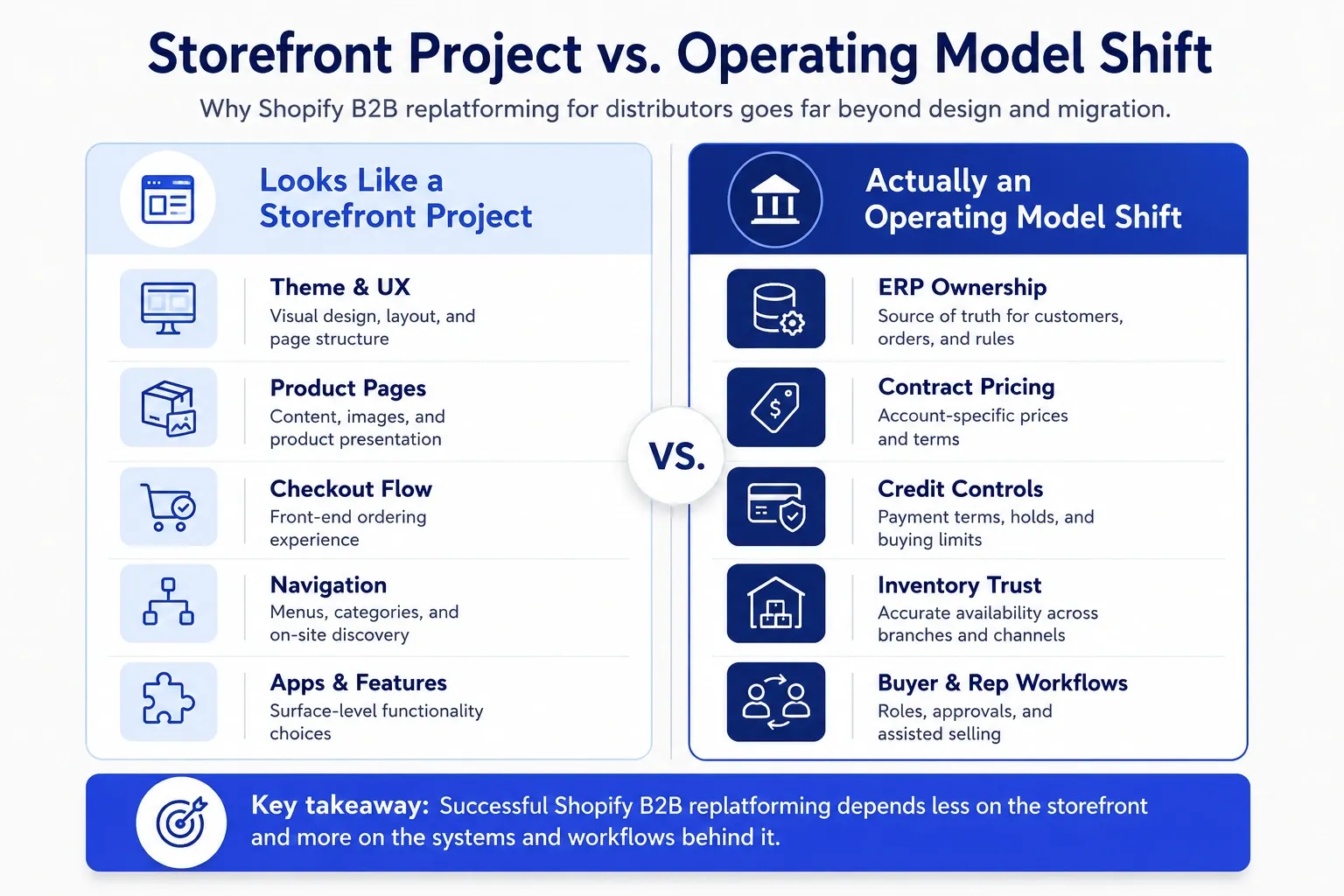
ERP owns the rules
Start with system ownership. Which system owns customer records? Which system owns inventory? Which system calculates final price? Which system blocks orders when credit status changes?
We usually answer those questions before platform configuration starts. Our piece on ERP and ecommerce alignment before replatforming shows why teams need ownership rules, sync logic, and process clarity before they build.
Personal pricing
Distributor pricing rarely stays simple. One buyer may see contract pricing, another may need branch-level pricing, and another may require quote review before checkout. Shopify supports company-based B2B setup, and company locations can carry their own pricing, payment terms, shipping address, billing address, tax details, and contacts.
That capability still needs a source of truth. We do not recommend building fragile pricing logic inside the wrong layer just because it looks faster at kickoff.
Inventory trust
Inventory trust drives adoption. Buyers will not keep using the portal if the site shows stock that cannot ship or hides stock a branch can fulfill.
Our Product Data & Integration Management work connects commerce, ERP, PIM, CPQ, and OMS flows so catalog, pricing, quotes, and orders share one operating rhythm.
Key point: Do not make the storefront reinvent the business. Make it expose the right rules at the right moment.
Fit Checks Before You Commit
Before you commit to Shopify B2B, test the business against the platform. Do not start with apps. Start with workflows.
We use a similar lens in our B2B ecommerce migration checklist for distributors and wholesalers: the highest risk usually sits behind the storefront, where pricing, ERP data, approvals, inventory, order history, and catalog complexity shape the launch.
| Requirement | Question to ask | Risk to validate |
|---|---|---|
| Catalog depth | Can buyers filter by SKU, spec, brand, application, and compatibility? | Buyers cannot find parts fast enough. |
| Contract pricing | Can the storefront show the right account price every time? | Customers lose trust or margins shrink. |
| Credit terms | Can the site respect account terms and credit controls? | Orders enter the wrong workflow. |
| Buyer roles | Can account admins, purchasers, and approvers use different permissions? | Customers bypass internal controls. |
| Rep workflows | Can reps support carts, quotes, and account activity? | Sales teams resist adoption. |
Catalog depth
Distributors often underestimate catalog work. A catalog may include thousands of SKUs, replacement parts, specs, compatibility notes, PDFs, images, and category rules that matter more than product copy.
Our article on B2B catalog management for distributors covers product visibility, SEO, and operational simplification because buyers search with specific terms, not generic category labels.
Contract pricing
Map every pricing scenario before design starts. Include customer-specific pricing, quantity breaks, promotions, quotes, branch pricing, regional exceptions, and overrides.
Then decide what Shopify displays and what ERP calculates. This step prevents teams from moving pricing logic into the wrong system.
Credit terms
B2B buyers often do not pay at checkout. Shopify supports B2B payment terms, and its documentation explains payment terms for company locations plus options for deposits and later payment. Shopify’s payment terms documentation gives the platform details.
Your team still needs to define how credit holds, overdue balances, and order limits affect checkout. Do not leave those decisions to launch week.
Buyer roles
A distributor account may include buyers, approvers, finance contacts, branch managers, and sales reps. Each role may need different access and a different view of orders, pricing, and approvals.
Shopify uses companies and company locations to structure B2B customers. Shopify’s companies documentation explains how company locations can carry their own settings.
Rep workflows
Sales reps need visibility, not replacement. They need to help customers reorder faster, recover stalled carts, review quote requests, and support complex buying.
Bring reps into discovery early. They know which customer habits keep revenue moving.
Where Launches Go Wrong
Most launch problems follow a pattern. Teams focus on the visible site first and find operational gaps too late.
| Mistake | What happens | Better move |
|---|---|---|
| Copying the old site | The team rebuilds legacy navigation and old friction. | Keep what buyers trust and remove what slows them down. |
| Late data cleanup | SKU, spec, image, and attribute gaps delay launch. | Start catalog cleanup before migration planning locks. |
| Apps first | Apps fill gaps the team has not defined clearly. | Define workflows, then choose native features, apps, integration, or custom build. |
| Broken habits | Customers struggle with login, reorder, approvals, or invoice access. | Pilot with real accounts and train before cutover. |
| Thin SEO planning | The team redirects top pages but loses long-tail SKU and spec visibility. | Protect categories, SKUs, specs, filters, and high-intent search paths. |
Old-site copy
A replatform gives the team a chance to remove friction. Do not rebuild the same confusing category tree, hidden reorder flow, or manual quote process just because buyers learned to tolerate it.
Keep behaviors customers trust. Remove steps that sales and operations keep explaining.
Late data cleanup
Product data can delay Shopify B2B replatforming faster than design. Missing specs, inconsistent categories, duplicate SKUs, weak descriptions, and incomplete images all reduce buyer confidence.
Clean the catalog before migration. Your data should help buyers search, compare, and reorder without calling support.
Apps first
Apps solve problems after the team defines the problem. They create complexity when teams use them to avoid decisions.
Start with the workflow. Then choose the simplest mix of Shopify native features, integration, custom development, and apps.
Buyer habits
B2B buyers build habits around reordering, saved items, approvals, invoice access, and rep communication. A launch can work technically and still fail adoption when it changes those habits too fast.
Pilot the experience with real customers. Watch where they hesitate.
A Safer Rollout Path
A safer rollout does not always move slower. It removes uncertainty before customer trust goes on the line.
We prefer phased validation when distributors manage complex accounts, branch-level rules, deep catalog data, or ERP-controlled workflows. That approach lets the team learn before every customer depends on the new portal.
01
One segment first
Pick a customer segment with enough complexity to test real workflows, but not so much risk that one issue disrupts major revenue. Good pilots often use loyal customers, one region, or one product category with predictable ordering.
Ask those users to test search, pricing, reorder, approvals, order status, and support handoffs. Their behavior will reveal gaps faster than internal demos.
02
Real accounts
Fake customers miss the messy details. Real accounts expose old pricing exceptions, unexpected permissions, stale addresses, data gaps, and order history issues.
Use live-like ERP data during testing. Confirm that the site shows the right products, prices, terms, inventory, and fulfillment options.
03
Phased cutover
A phased cutover gives the team time to learn. You can move one region, product line, customer group, or portal function before you move everyone.
| Rollout model | Best for | Watch out for |
|---|---|---|
| Big-bang launch | Simple workflows and low account variation | One issue can affect every customer. |
| Phased rollout | Complex accounts, ERP rules, and buyer groups | Teams must manage two experiences for a short period. |
| Parallel run | High-risk migrations with major operational dependencies | Costs rise if the old platform stays too long. |
After-launch signals
Launch day does not prove success. Adoption proves success.
Track login rates, repeat orders, search exits, quote requests, failed checkouts, rep-assisted orders, support tickets, and revenue through the new portal. These signals show where buyers trust the experience and where they still need help.
Rollout rule: Protect existing revenue first. Then improve the experience in measured steps.
When Shopify B2B Fits
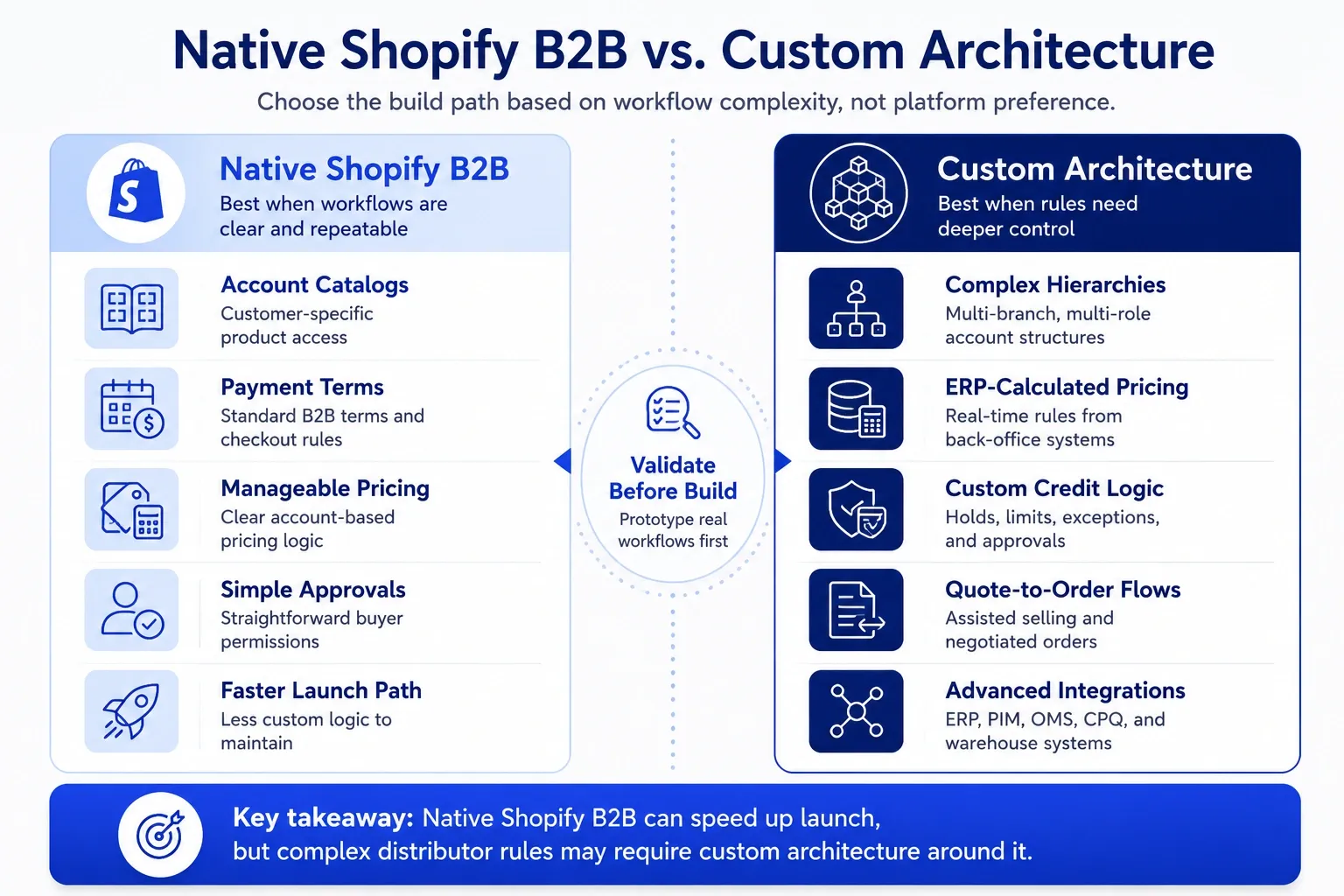
Shopify B2B fits many mid-market distributors when the team wants a modern buying experience, faster storefront management, and a clearer path to self-service. It works best when ERP can remain the source of truth without turning the storefront into a second ERP.
Our Shopify Plus implementation work for B2B commerce focuses on custom pricing, buyer-specific catalogs, ERP integration, and approval workflows because those decisions shape launch success.
| Signal | What it means | Move |
|---|---|---|
| Strong fit | ERP can own core rules while Shopify handles the buying experience. | Validate integration, catalog, and account workflows. |
| Needs validation | Pricing, quoting, or buyer roles vary heavily by account. | Prototype real scenarios before build commitment. |
| Look deeper | Procurement, hierarchy, or credit workflows require unusual control. | Compare Shopify Plus with more configurable or custom B2B options. |
Where it shines
Shopify B2B shines when distributors need faster storefront updates, account-specific catalogs, cleaner reorder paths, and a practical self-service experience. It also helps teams that want a commerce foundation for hybrid B2B and D2C models.
Where it strains
Shopify B2B needs more validation when the business depends on complex account hierarchies, unusual quoting rules, strict procurement flows, custom credit controls, or extreme pricing variation. Those needs do not always rule Shopify out, but they change the architecture discussion.
What to customize
Some distributors need custom architecture around pricing, checkout, search, ERP sync, or quote flows. Others can use more native Shopify B2B features with lighter integration.
We help teams compare fit before they lock the build. Our B2B ecommerce platform work helps leaders evaluate Shopify Plus, Virto Commerce, nopCommerce, WooCommerce, and custom approaches against real workflows.
Your Next Move
Shopify B2B replatforming works best when the team starts with operational truth. Before you pick apps, themes, or migration tools, map how customers buy, how ERP controls the business, and how sales teams support accounts.
Start with three questions: which customer workflows must work on day one, which rules should ERP own, and which product data gaps will hurt search or reorder behavior? Those answers will reveal the real scope faster than a feature checklist.
If SEO matters to your category, protect SKU and spec visibility before migration. Our article on Shopify Plus SEO for manufacturers and distributors explains why buyers often search by part number, material spec, and application instead of broad category terms.
We help distributors turn these decisions into a clear build plan. We map workflows, validate platform fit, connect ERP and product data, and plan rollout steps that protect revenue while buyers adopt the new experience.