
You launch the new storefront, and within an hour, your best customer calls because their contract price looks wrong.
Then sales asks why order history looks incomplete. Support opens tickets for invoice access. Operations spots inventory that does not match warehouse reality.
The real risk: That is the real risk in a Sana Commerce migration. You are not moving a simple online store. You are moving ERP-backed pricing, account rules, product data, inventory logic, order workflows, invoices, approvals, and customer expectations into a digital channel that your buyers will judge fast.
At Reveation Labs, we treat Sana Commerce migration as an operating model move, not a website move. We help you answer one practical question before building work goes too far: will your buyers, sales team, support team, operations team, and ERP environment still work smoothly on launch day?
Your ERP decides the migration
A Sana Commerce migration succeeds when your ERP data, business logic, and customer workflows support online buying without confusing buyers or internal teams.
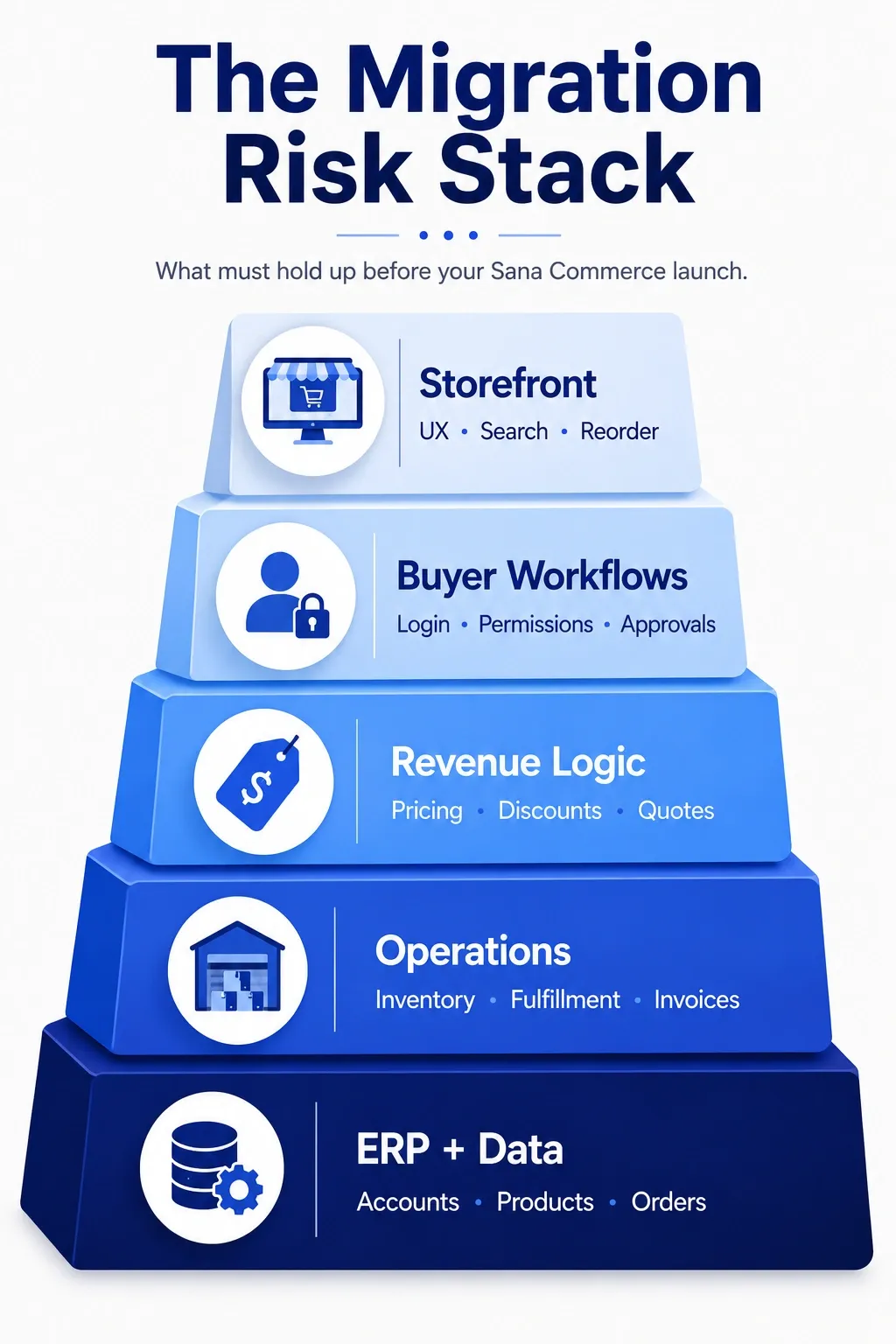
Sana Commerce is strongest when your ERP already runs the business. For many B2B teams, that means Microsoft Dynamics, SAP, or another ERP controls customer records, product data, contract pricing, inventory, orders, invoices, and fulfillment logic.
That changes the migration conversation. You do not just move pages, images, and product descriptions. You expose ERP-backed workflows to real customers.
Before you configure the storefront, map the ERP workflows buyers will touch online. Then decide which workflows are ready, which need cleanup, and which need stronger ownership.
| What to audit | What to check | Launch risk if missed | Owner |
|---|---|---|---|
| Customer accounts | Sold-to, ship-to, parent-child accounts, credit limits | Buyers see the wrong account data or cannot order | Sales Ops / ERP owner |
| Pricing | Contracts, discounts, customer groups, exceptions | Customers lose trust or call sales | Finance / Sales Ops |
| Inventory | Availability, warehouses, backorders, lead times | Buyers place orders you cannot fulfill | Operations |
| Product data | SKUs, variants, specs, documents, images | Search, product pages, and reorders create confusion | Product / Merchandising |
| Orders and invoices | Order history, invoice access, quotes, returns | Support volume rises immediately after launch | Customer service / ERP owner |
Important: If your ERP data looks messy internally, it will look worse online. Buyers will not care that the storefront works if prices, invoices, account permissions, or availability look wrong.
Our article on B2B ecommerce replatforming explains how teams can reduce risk before they commit to a new commerce platform.
Is Sana Commerce the right move?
Direct answer: Sana Commerce fits best when your ERP acts as the source of truth and your buyers need a reliable self-service experience tied to account, pricing, inventory, and order data.
Sana Commerce can make strong sense when your company wants ERP-integrated B2B ecommerce instead of another disconnected storefront. It often fits manufacturers, distributors, and wholesalers that rely on account-specific pricing, order history, inventory visibility, and repeat purchasing.
But the platform will not fix weak governance by itself. If your ERP data lacks ownership, your pricing rules live outside the system, or internal teams disagree on workflows, migration will expose those problems faster.
Strong fit
- ERP runs pricing, inventory, accounts, and orders
- Buyers need self-service ordering tied to ERP data
Risky fit
- Product data lacks structure or ownership
- Pricing rules live in spreadsheets outside ERP
A polished demo can hide gaps in pricing logic, account hierarchy, quote workflows, and internal usability. When you compare options, use real workflows instead of generic feature lists.
Our B2B ecommerce platforms comparison can help your team pressure-test Sana Commerce against workflow fit, integrations, scalability, and total effort.
Where migrations break first
Direct answer: B2B migrations usually break first in pricing, inventory, account mapping, permissions, product data, order history, invoices, and exception workflows.
Most B2B migrations do not fail because the homepage looks wrong. They fail because one operational workflow breaks trust.
A customer logs in and sees the wrong price. A buyer cannot reorder from history. A distributor sees inventory that does not match reality. A sales rep loses visibility into account activity.
Focus testing on the areas that create the most pain:
Customer-specific pricing: Test contract prices, discounts, volume breaks, and account exceptions.
Inventory and availability: Confirm in-stock, low-stock, backorder, discontinued, multi-warehouse, and restricted-item scenarios.
Product data: Validate SKUs, variants, specifications, safety documents, manuals, and images.
Buyer roles: Test approvals, permissions, spending limits, and multi-user accounts.
Order workflows: Check quotes, invoices, returns, order history, and reorder flows.
Migration mistake to avoid: Do not test with sample accounts only. Pull real customer scenarios from sales, support, finance, and operations, so your team can catch the issues buyers will actually experience.
Our B2B ecommerce migration checklist for distributors and wholesalers can help your team organize ERP, data, catalog, account, and launch readiness before the move creates customer-facing issues.
Clean data or carry the mess
Direct answer: Clean the data buyers will see first: customer accounts, product records, pricing rules, SKU structures, documents, order history, invoices, and permissions.
A Sana Commerce migration gives your team a choice. You can clean what buyers will now see, or you can move old data problems into a more visible channel.
Do not migrate everything by default. Decide what deserves to move, what needs cleanup, and what should stay archived.
Data migration decision lens
- Active customer accounts: Migrate, but clean duplicate records, outdated contacts, and bad account hierarchy.
- Product catalog: Migrate, but clean naming, specs, categories, images, and documents.
- Pricing rules: Migrate, but clean exceptions, expired discounts, and contract mismatches.
- Order history: Usually migrate, but clean broken mappings, missing fields, and duplicate records.
- Quotes: Migrate selectively, but clean status, expiration logic, and customer mapping.
Create a data owner matrix before migration starts. Every critical data type needs one accountable owner who can approve cleanup, mapping, and launch readiness.
Pricing is the real stress test
Test pricing with real customer accounts before UAT ends because wrong pricing damages trust faster than almost any other launch issue.
Pricing deserves its own section because it can damage trust fastest. Buyers may forgive a clunky page. They will not forgive the wrong contract price.
Your team should test pricing before UAT, during UAT, and again before launch. Do not wait until the final week.
Use real examples from your top customer segments:
- Standard customer price
- Contract price
- Volume discount
- Customer group discount
- Quote-based price
- Region-specific price
- Temporary promotion or rebate
- Exception price approved by sales
Then compare ERP output against storefront output. Ask Finance or Sales Ops to approve each pricing scenario before launch.
Practical test: Pick 25 high-value customers and run their top 10 reordered SKUs through the new experience. Compare contract price, discount logic, tax behavior, availability, and order confirmation against ERP records.
If your ecommerce, ERP, CRM, PIM, OMS, or data setup needs architecture review, our ecommerce tech stack consulting helps teams reduce avoidable integration debt before migration decisions become expensive.
What should stay in the ERP?
Keep transactional truth in the ERP and use Sana Commerce to improve how buyers access, understand, and act on that information.
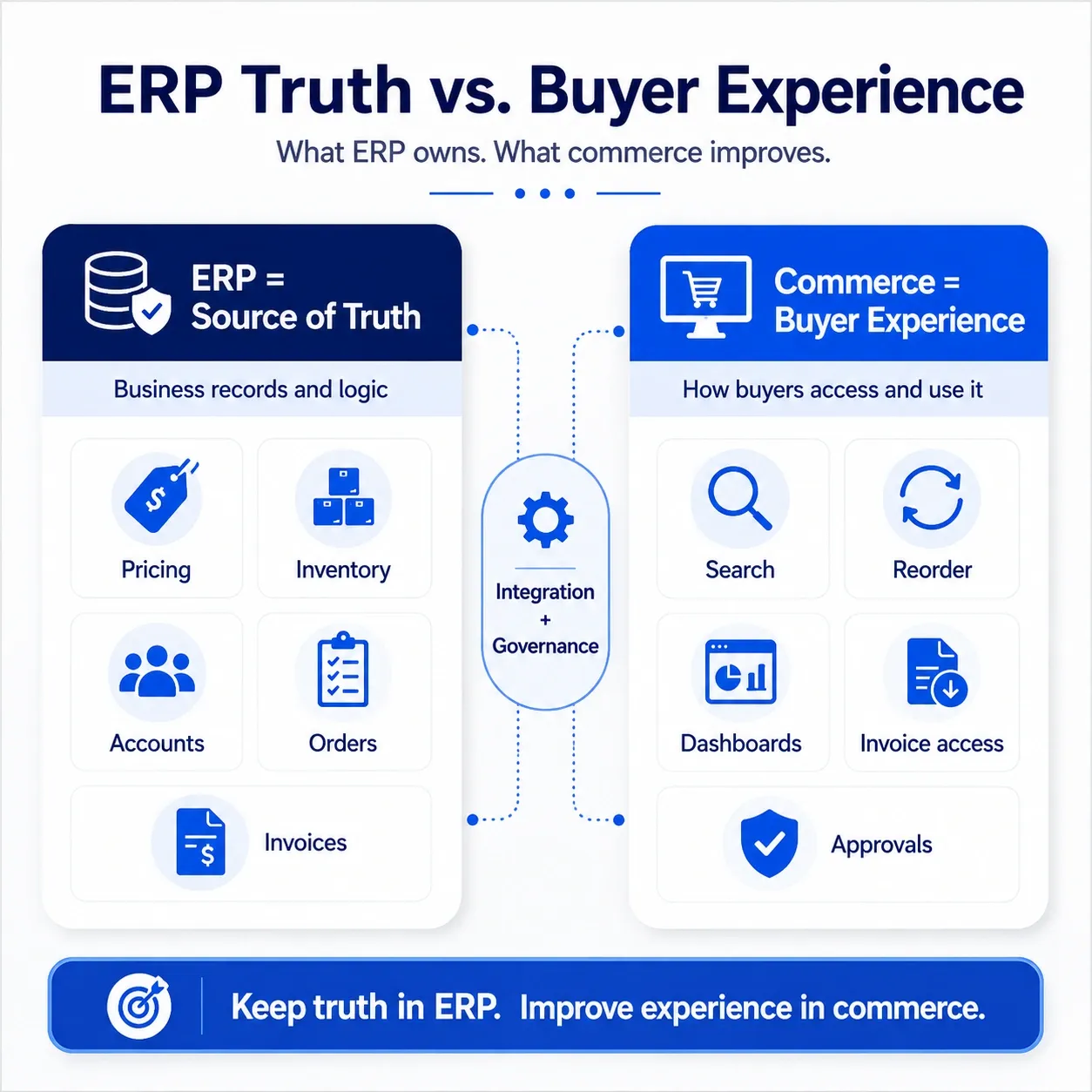
A common migration mistake starts with the wrong ownership model. Teams try to decide everything inside the ecommerce platform, even when ERP should remain the source of truth.
A better model separates transactional truth from buyer experience.
ERP should own
- Price rules, contracts, discounts
- Stock, warehouse logic, availability
- Order records and fulfillment status
- Customer records and credit rules
- SKU data and core attributes
- Invoice records
Ecommerce should shape
- Price display, explanations, and buyer clarity
- Availability messaging and reorder confidence
- Order tracking and reorder experience
- Account dashboard usability
- Merchandising, navigation, content, and search
- Download, search, and account access experience
This split keeps the business stable while improving the customer experience. Ask your team: where should the truth live, and where should the experience improve?
Big bang, phased, or parallel?
Choose big bang only when complexity is low, choose phased rollout when risk varies by customer group, and choose parallel run when revenue disruption would create serious business impact.
Your rollout model should match business complexity. Do not choose big bang because it feels faster. Choose it only when the risk truly fits.
Big bang
Best for: Low complexity, clean data, aligned teams
Biggest risk: One launch issue affects everyone
Recommendation: Use only after strong UAT and executive sign-off
Phased rollout
Best for: Complex accounts, multiple regions, many buyer types
Biggest risk: Longer coordination cycle
Recommendation: Start with a controlled customer group
Parallel run
Best for: High revenue risk, sensitive customers, complex ERP logic
Biggest risk: Extra operational effort
Recommendation: Use when disruption would hurt sales or service levels
For most B2B teams with complex pricing, ERP dependencies, or customer-specific workflows, phased rollout gives more control.
Our article on big-bang vs phased migration for B2B teams breaks down how to choose the safer rollout path based on complexity, data risk, and business impact.
Don’t launch until buyers can do these things
Direct answer: Your migration succeeds only when buyers can log in, see correct pricing, confirm availability, reorder, access invoices, use approvals, and get help without friction.
A migration only matters when buyers can complete real work without calling support. Test the experience from the buyer’s point of view before you let the full customer base in.
Use real accounts, permissions, and order scenarios. Then confirm these workflows:
- Can buyers log in without help?
- Can buyers see correct account-specific pricing?
- Can buyers see accurate inventory or availability messages?
- Can buyers reorder from past purchases?
- Can buyers download invoices?
- Can buyers use approvals and permissions?
- Can buyers request quotes or handle exceptions?
- Can sales reps see enough activity to support accounts?
- Can support teams answer order and inventory questions quickly?
Pause point: If any of these workflows fail, pause launch or reduce rollout scope. Your customers will not evaluate the migration based on internal milestones. They will evaluate it based on whether buying becomes easier.
When your migration also includes self-service account access, documentation, support, and customer operations, our B2B commerce and customer portal solutions help turn complex workflows into reliable digital experiences.
The launch plan nobody should skip
Direct answer: A strong launch plan needs real UAT scenarios, trained sales and support teams, named escalation owners, rollback triggers, and a 30 to 60 day stabilization plan.
A good launch plan includes more than a go-live date. It includes ownership, escalation, rollback, and stabilization.
Build your launch plan around real scenarios:
- UAT: Real customers, real pricing, real orders. Finds workflow issues before buyers do.
- Sales training: Account visibility, quote handling, exception paths. Prevents internal pushback.
- Support training: Login issues, order status, inventory questions. Reduces launch-day pressure.
- Rollback plan: Clear triggers and technical steps. Protects revenue when a critical issue appears.
- Escalation path: Named owners by issue type. Speeds resolution.
- Stabilization: 30 to 60 day monitoring plan. Catches adoption, data, and workflow issues.
Assign owners before launch week. A migration without ownership turns small issues into cross-functional confusion.
Migrate the business, not just the platform
Treat Sana Commerce migration as a business operating decision because your ERP, data, teams, buyer workflows, and rollout model all shape the launch outcome.
Sana Commerce migration works best when your team treats it as more than a technical move. You should clean the data buyers will see. You should validate pricing before it damages trust. You should test ERP workflows with real scenarios. You should choose a rollout model that protects revenue.
At Reveation Labs, we can take the heavy lift off your overloaded team. We assess ERP readiness, map B2B workflows, define migration scope, plan rollout, support implementation, and help your business avoid the launch issues that disrupt sales, operations, and customer experience.
If your team wants help evaluating the move, our B2B ecommerce platform services can help you plan and execute the migration with less risk.
Practical next step: Before you commit to scope, ask us to review ERP readiness, pricing risk, customer workflows, rollout model, and launch support needs. We can help you turn migration uncertainty into a clear execution plan.
Key takeaways
- Sana Commerce migration depends on ERP readiness, not just storefront design.
- Pricing, inventory, account permissions, invoices, and order history create the highest risk.
- Clean data before migration or buyers will see old problems in a new channel.
- Choose big bang, phased, or parallel rollout based on business complexity.
- Test with real customer scenarios before launch.
- Reveation Labs can assess, plan, and support the migration so your team protects sales, operations, and customer trust.