You are running Magento, and the site still takes orders. But every pricing update takes too long, every ERP change needs extra checking, and every new B2B request creates another workaround.
That is usually the moment when migration becomes more than a data move. A Magento to Virto Commerce migration should help your team decide what to keep, rebuild, simplify, or leave behind.
For B2B teams, the risk rarely starts with the storefront. It starts with contract pricing, customer-specific catalogs, company accounts, approval flows, ERP logic, invoices, tax, shipping, and order history.
Before teams scope the move, we recommend starting with a B2B ecommerce migration checklist that surfaces risks across pricing, catalog data, ERP integrations, inventory, workflows, SEO, and adoption. That early clarity helps the migration protect business continuity instead of simply changing platforms.
Why Leave Magento?
Most B2B teams do not leave Magento because one thing breaks. They leave because too many small problems start slowing the business down.
Your team may depend on extensions for pricing, custom modules for account rules, manual imports for catalog updates, and fragile integrations for ERP data. Over time, Magento can become less of a commerce platform and more of a patchwork operating layer.
That matters because B2B buyers expect fast reorder flows, accurate inventory, account-specific pricing, and self-service access. When Magento makes every improvement expensive or slow, your platform starts shaping the business in the wrong direction.
A Magento to Virto Commerce migration gives you a chance to reduce that drag. You only get that benefit when you redesign the right workflows instead of copying old workarounds.
Migration or Replatforming?
Migration
A basic migration moves data.
Replatforming
A replatforming effort improves how the commerce operation works.
Magento to Virto Commerce projects often need both. You may move products, categories, customers, selected order history, content, and URLs. But you should review pricing logic, account structures, approvals, quotes, integrations, and admin workflows before you rebuild them.
We break down this distinction in our article on B2B ecommerce replatforming. Migration transfers the system; replatforming resets the operating model.
Key idea: Keep the business rule, not the Magento workaround. Virto Commerce should reflect how your B2B operation needs to run next, not how Magento forced it to run before.
What Really Changes
Magento and Virto Commerce can both support ecommerce, but teams do not solve complexity the same way in each system. Magento projects often grow through extensions, theme customizations, and platform-specific workarounds.
In a Magento to Virto Commerce migration, your team should define modular services, integrations, B2B rules, and data ownership before implementation. That keeps the project focused on business outcomes, not one-to-one platform translation.
| Area | In Magento today | In Virto planning |
|---|---|---|
| Storefront | Theme-driven logic and custom frontend behavior | Buyer-role experience, catalog access, and self-service flows |
| Catalog | Attributes may include duplicates, legacy fields, or workaround values | Clean catalog structure before import |
| Pricing | Extensions, customer groups, ERP calls, or custom rules may affect price | Clear price ownership and contract logic |
| Accounts | Customer groups may hide pricing, access, and permission logic | Companies, buyers, roles, and account rules modeled intentionally |
| Checkout | Custom logic may support approvals, credit terms, or shipping rules | Only current business-critical checkout logic rebuilt |
| Orders | Historical data may sit in Magento while ERP owns fulfillment | Active history, archive needs, and ERP ownership defined upfront |
| Integrations | ERP, PIM, CRM, tax, payment, and shipping tools may connect unevenly | Source of truth and integration pattern agreed before build |
What Should Move
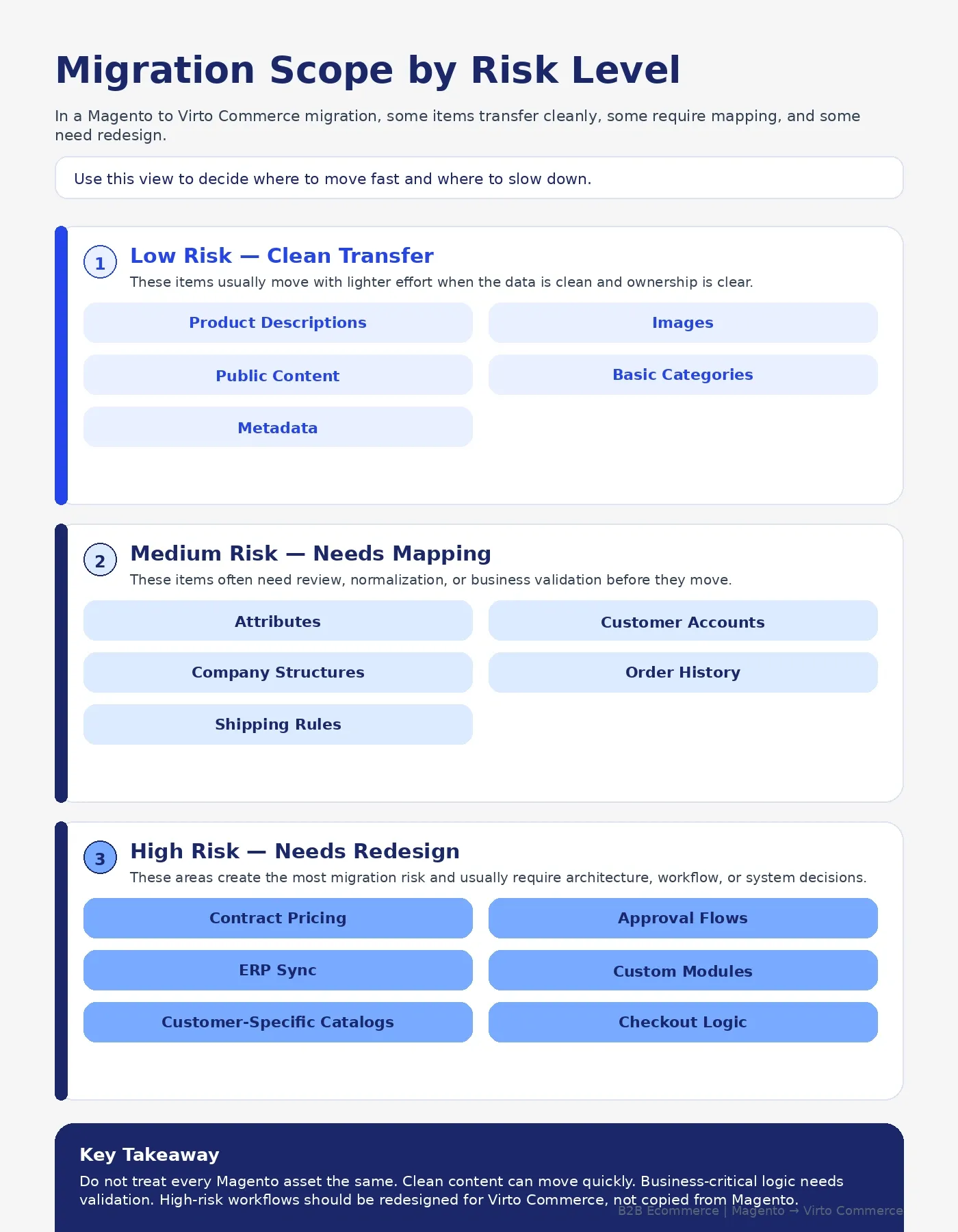
Move the data that still supports buying, fulfillment, reporting, compliance, or customer continuity.
That often includes products, categories, clean attributes, active customer accounts, company records, buyer users, selected order history, live pricing references, SEO URLs, and important content. You may also need invoices, saved lists, quotes, or reorder data when customers rely on them.
The goal is not to move the largest amount of data. The goal is to move the right data with clean ownership, clean structure, and clear business use.
Keep Clean Data
Start with products, SKUs, categories, customer records, and active accounts. Clean these before import because weak Magento data will not become useful inside Virto Commerce automatically.
Protect Active Workflows
Review reorder flows, account-specific pricing, approvals, quotes, and invoice access. These workflows often matter more to B2B buyers than the visual redesign.
Preserve Search Value
Keep URLs where you can. Redirect carefully where you cannot. Identify high-value Magento pages before launch week, not after traffic drops.
What Stays Behind
Some Magento data and logic should not move.
Old platforms collect clutter. You may find abandoned extensions, duplicate attributes, inactive customer groups, outdated catalog rules, unused CMS pages, old promotions, and custom modules nobody fully understands.
Treat every Magento item as a decision, not a default. A migration gives your team permission to stop carrying weight that no longer serves the business.
| Magento item | Best decision | Why it matters |
|---|---|---|
| Clean product data | Migrate | Buyers need accurate catalog and SKU data |
| Duplicate attributes | Clean or retire | Messy attributes create search, filter, and admin problems |
| Customer accounts | Migrate and validate | B2B buyers need continuity |
| Old customer groups | Review | Some groups hide pricing or permission logic |
| Contract pricing | Rebuild carefully | Price logic needs validation before launch |
| Magento extensions | Replace, rebuild, or retire | Extensions rarely transfer cleanly into a new architecture |
| Old order history | Migrate selectively | Not all history belongs in the active commerce database |
| Abandoned modules | Retire | Unused logic adds cost and launch risk |
Retire The Workarounds
Do not rebuild an old extension because the business has used it for years. Ask what job it performs today, who uses it, and what happens if you remove it.
Keep The Rules
If a custom module controls contract pricing, approval routing, or ERP order logic, do not ignore it. Rebuild the business rule more cleanly.
Remove Dead Weight
If no one owns the customization, no one can explain it, and no workflow depends on it, it probably doesn't belong in Virto Commerce.
What To Rebuild
Rebuild the workflows that define your B2B buying experience.
That often includes customer-specific pricing, company account roles, approval flows, quote workflows, saved lists, reorder paths, credit terms, shipping restrictions, and ERP-driven inventory or order status. These workflows may live across Magento, ERP, spreadsheets, middleware, and staff habits today.
In a Magento to Virto Commerce migration, this is where teams should stop translating Magento settings one-to-one. Model the workflow around how B2B buyers and internal teams actually need to work.
We explain this further in our article on Virto Commerce modular architecture for B2B ecommerce, where modular commerce helps teams support complex pricing, catalogs, and workflows without forcing every capability into one rigid layer.
Rebuild Real Rules
A real rule affects how customers buy or how teams fulfill orders. Examples include customer-specific pricing, account approvals, credit limits, regional catalog access, and quote-to-order flows.
Skip Fake Complexity
Some complexity only exists because Magento could not support the workflow cleanly. Do not rebuild that pain.
Validate With Users
Ask sales, service, finance, ecommerce, and operations teams to confirm which rules still matter. Then test those rules with real customer scenarios before launch.
Data That Matters
Magento B2B migration data goes beyond products and passwords. You need to map the objects that keep buying, pricing, fulfillment, and customer trust connected.
You do not need to map every field on day one. Start with the data that affects revenue, account continuity, order accuracy, and operational control.
- Products, SKUs, categories, attributes, images, documents, and specifications
- Customer records, company accounts, buyer users, roles, permissions, and addresses
- Customer-specific catalogs, price lists, tier pricing, contract pricing, and discounts
- Quotes, saved carts, reorder lists, invoices, order history, and credit terms
- Shipping methods, tax rules, payment methods, and approval requirements
- ERP IDs, PIM IDs, CRM IDs, warehouse references, and order status mappings
- SEO URLs, redirects, metadata, canonical tags, and high-value content pages
The most important field may look ordinary. An ERP customer ID or product reference can decide whether pricing, inventory, invoices, and orders stay aligned after launch.
Pricing Can Break
Pricing deserves its own section because B2B pricing breaks quietly.
A customer may log in, see the wrong catalog, receive the wrong discount, miss a contract price, or lose access to negotiated terms. Even a small pricing error can damage trust because buyers expect their ecommerce account to reflect their agreement.
Before you migrate from Magento to Virto Commerce, define where pricing lives. Does Magento calculate it today? Does the ERP own it? Do sales teams maintain exceptions? Do extensions apply discounts? Do customer groups control catalog access?
| Pricing question | Why it matters |
|---|---|
| Who owns base price? | Prevents conflicts between commerce and ERP |
| Who owns contract price? | Protects negotiated customer agreements |
| Who owns tier pricing? | Keeps volume discounts accurate |
| Who owns promotions? | Avoids double discounts or missed offers |
| Who owns catalogs? | Controls what each account can buy |
| Who validates checkout price? | Reduces order corrections after submission |
If pricing comes from multiple systems today, fix that during the migration plan. Do not wait for testing to reveal that three systems calculate price differently.
Extensions Need Decisions
Magento extensions do not migrate into Virto Commerce as-is. Each one needs a decision.
Start with an extension inventory. List every extension, what it does, who uses it, what data it touches, what workflow depends on it, and whether the business still needs that function.
Then choose one of four paths:
Replace with Virto capability
Use when: Virto supports the need directly
Example: Catalog, pricing, roles, or workflow features
Replace with integration
Use when: A third-party system should own the function
Example: Tax, payments, shipping, search, or CRM
Rebuild custom functionality
Use when: The workflow creates real business value
Example: Quote flow, account logic, or custom approvals
Retire
Use when: The extension supports an old workaround
Example: Unused promotions, duplicate imports, or old checkout patches
We do not recommend rebuilding every Magento extension by default. We identify the business capability behind it first, then choose the cleanest way to support that capability in Virto Commerce.
Integrations Decide Success
Most Magento to Virto Commerce migration risk sits in integrations.
ERP, PIM, CRM, OMS, tax, payments, shipping, WMS, analytics, and customer service tools all shape the buyer experience. If those systems do not agree on product data, pricing, inventory, order status, invoices, and customer records, the new platform will not feel reliable.
We cover this in more detail in our article on Virto Commerce integration with existing systems. For Magento migrations, the core question stays simple: which system owns each business object?
| Business object | Likely owner | Migration question |
|---|---|---|
| Product data | PIM or ERP | Which fields should Virto receive and display? |
| Inventory | ERP or WMS | Does Virto need real-time, cached, or scheduled updates? |
| Customer records | ERP or CRM | Which system owns account changes? |
| Contract pricing | ERP or pricing engine | How does Virto request and validate price? |
| Orders | Virto and ERP | When does an order become final? |
| Invoices | ERP | Should customers view invoices in the portal? |
| Order status | ERP, OMS, or WMS | How often should customers see updates? |
Check Ownership First
Do not start with APIs. Start with ownership. Once you know which system owns each object, integration choices become much clearer.
Reduce API Noise
Do not call every system for every page load. Use caching, batch updates, event-driven flows, or scheduled syncs where they make sense.
Test Real Orders
Use real customer scenarios during testing. Include negotiated pricing, restricted catalogs, split shipping, tax rules, approvals, and ERP order confirmation.
Launch Path Matters
You do not need to launch every customer, region, brand, and workflow at once.
Some Magento to Virto Commerce migrations work best as a big-bang launch. Others need a pilot, phased rollout, or parallel run. The right path depends on complexity, customer risk, integration readiness, and how much operational change your team can absorb.
When teams need to compare rollout paths, we recommend reviewing the tradeoffs between big-bang and phased migration before go-live planning begins.
| Launch model | Best fit | Main risk | Avoid when |
|---|---|---|---|
| Big-bang | Smaller Magento footprint or firm deadline | Higher launch pressure | Pricing, ERP, or account logic still needs testing |
| Customer pilot | High-value B2B accounts need validation | Pilot customers may need extra support | You cannot isolate pilot customers cleanly |
| Phased by region | Multi-region operations | Parallel operations get complex | Shared pricing or inventory logic cannot split |
| Parallel run | High-risk workflows | More coordination and cost | Teams cannot maintain two flows temporarily |
SEO Needs Protection
Migration can hurt SEO when teams treat URLs as a final-week task.
Start URL planning early. Export Magento URLs, identify high-value pages, map redirects, preserve metadata where useful, review canonical tags, and test the staging site before launch.
After launch, monitor crawl errors, redirects, rankings, indexed pages, and organic traffic. SEO protection also protects customers because buyers may bookmark product pages, invoice areas, saved lists, or reorder flows.
Customers Need Continuity
Customers do not care that you changed platforms. They care whether they can still log in, find products, see the right price, place orders, and reorder without calling support.
Plan account continuity carefully. Confirm how users will access the new site, how authentication will work, which roles each buyer gets, and what order history they can see.
Saved lists, quotes, carts, invoices, and reorder flows deserve special attention. In many B2B businesses, these features drive repeat purchases more than homepage improvements.
Timelines Are Conditional
A Magento to Virto Commerce migration timeline depends on complexity, not just catalog size.
A smaller catalog with messy pricing and ERP dependencies can take more effort than a large catalog with clean data. The biggest timeline drivers include data quality, integration count, pricing rules, custom workflows, SEO footprint, user roles, testing cycles, and launch model.
A realistic project moves through these stages:
- Magento audit and extension inventory
- B2B workflow mapping
- Virto Commerce architecture planning
- Data cleanup and mapping
- Integration design
- Build and configuration
- Migration rehearsal
- User acceptance testing
- Cutover planning
- Launch and stabilization
Do not compress discovery to save time. Weak discovery creates more rework later.
Biggest Mistakes
Most migration mistakes start with one assumption: “We already know how Magento works.”
Teams often know how Magento behaves on the surface, but not how every rule works underneath. Hidden risk sits in custom code, extensions, admin habits, ERP exceptions, pricing rules, and undocumented workflows.
| Mistake | What happens | Better move |
|---|---|---|
| Migrating bad data | Search, filters, pricing, and admin tasks get messy | Clean data before import |
| Rebuilding every customization | Cost rises and old problems return | Rebuild only validated business rules |
| Ignoring ERP ownership | Prices, inventory, and orders lose trust | Define the system of record first |
| Testing too late | Launch week becomes firefighting | Run migration rehearsals early |
| Skipping customer scenarios | Real buyers find issues after launch | Test account-specific workflows |
| Treating SEO as cleanup | Rankings and bookmarks break | Map URLs before build ends |
| Ending at go-live | Problems pile up after launch | Plan stabilization support |
Do not copy chaos: Magento may contain years of emergency fixes. Some solved real business needs. Others only kept the old system alive. Know the difference before you rebuild anything.
Before You Start
Before you commit to build, answer these questions:
- Which Magento data still supports buying, fulfillment, reporting, or compliance?
- Which extensions support real business workflows?
- Which custom modules should we rebuild, replace, or retire?
- Which system owns products, pricing, inventory, customers, orders, and invoices?
- Which customer roles, catalogs, and price rules must work on day one?
- Which URLs, pages, and content assets need SEO protection?
- Which launch model reduces risk for customers and internal teams?
- Which test accounts will prove the migration works?
We start here before recommending the scope. Our Virto Commerce implementation partner work helps teams plan the commerce engine, PIM, CPQ, OMS, AI, integrations, and implementation path around business goals first.
If your team still compares target platforms, our B2B ecommerce platforms comparison can help you evaluate workflow fit, integrations, scalability, and long-term operating needs before you commit.
Final Takeaway
A Magento to Virto Commerce migration should not move old complexity into a new platform.
Use the project to clean data, simplify workflows, retire weak extensions, protect pricing, clarify integrations, and improve the B2B buying experience. That approach helps you create a Virto Commerce setup that supports how your business actually sells.
If your Magento environment has complex pricing, catalogs, ERP dependencies, or custom workflows, start with a scope assessment before the build begins. The right plan will show what to migrate, what to rebuild, what to retire, and how to launch without surprising customers.