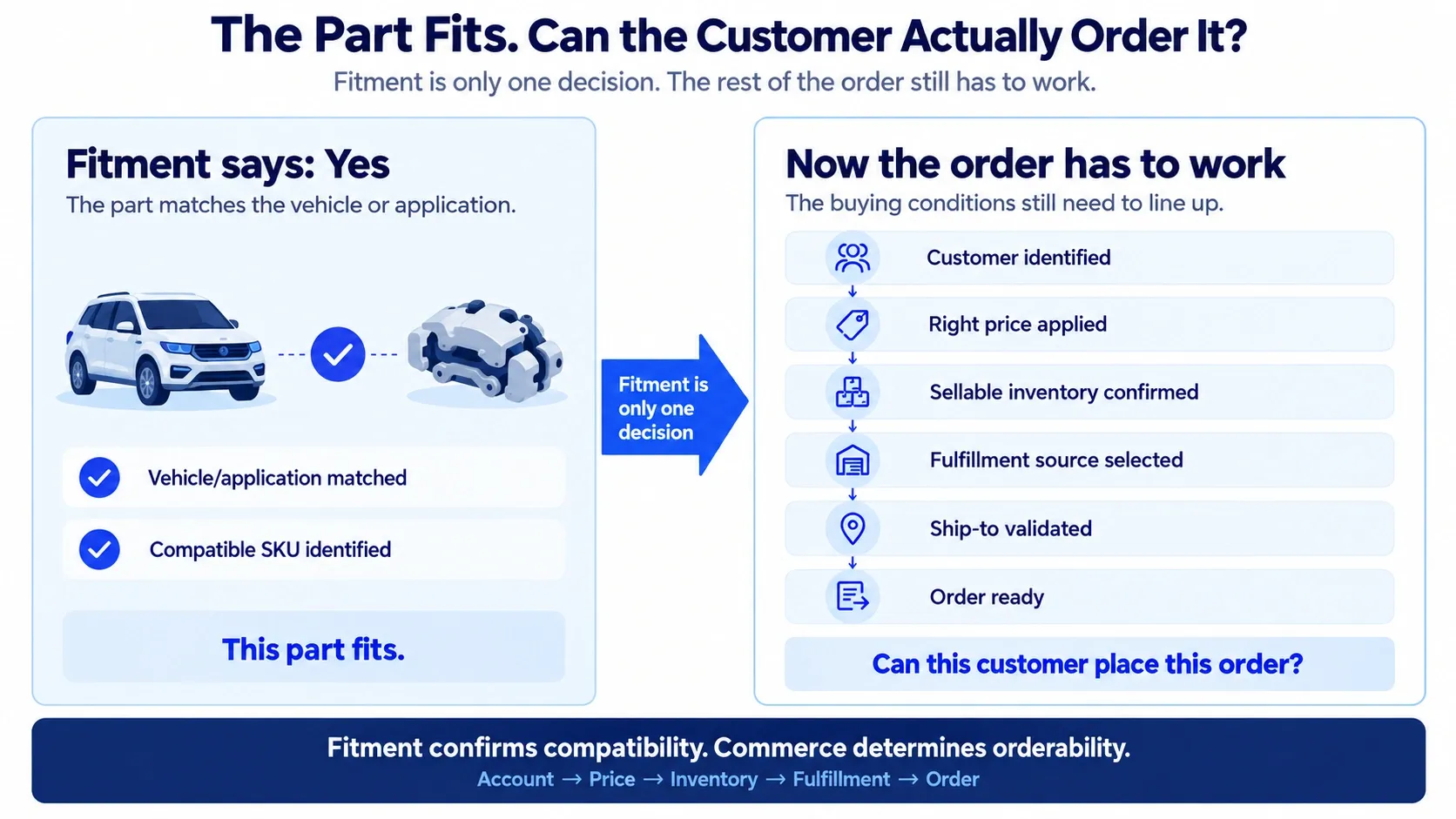
Auto parts fitment can identify the correct part, but B2B ecommerce still has to turn that match into a valid order. The system must apply the right customer account, price, sellable inventory, warehouse, ship-to, and fulfillment rules before the buyer can complete the purchase.
A buyer may find the right brake caliper for a vehicle and still hit the wrong contract price, unavailable branch stock, or a ship-to location that changes the delivery options. If that happens, fitment worked. The order flow did not.
What Happens After Auto Parts Fitment?
After auto parts fitment identifies a compatible SKU, B2B ecommerce still needs to apply the customer account, customer-specific price, sellable inventory, warehouse or branch rules, ship-to location, fulfillment options, and final order handoff.
Fitment data supports the compatibility decision, but it does not manage the whole transaction. The Auto Care Association defines ACES as the standard for communicating product fitment data and PIES as the standard for product information through its automotive data standards .
For teams working through the latest aftermarket data requirements, our ACES and PIES article covers the data standards, reference databases, validation needs, and downstream dependencies in more detail.
1. The Right Part Still Needs the Right Customer
A fitment match can tell you that brake caliper BC-48217 works with the selected vehicle. It cannot tell you whether the buyer is a dealer, fleet account, repair chain, or independent shop.
That buyer context changes the commercial offer around the same SKU. The part may stay exactly the same while catalog access, payment terms, and preferred fulfillment location change.
| Buying context | Dealer | Fleet Account | Repair Shop |
|---|---|---|---|
| Fitment | Compatible | Compatible | Compatible |
| SKU | BC-48217 | BC-48217 | BC-48217 |
| Catalog | Dealer | Fleet-approved | Trade |
| Terms | Net 45 | Net 30 | Card |
| Preferred location | Dealer warehouse | Regional DC | Local branch |
The part did not change. The account did.
Why buyers still need help
Problems start when ecommerce treats every logged-in buyer the same. A customer may find the correct part but still need to call a rep to confirm whether it belongs in their catalog, whether their account can order it, or whether existing payment terms apply online.
A stronger setup connects commerce with customer hierarchy, entitlements, purchasing roles, and account data already used by the business. That lets the storefront respond to the buyer’s actual account instead of forcing everyone through the same rules.
We cover this account-first approach in more detail in our article on B2B customer portals .
2. The Correct Part Can Still Show the Wrong Price
Fitment does not decide what a B2B customer should pay. The same compatible part can carry different prices for a dealer, fleet account, or repair shop because their contracts and account agreements differ.
For the same brake caliper:
| Buyer | Fitment | Customer Price |
|---|---|---|
| Dealer | Compatible | $91.00 |
| Fleet account | Compatible | $84.50 |
| Repair shop | Compatible | $102.00 |
If the fleet buyer logs in and sees $102 instead of $84.50, the problem is no longer part discovery. The storefront has lost the commercial context attached to that customer.
Wrong pricing kills trust quickly
Buyers do not care which system created the mismatch. They see a website that disagrees with their contract, so they call sales before placing the order.
That weakens self-service because buyers start treating every online price as something that needs confirmation. Commerce should use the pricing source that already owns the customer’s rules instead of recreating a second version inside the storefront.
Reveation can connect ecommerce with ERP or another pricing source so customer-specific pricing reaches the storefront in the right account context. We cover common failures around this in our article on pricing and inventory sync .
3. “In Stock” Does Not Always Mean Orderable
Inventory looks simple when a product page says 24 in stock. That number becomes less useful when the stock sits across branches, regional distribution centers, reserved inventory, and supplier locations.
Suppose the buyer needs 12 calipers:
| Inventory source | Quantity | What the buyer can do |
|---|---|---|
| Dallas branch | 6 | Pickup or local delivery |
| Regional DC | 18 | Regional shipping |
| Supplier | 40 | Dropship only |
The network may contain more than enough stock, but the buyer may not be able to access all of it through the same transaction. Some inventory may already be allocated, tied to another territory, or available only through dropship.
Show inventory the business can actually promise
Raw stock totals can create bad orders if ecommerce shows units that operations cannot release. The storefront needs a definition of availability that matches what the business can actually sell or promise.
That may include available-to-promise inventory, branch rules, safety stock, allocations, supplier availability, or other operating rules. Reveation can connect those inventory sources to commerce so the buyer sees a usable quantity rather than a misleading total.
4. The Best Warehouse Is Not Always the Closest One
Once stock exists, the next question is where the order should come from. The closest branch may not have enough quantity, while a regional DC can fill the whole order with a better delivery promise.
The buyer needs 12 units. Which source can actually fulfill the order?
The answer depends on more than which location sits closest to the customer.
Dallas branch
6 of 12 available
Pickup today
Regional DC
18 available
Next-day delivery
Supplier
40 available
Dropship in 3–5 days
The decision is not simply “Where is stock?” The better question is which source can meet the quantity, delivery promise, customer rules, and fulfillment method for this order.
The nearest location is not automatically the best one. In this example, the buyer may prefer one complete next-day shipment from the regional DC instead of picking up six units and waiting for the rest.
Routing should happen before checkout creates extra work
Warehouse selection may depend on inventory, customer territory, preferred branch, delivery promise, shipping cost, dropship rules, or split fulfillment. If ecommerce ignores those rules, operations has to fix the order later.
Reveation can connect commerce with order and fulfillment systems so those routing rules become part of the transaction instead of a manual task after checkout.
Our order management integration work covers that connection across ecommerce, OMS, and fulfillment workflows.
5. A Different Ship-To Can Change the Whole Order
B2B buyers often purchase under one account while sending parts to several delivery locations. A fleet account may order centrally but ship to service centers in Dallas, Fort Worth, Austin, and Houston.
Changing the ship-to can affect eligible inventory, assigned branch, freight, delivery method, taxes, and lead time. The buyer stayed the same, but the order changed.
The destination should drive the right rules
Problems appear when ecommerce stores an address but does not connect that address to the rest of the order logic. Buyers end up adding delivery instructions in notes, asking reps to switch locations, or waiting for someone internally to fix the order.
A better setup connects bill-to and ship-to records with inventory and fulfillment rules. Reveation can help tie those pieces together so changing the destination updates the order instead of creating another manual step.
6. Fitment Context Should Follow the Buyer
The buyer has already done useful work by selecting the vehicle or application and finding a compatible part. That context should not disappear when they sign in, add the item to a cart, or move into checkout.
Keep the context the buyer already created. Once a buyer selects a vehicle and compatible SKU, that selection should stay with them through login, cart, and checkout so they do not have to repeat the fitment search.
The storefront does not need to repeat the entire fitment process at every stage. It does need to preserve enough context to keep the buyer from starting again and to support later checks tied to the selected part.
Do not lose the match after login
One common break happens when a buyer finds a part publicly, signs in for account pricing, and lands on a generic portal page. The buyer then has to search for the vehicle and part again.
The better handoff keeps the selected SKU, quantity, application, and intended action through authentication and checkout.
We cover this broader handoff problem in our article on how to preserve product context .
For the fitment mechanics themselves, Virto Commerce has a useful breakdown of the fitment workflow , including vehicle identification, application data, compatibility, and connected commerce.
7. Checkout Should Produce a Complete Order
A successful checkout should give operations an order they can work with. If someone still has to correct the price, choose the warehouse, change the ship-to, confirm available quantity, or re-enter the order into another system, ecommerce stopped too early.
The final order should carry the decisions made during the buying process.
Depending on the business, that may include the customer account, SKU, quantity, price, fitment context, fulfillment location, ship-to, and delivery method.
Follow the order after the buyer clicks submit
Take a few real B2B orders and follow them from checkout into ERP, order management, warehouse processing, and fulfillment. Count how many times someone has to correct, add, or re-enter information.
Each repeated manual step points to a part of the transaction that ecommerce did not finish. Reveation can connect the storefront with ERP, OMS, and fulfillment systems so those decisions travel with the order instead of being rebuilt downstream.
Our article on ERP ecommerce alignment explains why customer, pricing, inventory, credit, and order logic need clear system ownership across the buying flow.
Where Does Your Auto Parts Order Flow Break?
You do not need a full platform audit to spot the first problems. Take a handful of real orders from different customer types and trace what happens after each buyer gets a successful fitment result.
The part fits, but the price is wrong
Check whether ecommerce identifies the correct customer, pricing agreement, quantity, and current pricing source. If sales sees the right price but the logged-in customer does not, fitment is not the problem.
Stock exists, but the website says zero
Check which warehouses, branches, and supplier sources feed the storefront. Then confirm whether the website uses raw stock, allocated stock, available-to-promise inventory, or another definition of availability.
Inventory shows, but the order cannot ship
Check whether the storefront treats “stock exists” and “this customer can receive this stock” as the same condition. Warehouse eligibility, territory, fulfillment method, and ship-to can all change the answer.
The ship-to needs manual fixing
Check whether account locations match the records used by ERP and fulfillment systems. A saved address may still be missing the branch assignment, account relationship, or delivery rules attached to that location.
Sales still finishes the digital order
Look at every decision the rep makes after the customer submits the order. If sales routinely confirms price, stock, warehouse, delivery, or account eligibility, those are the first areas to investigate.
Is Fitment Really the Problem?
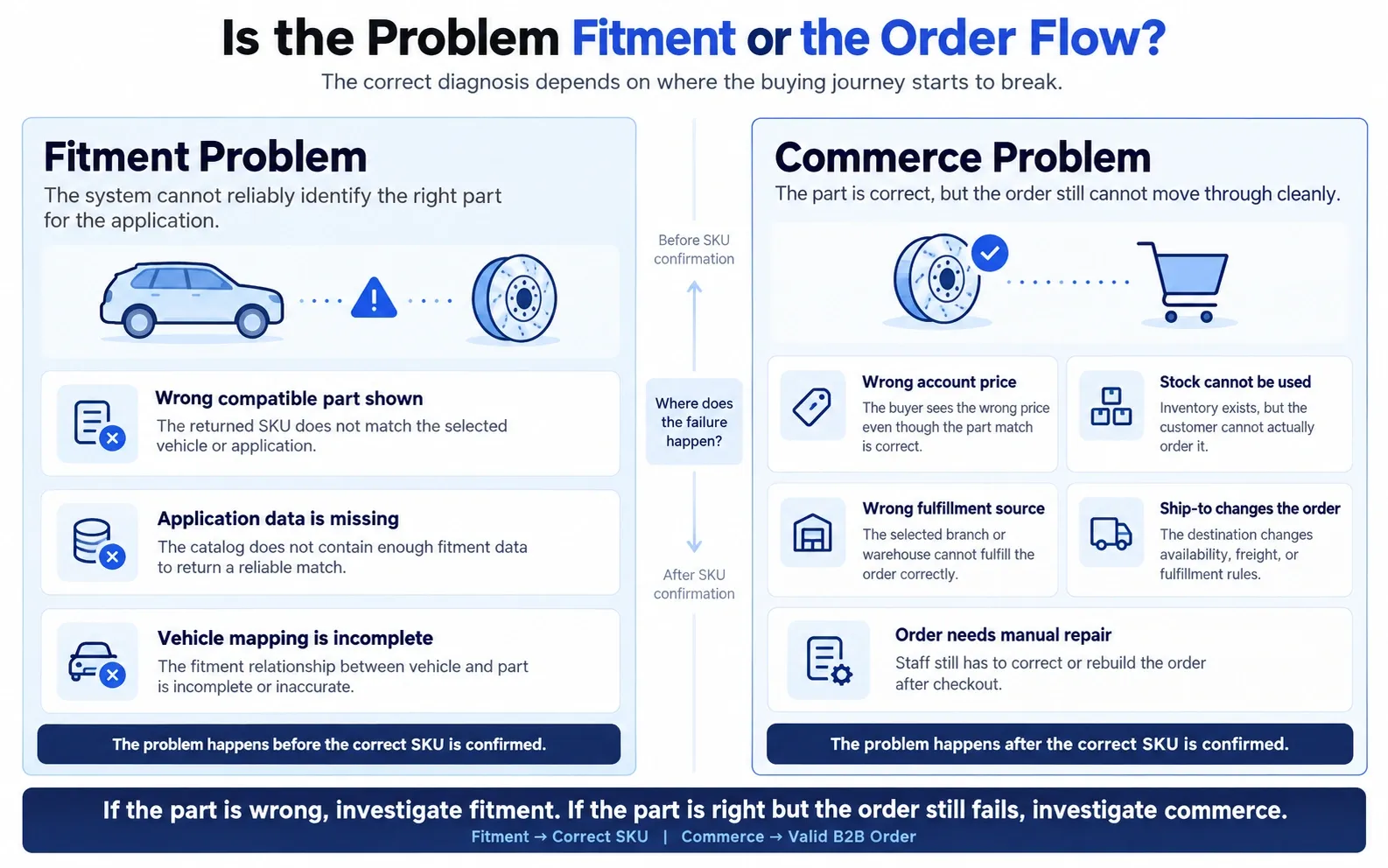
Fitment needs attention when buyers regularly select incompatible parts or application data cannot return reliable matches. If buyers consistently find the correct SKU but still struggle to finish the transaction, redesigning the fitment selector may not solve the real issue.
Look at what happens after a successful match. If customers still call for pricing, check stock with a branch, ask which warehouse will ship, email delivery instructions, or wait for manual confirmation, the friction sits farther down the buying path.
That distinction matters because different teams may own different parts of the problem. Product data teams may own compatibility, while ecommerce, ERP, operations, and fulfillment teams own the steps that turn the compatible product into an order.
What a Connected Auto Parts Order Looks Like
A good B2B auto parts experience does not ask one system to do everything. It lets each system own the information or rules it handles best, then connects those decisions into one buying journey.
For the buyer, that should feel like one transaction. They find the right part, see information that applies to their account, choose from options the business can honor, and submit an order that does not need to be rebuilt by sales or operations.
At Reveation Labs, we help automotive manufacturers and distributors connect B2B ecommerce with customer data, ERP pricing, inventory, warehouse and branch logic, OMS workflows, and fulfillment. The goal is simple: keep the correct fitment result moving through the rest of the order without forcing buyers or internal teams to bridge system gaps manually.