
If you run B2B ecommerce for a manufacturer or distributor, customer portal vs B2B ecommerce storefront is not a platform beauty contest. It is a choice about what your accounts need to do without calling you.
A B2B ecommerce customer portal is account-first. Existing customers log in to reorder, run approvals, pull invoices, check order status, open RMAs, and see service history under their contract terms. Role-based access is assumed from day one.
A B2B ecommerce storefront is product-first. It focuses on catalog structure, search, filters, product pages, cart and checkout, and conversion — and often authenticated pricing, quote-to-order, and terms once buyers log in. That is what supports new account growth.
A hybrid is not two websites. It is one login and one source of truth that switches by role: discover products when needed, operate the account after authentication.
When the experience does not match how your customers buy, they fall back to email, spreadsheets, and phone calls. That feels normal until you count order errors, slow quote cycles, and support load. Pick the path that removes the most friction in the next 12 to 18 months, then phase the rest so you do not build twice.
What a B2B ecommerce customer portal must do on day one
Day one for a B2B ecommerce customer portal is not a full service desk. It is the work your accounts already do by email and phone.
- Login that matches the account — the right company, locations, and users, not a shared password
- Contract price and entitlements — what this account can see and buy, from the system that already holds the rule
- Reorder from history — last order, standing lists, or invoice lines without rebuilding the cart from scratch
- Order status — open orders and shipments without a status call
- Invoices and statements — download or view payment history without finance forwarding PDFs
- Roles that match how you sell — requester, approver, buyer, and finance where approvals are real today
If those jobs are not self-serve, a prettier catalog will not cut support load. Add RMAs, warranty, and deeper service intake after reorder, status, and invoices are trusted.
Signals you are building the wrong thing
- You shipped a storefront, tickets did not drop. Accounts still ask for price, status, and invoices. You optimized discovery while the pain was account operations.
- You shipped a portal, new demand still stalls. Named accounts can reorder, but nobody can find substitutes, specs, or a path in without a rep. You locked the gate before you had a discovery path.
- Two logins, two prices. Buyers discover in one place and operate in another, and neither matches what sales quotes. That is not hybrid — that is two systems.
- Everyone shares one user. Approvals, spend limits, and location rules were deferred “until later,” so self-service creates risk instead of removing it.
- The demo catalog is clean; live price is not. If ERP or the pricing source cannot answer for one account in the demo, the portal or storefront will not either.
Use these as a check before you fund phase two features.
Why this keeps coming up in B2B
B2B buying is rarely one person, one cart, one checkout. A requester builds an order, an approver authorizes it, finance needs invoices, and service may need warranty records. When digital does not support those roles and handoffs, customers default to manual work.
That fallback looks fine until you measure it. Order errors, slow quote cycles, and high support volume tax growth.
Gartner reports that 67% of B2B buyers prefer a rep-free experience, and a later Gartner release says 70% prefer a completely digital, self-service buying experience. Those figures describe pressure on the channel — not whether to fund a portal, a storefront, or both first.
How a portal and a storefront differ
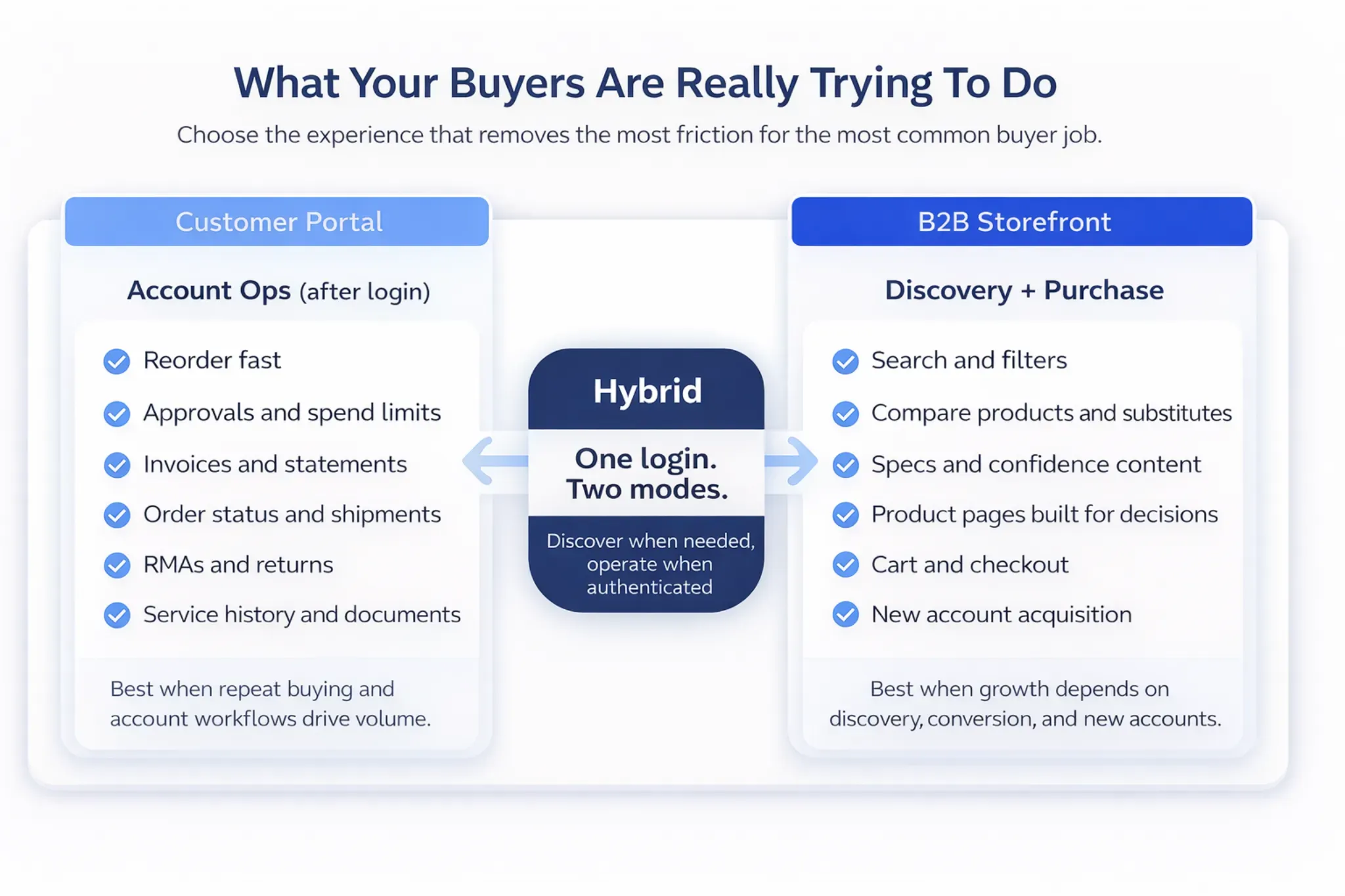
1) Primary intent: manage the account vs discover and purchase
Portals optimize for “help me reorder and manage my account without emailing anyone.” Storefronts optimize for “help me find the right product and purchase with confidence.” If buyers already know what they need, portal-first often removes friction fastest.
2) Identity, roles, permissions, approvals
Portals usually assume multi-user accounts and governance from day one (requester, approver, buyer, finance, service). Approvals, spend limits, and location-based permissions are core B2B requirements. Storefronts can support these patterns too, but teams often add them after discovery and checkout fundamentals.
3) Pricing, catalogs, and entitlements
Portals handle contract pricing and “who can buy what” well. Storefronts can do account pricing too, but the experience gets fragile when exceptions multiply. The more pricing and availability vary by account, the more data discipline matters — on either path.
4) Post-purchase work: status, invoices, RMAs, service
Portals usually go deeper after checkout: order history, shipment status, invoices, RMAs, warranty claims, service tickets, and account documentation. When those are not self-serve, customers call because they have to. Storefronts often include tracking; portals typically unify more operational work.
5) Discovery and merchandising
Storefronts usually win on discoverability: search relevance, category navigation, filters, comparisons, and content that supports decisions. Portals can still have strong search, but it is often tuned for speed: find my SKU, reorder last order, download the spec sheet.
When your channel is dealers, not end customers, dealer portal build or buy walks through partner catalogs, pricing, and whether to build or buy. When buyers cannot find the right SKU in either mode, B2B ecommerce search: portal vs storefront shows how search should behave after login versus on a public catalog.
Where capabilities usually live
Map each capability once so you do not rebuild price, roles, or invoices in two places. Price, inventory, and orders only stay trustworthy when ecommerce integration connects the experience to the systems that already hold those rules.
| Capability | Portal | Storefront | Hybrid (usual practice) |
|---|---|---|---|
| Public catalog + SEO pages | No | Yes | Yes (public + gated) |
| Product discovery (filters, comparisons) | Sometimes | Yes | Yes |
| Contract pricing + entitlements | Yes | Sometimes | Yes |
| Roles, permissions, approvals | Yes | Sometimes | Yes |
| Invoices, statements, payments | Yes | Sometimes | Yes |
| RMAs, warranty, service tickets | Yes | Sometimes | Yes |
Use cases by business model
Manufacturers with dealer networks
Dealer ecosystems often need account governance: contracted pricing, controlled catalogs, and approval flows. A portal-first approach can unlock faster adoption because it mirrors how partners already operate. Storefront capabilities still matter when discovery and expansion are strategic goals.
Distributors with high-SKU catalogs
Distributors often benefit from storefront-first because discovery is the growth engine: search, filters, and substitutes reduce reliance on sales for “find and quote.” Many still need portal workflows for invoices, approvals, and account pricing, so hybrid is a common end state.
Service- and parts-heavy businesses
If parts and service lifecycle drive retention, portals can become a competitive advantage. Buyers want compatibility help, fast reorder, service history, and documentation without friction. Storefront discovery can still matter for new customers or new product lines.
Which should you build first?
Start with the friction your accounts feel most often.
| If your biggest pain is… | Start with… | You’ll prove value with… |
|---|---|---|
| Invoice, status, and document requests and support load | Portal | Ticket deflection and shorter cycle times |
| Buyers can’t find the right product, substitutes, or specs | Storefront | Search-to-cart, conversion, and new account activation |
| Teams are split because both are true | Hybrid (phased) | Adoption, fewer workarounds, and fewer “call to fix” moments |
Portal-first also fits when most volume is replenishment, pricing and access vary heavily by account, approvals are required for adoption, or service and parts workflows keep customers. Storefront-first fits when discovery drives new accounts, the catalog is large, substitutes matter, or SEO and product education are part of pipeline.
If the harder question is whether you need a first digital build or a platform change under workflows you already have, greenfield vs replatforming for B2B ecommerce lays out that choice.
Phased rollout roadmap (so you don’t build twice)
A phased plan lets you launch quickly while protecting long-term architecture. Prove value early without creating a second system you will later retire. Keep scope tight and still design for hybrid.
Before either MVP, name the data that must be true in the demo: which system is customer master, where contract price and entitlements live, which roles and approval rules are real today, how invoice and order status will be read, and whether the catalog is clean enough to search or reorder against. If those answers are fuzzy, fix the source before you polish the UI.
Phase 1 (0 to 90 days): MVP that removes the biggest friction
- Portal MVP: login, baseline roles, account pricing, reorder, order status, invoices and document access — usually delivered with an ecommerce implementation that is integration-first, not UI-first.
- Storefront MVP: catalog structure, search and filters, product pages, cart and checkout, baseline integrations
Teams that need the full picture across catalog, accounts, and integrations often review B2B ecommerce solutions once they know whether day one is portal work, storefront work, or both.
Phase 2 (90 to 180 days): workflows that drive adoption
- Approvals and spend limits
- Quote-to-order / RFQ enhancements
- RMAs, warranty, and service intake
- Search tuning and product data improvements
Phase 3 (180+ days): differentiation and scale
- Personalization by role or segment
- Proactive service and lifecycle workflows
- AI-assisted search and self-service support where the data and workflows are already trustworthy
KPIs leaders can use to prove ROI
Portal success often shows up as operational efficiency and retention. Storefront success often shows up as digital revenue and lower friction in acquisition. Decide KPIs early so scope stays tied to outcomes, not feature lists.
Portal KPIs
- Ticket deflection (order status, invoices, documents)
- Order accuracy and reduced manual entry
- Reorder adoption rate and time-to-order
- Invoice self-serve adoption
- Service request cycle time
Storefront KPIs
- Digital revenue % of total
- Conversion rate and search-to-cart rate
- New account signups / activation
- Repeat purchase rate
- Catalog engagement (search usage, filter usage)
Architecture and integration realities
Portals and storefronts can share the same backbone, but they stress different data. Portals lean on customer master data, pricing entitlements, invoices, and service history. Storefronts lean on product data, search indexing, and content that supports decisions.
Pricing, availability, and attributes have to match what sales and customer service would tell the customer. If those answers disagree in the demo, buyers will not trust either experience.
Common mistakes (and how to avoid them)
Mistake #1: Treating B2B like B2C. B2B buyers value speed, accuracy, and account-specific rules more than generic merchandising. Build for reordering, governance, and clarity first, then refine discovery.
Mistake #2: Launching without roles and approvals. If customers cannot route orders properly, “self-service” becomes confusing. Define roles, permissions, and approval logic early, even if you phase the UI.
Mistake #3: Underinvesting in search and product data. Storefronts live or die by discoverability; portals live or die by fast retrieval. Fix product data earlier than you think, and validate it against real buyer tasks.
Pick the experience that matches how your customers work
Do not start by debating features. Name the work your customers need to finish without calling you, then map the workflows and data required to support it. That is how you launch faster and avoid rework.
If you want one prioritized roadmap across commerce, customer experience, and AI opportunities, start with the B2B eCommerce Discovery Sprint.
Ready to test your replatform readiness?
Book a scoped working session with Reveation Labs. We will help you clarify the gaps that matter before you commit the next build.