
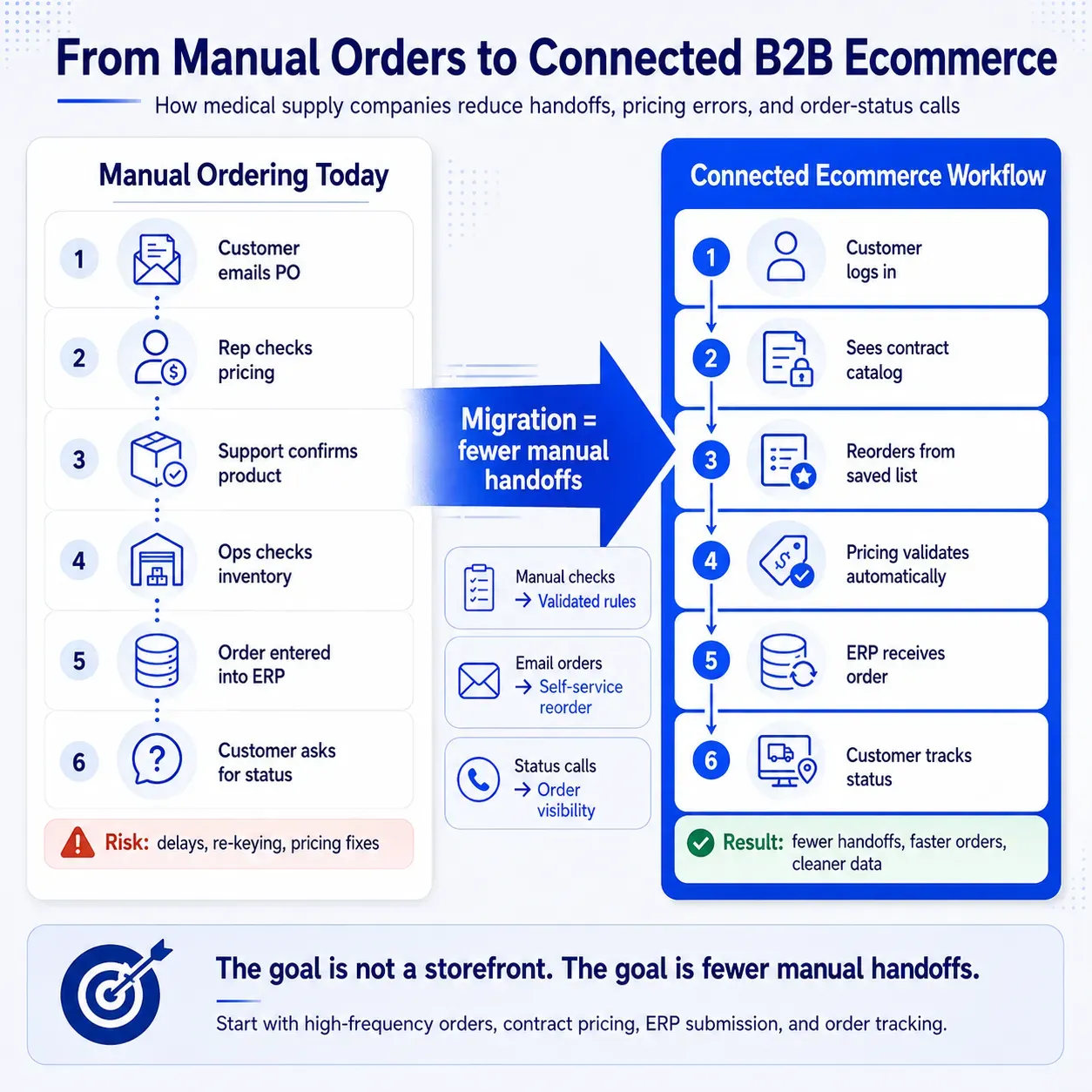
Medical supply companies migrate to B2B ecommerce by digitizing the workflows that already run the business: product catalogs, customer accounts, contract pricing, reorder paths, ERP inventory, approvals, payments, fulfillment, and sales support.
The mistake is treating ecommerce like a separate online store. For medical supply distributors and manufacturers, the better move is to build a connected buying portal that reflects how hospitals, clinics, dental practices, labs, long-term care facilities, and purchasing teams already buy.
If you are trying to decide what to migrate first, how contract pricing should work online, whether ERP integration is required, and how to launch without disrupting sales or operations, this guide gives you the practical path. The goal is not “launch a website.” The goal is to make repeat ordering, quote requests, account-specific pricing, product discovery, and order tracking easier without breaking the operations your customers depend on.
Pricing
Contract pricing, tiers, discounts, and account-level access.
Reordering
Saved lists, prior invoices, facility catalogs, and SKU uploads.
Integration
ERP, inventory, fulfillment, payments, tax, and support systems.
What Makes Medical Supply B2B Ecommerce Different
Medical supply B2B ecommerce is more complex than a normal online catalog because buyers are rarely purchasing one-off products at public prices.
They may buy from negotiated contracts, restricted catalogs, facility-specific product lists, approval workflows, and recurring reorder patterns. A nurse manager, procurement lead, dental office administrator, lab buyer, or distributor account manager may all interact with the same account in different ways.
That is why a strong B2B ecommerce strategy needs to support account-based buying, not just product browsing.
Contract Pricing and Customer-Specific Catalogs
Medical supply buyers expect the portal to show the right price after login. That may include contract pricing, volume tiers, customer-specific discounts, negotiated product bundles, or account-level product access.
If ecommerce shows the wrong price, customers lose trust fast. Worse, sales and support teams end up manually correcting orders, which defeats the purpose of the migration.
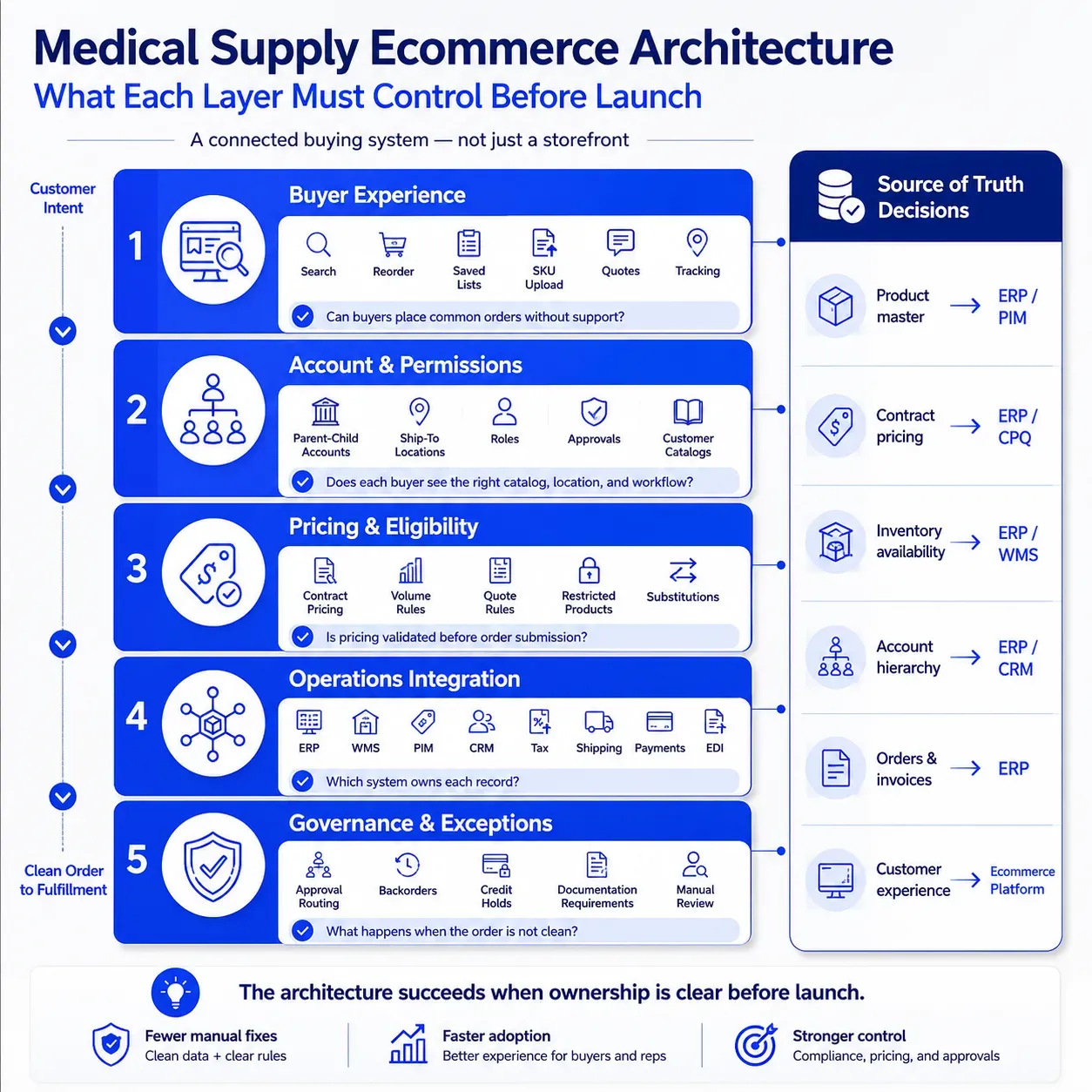
The ecommerce platform should know who the customer is, what they are allowed to buy, what price they should see, and whether the order needs approval before it reaches fulfillment.
Facility-Level Buying and Repeat Ordering
Medical supply customers often reorder the same products repeatedly. They may not want to browse categories every time they need gloves, masks, sterilization products, dental consumables, lab supplies, wound care items, or exam-room essentials.
They want to reorder from saved lists, previous invoices, approved product catalogs, or uploaded SKU files. They may also need different product lists by facility, department, location, or buyer role.
This is where medical supply ecommerce needs to act less like a retail storefront and more like a purchasing workspace.
ERP, Inventory, and Fulfillment Complexity
Most medical supply companies already rely on ERP systems for item records, inventory, customer accounts, pricing, invoices, and order history.
That means ecommerce cannot operate as a disconnected storefront. It needs reliable integration with ERP, warehouse, shipping, payment, tax, and customer service systems.
When we plan B2B ecommerce integration, we usually start by mapping the order lifecycle from login to invoice, not by picking front-end features first.
Compliance-Sensitive Product Information
Medical supply ecommerce also needs careful control over product data.
Some products may require documentation, restricted visibility, special handling, substitution rules, expiration awareness, or approval before purchase. Ecommerce does not “solve compliance” by itself, but it can help teams manage product information, visibility, and workflow controls more consistently.
A good implementation makes it easier for customers to find accurate product details while keeping sensitive workflows behind the right permissions.
What Should Medical Supply Companies Migrate First?
Start with the workflows that are frequent, predictable, and easy to validate.
For most medical supply companies, that means priority customers, top SKUs, login-based contract pricing, reorder tools, order history, account-specific catalogs, and ERP order submission. Leave complex edge cases, niche product lines, advanced approval trees, and automation-heavy workflows for later phases.
A good first launch should answer this question: Can our best customers place their most common orders online with accurate products, pricing, inventory expectations, and order confirmation?
If the answer is yes, you have a useful MVP. If the answer is no, adding more features will not fix the foundation.
Before You Migrate: Checklist
Before choosing a platform, medical supply companies should ask a more practical question:
Are our workflows, data, and teams ready for customers to self-serve?
This matters because ecommerce will expose operational gaps that phone, email, and sales reps currently hide.
| Readiness Area | What to Check | Why It Matters |
|---|---|---|
| Product data | SKUs, descriptions, images, units of measure, attributes, substitutes | Poor product data makes search and reordering frustrating |
| Customer accounts | Parent-child accounts, ship-to locations, buyer roles, permissions | Medical supply buyers often purchase across multiple facilities |
| Pricing | Contract pricing, tiers, discounts, quote rules, approval logic | Wrong pricing creates support tickets and trust issues |
| Inventory | Available quantity, backorders, substitutions, lead times | Customers need confidence before placing time-sensitive orders |
| Order history | Past invoices, repeat orders, saved lists, quotes | Reordering is often the highest-value ecommerce workflow |
| Integrations | ERP, CRM, WMS, payments, tax, shipping | Ecommerce must fit the operating model |
| Sales process | Rep involvement, account ownership, escalation paths | Sales teams need to support ecommerce, not fight it |
If pricing, inventory, or units of measure are frequently corrected manually today, do not expose them to customers online until ownership and validation rules are clear.
That does not mean everything has to be perfect before launch. It means the first release should focus on the parts of the business where data is reliable enough to support customer self-service.
Why Medical Supply Companies Are Moving to B2B Ecommerce
B2B buyers increasingly expect digital self-service, even when the purchase is complex. Gartner reported in 2025 that 61% of B2B buyers prefer an overall rep-free buying experience, while still needing seller support for higher-context decisions.
That does not mean sales reps disappear. It means buyers want to complete routine steps on their own: find products, check pricing, reorder common items, download documentation, track orders, and request quotes.
McKinsey’s 2024 B2B Pulse research also found that market leaders continue to invest in omnichannel sales as a path to sustainable growth.
For medical supply companies, the operational case is just as important as the buyer-experience case. Every manual reorder, price check, invoice request, and order-status call consumes team capacity that could be spent on higher-value account work.
The Migration Roadmap: From Manual Ordering to Integrated Ecommerce
A successful medical supply B2B ecommerce migration should happen in phases.
Trying to launch every product, every customer, every workflow, and every integration at once usually creates delays. A better approach is to start with a minimum viable launch: priority customers, high-frequency SKUs, accurate account pricing, clean reorder workflows, and the integrations needed to process orders reliably.
If your team needs help structuring the rollout, our B2B ecommerce implementation services are built around staged deployment, integration planning, and go-live readiness.
Step 1
Audit Current Ordering Workflows
Start by documenting how orders arrive today.
Look at phone orders, email orders, EDI, PDF purchase orders, rep-entered orders, customer portals, marketplace orders, and recurring replenishment patterns. Then identify which workflows are repetitive enough to digitize first.
The best first ecommerce workflows are usually not the most complex ones. They are the high-volume, low-exception workflows that create daily operational drag.
Step 2
Clean Product, Customer, and Pricing Data
Ecommerce depends on trustworthy data.
Product records need searchable names, consistent categories, clear units of measure, accurate images where appropriate, and attributes that help buyers filter quickly. Customer records need correct account structures, ship-to locations, permissions, and contract assignments.
Pricing needs special attention. If customer-specific pricing is not reliable in the ERP or pricing engine, it will not magically become reliable online.
Step 3
Choose the Right Ecommerce Architecture
Do not choose a platform before defining workflows.
A medical supply company with straightforward account pricing and moderate catalog complexity may do well with a modern hosted platform. A company with complex contracts, ERP-heavy ordering, custom approvals, and multiple customer portals may need a more composable or custom architecture.
For teams still comparing options, we recommend using a structured B2B ecommerce platforms comparison before committing to Shopify Plus, BigCommerce, OroCommerce, Adobe Commerce, or a custom build.
Step 4
Define the Right ERP Integration Depth
ERP integration is usually the center of the migration.
At minimum, ecommerce may need to sync customer accounts, product data, pricing, inventory, order submission, invoices, and order status. Some companies also need integrations with CRM, PIM, CPQ, OMS, WMS, EDI, tax engines, payment gateways, procurement systems, and shipping platforms.
Think about ERP integration in three levels. Start with basic sync, move into operational sync, and add advanced sync when your workflows require deeper controls.
Basic Sync
Products, customers, and order submission.
Best fit: Smaller MVPs with simpler workflows.
Operational Sync
Pricing, inventory, invoices, order status, and shipping updates.
Best fit: Most medical supply ecommerce launches.
Advanced Sync
Substitutions, approvals, credit limits, account hierarchies, and quote workflows.
Best fit: Complex distributors and enterprise accounts.
The key is to decide which system owns each record. If ecommerce, ERP, and CRM all try to be the source of truth for the same data, errors multiply.
Step 5
Launch With Priority Customers First
A phased launch reduces risk.
Start with a customer segment that has clear reorder patterns, manageable product needs, and enough volume to prove value. Give them a guided onboarding experience and collect feedback before expanding to more customers.
This approach helps the team fix product data issues, improve search, refine pricing logic, and train support teams before the broader rollout.
Step 6
Train Sales, Support, and Operations Teams
Sales adoption is one of the biggest success factors.
If reps see ecommerce as a threat, they may avoid promoting it. If they see it as a tool that removes repetitive work, they can use it to improve account service.
Give sales reps tools that help them support ecommerce adoption:
- Assisted buying or customer impersonation
- Saved carts and saved lists for key accounts
- Quote visibility
- Order history and reorder support
- Adoption reporting by customer
- Exception alerts for stuck orders, backorders, or pricing issues
Position the portal as a sales enablement tool. Reps should be able to help customers buy faster, reorder confidently, and escalate exceptions when human support adds value.
Common Migration Mistakes That Delay Launch
Most medical supply ecommerce delays come from underestimating operational complexity.
The technology matters, but the bigger problem is often unclear ownership, messy data, or workflows that were never documented. Here are the mistakes we see most often:
| Failed Approach | Why It Creates Problems | Better Approach |
|---|---|---|
| Launching a storefront before cleaning data | Customers cannot find products or trust pricing | Clean top SKUs, categories, units, and pricing first |
| Treating ecommerce as separate from ERP | Orders, inventory, and invoices fall out of sync | Define integration ownership early |
| Migrating every customer at once | Support teams get overwhelmed | Start with priority customer groups |
| Over-customizing before launch | Timeline expands and ROI gets delayed | Launch the core workflow first, then improve |
| Ignoring sales team adoption | Reps may not promote the portal | Train reps to use ecommerce as an account tool |
| Choosing software too early | Platform may not support real workflows | Map workflows before selecting architecture |
| Hiding exceptions until the end | Approvals, substitutions, and backorders break the flow | Design exception handling into the first release |
The biggest mistake is assuming ecommerce will simplify operations automatically.
It will only simplify operations if the implementation reflects real ordering behavior.
Do not launch with all SKUs if only a smaller group drives most repeat orders. Do not expose inventory online if warehouse data is unreliable. Do not promise self-service if customers still need reps to correct pricing.
Do launch with workflows that are frequent, predictable, and easy to validate.
Platform and Integration Choices for Medical Supply Ecommerce
Medical supply companies usually have three broad platform paths: hosted, composable, or custom.
Hosted
A hosted platform can be faster to launch and easier to maintain.
Composable
A composable architecture gives more flexibility when different systems need to own different parts of the experience.
Custom
A custom build may make sense when workflows are highly specialized, but it also increases ownership and maintenance requirements.
The right choice depends on catalog complexity, pricing logic, ERP constraints, customer account structure, and the role ecommerce will play in the sales process.
If most complexity lives in pricing and ERP, integration architecture matters more than storefront design. If most complexity lives in customer experience, search, and merchandising, front-end flexibility matters more. If both are complex, do not force the business into a platform before mapping workflows.
If your team is early in platform selection, use our guide on how to choose a B2B ecommerce platform that will not fail as a decision framework rather than a software shortlist.
Practical Decision Matrix for Migration Planning
Use this matrix to decide what your ecommerce migration needs first.
| Business Requirement | Recommended Implementation Approach |
|---|---|
| Customers reorder the same SKUs frequently | Prioritize saved lists, order history, quick order, and invoice-based reorder |
| Customers have negotiated contract pricing | Require login-based pricing, ERP or pricing engine sync, and pricing validation |
| Catalog visibility differs by account | Use customer-specific catalogs and role-based permissions |
| ERP controls inventory and order status | Make ERP integration part of the first release |
| Buyers submit large SKU lists | Add CSV upload, quick order entry, and bulk add-to-cart |
| Products require approval or restricted access | Build approval workflows and restricted catalog rules |
| Sales reps manage strategic accounts | Give reps account visibility, quote tools, and assisted buying workflows |
| Support handles order status calls | Add self-service order tracking and invoice access |
| Quote requests slow down sales | Automate quote intake and routing where possible |
This is where ecommerce becomes more than a website. It becomes an operating layer across sales, service, procurement, and fulfillment.
Quick Wins After Launch
After the first release, the best improvements are usually practical.
They help customers complete routine tasks faster and help internal teams reduce repetitive work. Start with the workflows that already consume the most support time.
| Quick Win | Customer Benefit | Internal Benefit |
|---|---|---|
| Reorder from past invoices | Faster replenishment | Fewer manual repeat orders |
| Saved product lists by facility | Easier recurring purchasing | Better account stickiness |
| Customer-specific pricing after login | More trust in online ordering | Fewer pricing disputes |
| Real-time or near-real-time inventory | Better purchase confidence | Fewer availability calls |
| Quote-to-order automation | Faster buying path | Shorter quote cycles |
| Order tracking dashboard | More transparency | Fewer “where is my order?” tickets |
| Approval routing | Better control | Fewer manual exceptions |
For quote-heavy workflows, we often look at ways to convert manual documents into structured buying paths. Our work around turning RFP PDFs into instant quotes is a useful example of how ecommerce can reduce friction in complex B2B sales.
For companies ready to go further, agentic commerce automation can help automate repetitive ecommerce operations when the data and workflows are ready.
Where AI and Automation Fit
AI should not be the first layer of a broken migration.
If product data is messy, pricing logic is unclear, and ERP ownership is unresolved, automation will amplify those problems. But once the foundation is stable, AI-assisted workflows can help with quote intake, product matching, support triage, catalog enrichment, and order exception routing.
Practical medical supply use cases include matching uploaded SKU lists to the right products, flagging substitute products when inventory is low, routing quote requests to the right rep, enriching product attributes, summarizing order exceptions, and helping support teams answer order-status questions.
We think the most practical use of agentic AI for B2B ecommerce is not replacing the team. It is helping the team handle repetitive operational work faster and more consistently.
The rule is simple: stabilize the workflow first, automate second.
Should Medical Supply Ecommerce Replace Sales Reps?
No. Medical supply ecommerce should remove repetitive transaction work so sales reps can focus on the work where human judgment matters.
That includes strategic account planning, product education, contract expansion, substitution guidance, exception handling, and relationship management. A good portal gives reps better account visibility, not less relevance.
This is especially important in healthcare and medical supply sales because buyers often need both speed and confidence. Ecommerce should make the routine path easier while giving customers a clear way to reach a person when the order is complex.
Migrate the Workflow, Not Just the Website
Medical supply B2B ecommerce works best when it reflects how customers already buy.
That means accurate contract pricing, reliable ERP integration, useful product data, fast reorder paths, account-specific catalogs, and sales-assisted workflows. The companies that succeed do not treat ecommerce as a side project; they treat it as a connected operating model.
Start with the workflows that create the most friction today. Launch with a focused customer group, measure adoption, improve the experience, and expand from there.
At Reveation Labs, we help B2B teams map current ordering workflows, identify the right MVP scope, validate integration requirements, and choose a migration path before budget is locked into the wrong platform.