A new product arrives from a supplier. Purchasing adds it to the ERP, inventory gets updated, and the item is ready to sell.
Except nobody can put it on the website yet.
The description barely tells customers what they're buying. The specifications are buried in a PDF. The images are sitting in someone's inbox. And the eCommerce team still has to pull everything together before the product can go online.
Your ERP isn't necessarily doing anything wrong. It's handling the information your business needs to purchase, stock, and sell the item.
But who's managing everything your customer needs to choose it?
That's where PIM vs ERP comes into the picture. Both systems can store product information, but they have different jobs. The question is whether your business needs both, and which one should control each piece of data.
The short answer
ERP manages the operational records behind products, including purchasing, inventory, pricing, and orders. Product Information Management (PIM) organizes the descriptions, specifications, images, and other details customers need to find and compare products. You may need both when your ERP handles transactions well but your team struggles to maintain customer-facing product information.
PIM vs ERP: What's the Difference?
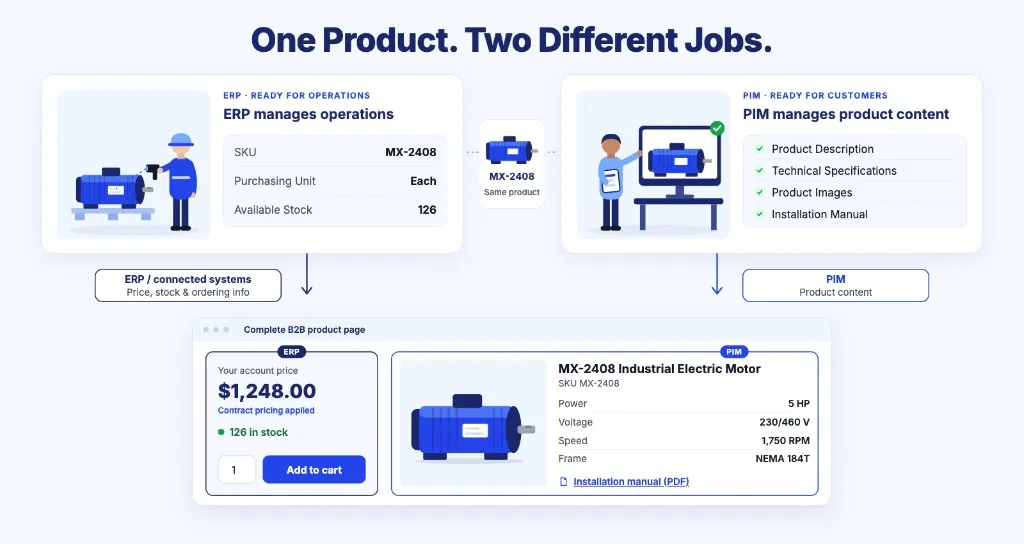
ERP keeps business operations moving. Purchasing teams use it to manage suppliers and items, warehouse teams track stock, and sales teams rely on it for orders and account information.
PIM handles the work that turns those product records into useful online listings. It organizes attributes, approved descriptions, technical documents, images, and categories for websites, dealer portals, and other sales channels.
| Comparison | ERP | PIM |
|---|---|---|
| Main purpose | Run business operations | Manage and publish product information |
| Product data | Item numbers, costs, purchasing units | Descriptions, attributes, images, categories |
| Pricing | Often manages account prices and contracts | May receive pricing data for display but rarely calculates transaction prices |
| Inventory | Tracks stock directly or through connected warehouse systems | Does not normally control live availability |
| Main users | Purchasing, finance, operations, sales | Product, catalog, marketing, eCommerce |
A manufacturer selling a limited number of standard components may already have enough product information in its ERP. A distributor receiving thousands of items from different suppliers has a different job: matching part numbers, organizing specifications, maintaining documents, and making products searchable.
That extra work is where PIM can become useful. It doesn't have to replace the ERP product master to improve how product information reaches customers.
Which Product Data Goes Where?
A customer looking for a replacement motor needs more than a product name and SKU. Voltage, horsepower, frame size, dimensions, and mounting details may determine whether the motor will work in their equipment.
ERP might already hold the item number, supplier, purchasing unit, cost, and stock quantity. Engineering or the manufacturer supplies the technical specifications, while the catalog team prepares those details for customers.
Now a revised specification sheet arrives. Engineering approves it, but the website continues showing the previous document. The ERP record is correct, yet the information customers see is outdated.
That leaves a simple question: who owns the update, and which system should send the approved version to the website?
Who Should Own Each Field?
| Product information | Typical system responsible | Why |
|---|---|---|
| SKU / item number | ERP or item master | Keeps purchasing and orders tied to the correct item |
| Product descriptions | PIM | Maintains approved customer-facing content |
| Technical specifications | Engineering or PLM for approval; PIM for publication | Keeps published attributes aligned with approved specifications |
| Images and manuals | PIM or DAM | Manages approved assets and document versions |
| Product categories | PIM | Supports browsing and product filters |
| Units of measure | ERP | Keeps purchasing and selling quantities consistent |
| Customer-specific pricing | ERP or pricing engine | Applies contracts and account pricing rules |
| Inventory availability | ERP, WMS, or OMS | Reflects stock and fulfillment rules |
| Order status | ERP or OMS | Tracks orders after checkout |
| Replacement relationships | Parts master or PIM, with appropriate approval | Shows valid replacement products |
These are common arrangements, not fixed rules. Some manufacturers maintain technical data in PLM, while others use ERP or specialized engineering systems. PIM can publish approved information from those sources without taking ownership of every field.
When several suppliers use different part numbers, units, or specifications, managing a B2B product catalog becomes much more involved than importing files. Each item needs the correct identifiers, attributes, and documents before buyers can rely on it.
What Happens When Two Systems Own the Same Field?
Your product manager corrects a description in PIM. The next ERP synchronization runs, and the old description returns to the website. Nobody notices until a customer asks why the product page doesn't match the latest specification.
Or purchasing changes a unit of measure, but the storefront continues displaying the previous unit. Now the customer sees a quantity that doesn't match how the business processes orders.
Who Approves It?
Name the person or team responsible for checking the information before it changes.
Where Does It Change?
Choose the authoritative system instead of letting several applications edit the same value.
Where Does It Go?
Identify the websites, portals, and connected systems that need the approved update.
Clear field ownership also makes product-data quality easier to maintain. The independent GS1 Data Quality Framework provides guidance on managing data quality, reviewing business processes, and validating product attributes.
How Do PIM and ERP Work Together?
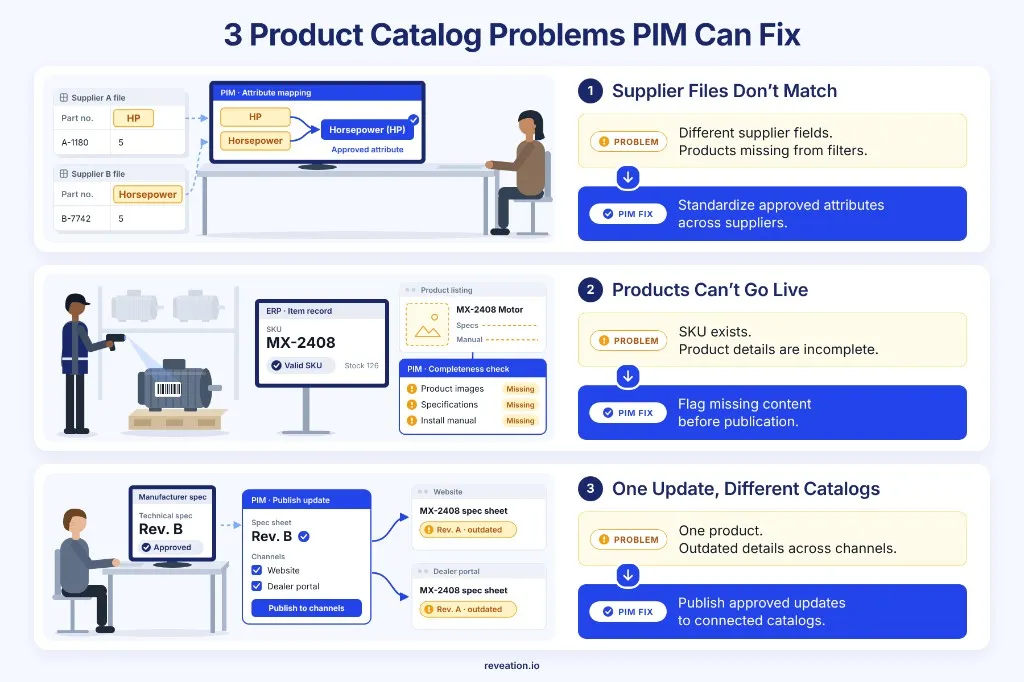
Supplier product files rarely arrive in one consistent format. One manufacturer sends Excel sheets with part numbers and dimensions. Another provides technical PDFs, while a third sends images separately with filenames that don't match the ERP records.
The catalog team still has to turn those files into product listings customers can search, compare, and order. A PIM ERP integration divides the work between product enrichment and business operations.
From Item Record to Product Page
Purchasing starts by matching the supplier's part number to an existing ERP item or creating a new record. The ERP maintains the identifier, purchasing unit, supplier relationship, and details needed for transactions.
The catalog team then works with the approved product information in PIM. It standardizes attributes, adds images and documents, assigns categories, and resolves missing information before publication.
A supplier might label an attribute "operating pressure" while another uses "working pressure." The team needs to confirm whether those values describe the same characteristic before treating them as equivalent in the catalog.
From Product Page to Order
PIM sends approved content to the eCommerce platform, but that doesn't complete the buying experience. Customers still need their contract prices, stock availability, account permissions, and ordering rules.
Those values may come from ERP, a pricing engine, WMS, or OMS. The storefront brings the information together when the customer needs it.
A complete product description won't help if checkout applies the wrong contract price. That's why connecting eCommerce with ERP involves more than transferring product records. The integration must also carry the account, pricing, availability, and order information that buyers depend on.
What Does This Look Like in a Real B2B Store?
An accurate parts catalog is useful, but it won't get an order through checkout if the customer sees the wrong price or can't find available stock.
De Havilland Aircraft of Canada's aftermarket business manages a catalog of more than 110,000 parts online. Its buyers need customer-specific pricing and stock information across warehouses, while orders must connect correctly with IFS ERP.
Reveation built De Havilland's B2B aftermarket eCommerce platform using Virto Commerce and custom ERP integrations. The storefront retrieves customer-specific pricing and inventory on demand, while two-way synchronization supports product attributes, pricing, and orders.
The customer sees one storefront. Behind that screen, product information, pricing, inventory, and orders have different responsibilities. Each part of the buying process needs the right information from the system that controls it.
Do You Actually Need PIM?
You might not. If your ERP supports your catalog, your team keeps product information accurate, and customers can find what they need without constant manual corrections, another platform may add more work than value.
The need becomes clearer when teams spend more time preparing and repairing product content than they spend publishing it.
| What's happening? | What to look at first |
|---|---|
| Small, stable product range | Existing ERP and commerce tools may be enough |
| Supplier files arrive in different formats | PIM can help standardize and maintain incoming product content |
| Teams maintain separate product spreadsheets | Find out why descriptions and attributes lack a controlled home |
| Customers can't filter by technical specifications | Review product attributes, catalog structure, and search |
| Dealers and marketplaces need different product content | Evaluate PIM for channel-specific publishing |
| Customers see incorrect prices or stock | Check ERP, pricing, inventory, and integration rules first |
If a customer sees the wrong price, the problem may sit in an account mapping or pricing rule rather than product content. Stock discrepancies can come from allocation rules, warehouse feeds, or delayed updates.
Those issues need the right diagnosis. Our article on B2B pricing and inventory sync mistakes explains why accurate ERP data can still appear incorrectly on a customer's storefront.
Does the Number of SKUs Matter?
Catalog size matters, but it doesn't tell the whole story. A distributor with 30,000 straightforward products and clean supplier files might have a simpler process than a manufacturer managing 3,000 configurable products with drawings, specifications, and compatibility requirements.
The harder question is how much work each product creates. If employees repeatedly correct attributes, search for documents, or republish the same change across channels, the process may have outgrown its current tools.
What Should You Check Before Adding PIM?
Start with a product your team regularly struggles to maintain. Open its ERP record, supplier file, product page, and latest specification sheet. Follow the information from the point someone creates it to the point a customer sees it.
You don't need to map the entire catalog first. One product family can show where information gets stuck, duplicated, or overwritten.
Six Questions for Your Team
- Who creates the item number? Does every system use the same identifier?
- Who approves technical changes? Can a website display new specifications before engineering approves them?
- Where do descriptions and images change? Must employees repeat updates in several places?
- Who controls price and availability? Does the storefront show the right values for each account?
- What happens when a supplier revises a product? Can incoming files overwrite approved content?
- How do you know an update worked? Can the team find failed publications and correct them?
If the answers are unclear, adding software won't automatically fix the problem. Teams first need to agree on data ownership, approvals, and how changes reach connected applications.
A well-planned PIM implementation deals with those decisions before the company migrates records, builds publishing workflows, or connects new sales channels.
Get the Product Data Right First
Your ERP may already do its job perfectly well. The real problem could be everything your team does around it to get products ready for customers.
If specifications live in PDFs, descriptions need constant corrections, and product updates take several rounds of manual work, find out who owns that information and why it keeps getting stuck.
You may need PIM. You may need better connections between the systems you already have. Or you may need clearer rules for managing product data.
At Reveation Labs, we help manufacturers and distributors organize product information and connect it with their existing commerce and backend systems. Our work covers data structure, publishing workflows, and integrations without replacing systems that already work.
Is Your ERP Doing Too Much Catalog Work?
Find out where product information should live, how updates should reach your storefront, and whether a separate PIM would actually help your team.
Explore Our PIM Services